Product Changelog

Stay up-to-date with all the improvements, features, and changes introduced to the product, APIs, docs, and other resources.

rss_feedSubscribe to RSS Feed

New Features:

  • @contentstack/cli (2.0.0):
    • Introduced a guided warning and install prompt for missing launch:* or cm:entries:migrate-html-rte commands instead of a bare "command not found" error, making plugins opt-in at GA.
  • @contentstack/cli-asset-management (1.0.0):
    • Introduced a new plugin providing full Asset Management 2.0 (AM 2.0) API support, covering spaces, workspaces, fields, and asset types.
    • Added OAuth authentication support for AM.
  • @contentstack/cli-bulk-operations (2.0.0):
    • Consolidated 14 separate bulk-publish commands into unified commands (cm:stacks:bulk-entries, cm:stacks:bulk-assets).
    • Added the new cm:stacks:bulk-taxonomies command for bulk publishing or unpublishing taxonomy terms.
    • Integrated the Progress Manager UI.
    • Configured NRP to be used on all publish/unpublish calls.
  • @contentstack/cli-cm-migrate-rte (2.0.0):
    • Made the RTE migration available as a separate, opt-in plugin via csdx plugins:install @contentstack/cli-cm-migrate-rte.
  • @contentstack/cli-auth (2.0.0):
    • Added the new auth:tokens:list command for listing saved tokens and introduced the auth:tokens namespace as help.
  • @contentstack/cli-utilities (2.0.0):
    • Added a new readGlobalFieldSchemas utility function.
    • Introduced a retry mechanism with backoff for transient HTTP errors (network / 429 / 5xx), used across AM and export/import.
    • Implemented a strategy pattern to support Progress Manager and Summary Manager rollout across plugins.
    • Registered bulk-operations as a Progress-Manager-supported module.

Enhancements:

  • @contentstack/cli-cm-export (2.0.0):
    • Added AM 2.0 export support, featuring automatic detection via org plan-check to correctly skip assets under a management token.
    • Updated the export structure to output a flat directory.
    • Main branch is exported by default for branch enabled stack when branch flag is empty.
    • Changed Global fields to export as individual files (one per item) rather than a single combined file.
    • Removed the content type schema JSON export.
    • Added concurrency support for faster AM exports and improved logging.
    • Integrated Progress Manager and Summary Manager across stack, assets, environments, taxonomies, extensions, global fields, locales, personalize, and variant-entries export.
    • Removed deprecated short flags in favor of long-form only (--data-dir, --stack-api-key, --alias, etc.).
  • @contentstack/cli-cm-import (2.0.0):
    • Added AM 2.0 import and asset publishing support.
    • Updated taxonomies to re-publish automatically after import, and added a new --skip-taxonomy-publish flag to allow review before publishing.
    • Integrated Progress Manager and Summary Manager.
    • Removed deprecated short flags in favor of long-form only.
  • @contentstack/cli-cm-import-setup (2.0.0):
    • Added AM 2.0 support and Progress Manager integration.
  • @contentstack/cli-cm-seed (2.0.0):
    • Refined the interactive stack-seed picker to display a curated list of 3 official starter repos instead of searching GitHub live for a faster, more reliable experience.
  • @contentstack/cli-bulk-operations (2.0.0):
    • Removed the --api-version flag from cm:stacks:bulk-entries and cm:stacks:bulk-taxonomies as the NRP header is used by default.
  • @contentstack/cli-config (2.0.0):
    • Added optional --cs-assets and --auth-api flags to config:set:region for setting custom Contentstack Assets and Auth API endpoints.
    • Improved error handling for rate-limit failures and region-endpoint resolution.
  • @contentstack/cli-utilities (2.0.0):
    • Consolidated session log files into a single folder per run.
    • Renamed the console log config key internally to showConsoleLogs.
  • @contentstack/cli-variants (2.0.0):
    • Ensured entry variants and variant groups correctly respect the --branch flag on export and import instead of always operating against the default branch.
  • @contentstack/apps-cli (2.0.0):
    • Added support for -k as a shorthand for --stack-api-key.
  • contentstack-cli-tsgen (5.0.0):
    • Renamed the --token-alias flag to --alias.
    • Removed -o, -p, and -d short flags in favor of long-form flags only.
  • contentstack-cli-content-type (2.0.0):
    • Removed deprecated flags and ambiguous short characters across all six content-type:* commands (audit, compare, compare-remote, details, diagram, list).
  • @contentstack/cli-migration (2.0.0) & @contentstack/cli-external-migrate (2.0.0):
    • Cleaned up additional short-character flags in favor of long-form flags only.
  • @contentstack/cli-cm-regex-validate (2.0.0):
    • Added new message strings to the plugin.
  • Cross-Plugin Enhancements:
    • Implemented clearer, conditional success/warning messaging and consolidated end-of-run failure summaries across export, import, and bulk operations.

Bug & Security Fixes:

  • @contentstack/cli (2.0.0):
    • Fixed an issue where Ctrl+C during an interactive prompt threw an uncaught error; it now exits cleanly with code 130.
    • Resolved several Snyk-flagged false-positive hardcoded-secret findings.
  • @contentstack/cli-auth (2.0.0):
    • Fixed a two-factor authentication (2FA) login issue.
  • @contentstack/cli-utilities (2.0.0):
    • Fixed a race condition in OAuth token refresh where concurrent refresh attempts could conflict.
  • @contentstack/cli-cm-clone (2.0.0):
    • Resolved a prompt issue during clone import.
    • Fixed a path-resolution bug that broke when the CLI was installed under a directory path containing /lib/ (e.g., Node's own lib/node_modules).
  • @contentstack/cli-cm-export (2.0.0) & @contentstack/cli-cm-import (2.0.0):
    • Fixed a null/undefined crash affecting multiple export/import modules (custom roles, environments, extensions, labels, locales, taxonomies, webhooks, and workflows).
    • Resolved a duplicate prompt for the marketplace app encryption key during export.
    • Corrected the taxonomy and extension mapper path used during import, which previously pointed to the wrong directory.
  • @contentstack/cli-cm-export-to-csv (2.0.0):
    • Fixed pagination when fetching organization users for organization owners with a large number of users.
  • @contentstack/cli-cm-seed (2.0.0):
    • Fixed a directory-change ordering bug that could break a nested import during seeding.
  • @contentstack/cli-audit (2.0.0):
    • Fixed the prompt shown when auditing a stack with no global fields.
  • @contentstack/cli-variants (2.0.0):
    • Fixed a content-type linking failure when a personalize experience had no audience.
  • @contentstack/cli-external-migrate (2.0.0):
    • Resolved a path traversal vulnerability in the Contentful migration adapter.

We've released Contentstack MCP Server v0.9.1, which updates dependencies to resolve Snyk-identified security vulnerabilities.

What's Fixed?

Updated dependencies to resolve Snyk-identified security vulnerabilities

To learn more, refer to the Contentstack MCP Server documentation.

Bug & Security Fixes:

  • Updated dependencies in datasync-asset-store-filesystem (v2.3.8) to resolve Snyk-identified security vulnerabilities.

New Feature:

  • Added Taxonomy CDA support: fetch and query published taxonomies and terms with hierarchy traversal, localization, and fallback.

Bug & Security Fixes:

  • Updated vulnerable dependency versions in contentstack.management.aspnetcore.csproj and test project files to resolve Snyk-identified security vulnerabilities.
  • Added // deepcode ignore comments to suppress static-analysis alerts for hardcoded credentials in test files (integration and unit tests).

Bug & Security Fix:

  • Resolved Snyk-identified security vulnerabilities.

Bug & Security Fixes:

  • Bumped @contentstack/core dependency to ^1.5.0, introducing the following stability improvements:
    • Added default retry logic for transient network-level errors (e.g., ECONNABORTED, ETIMEDOUT, ECONNRESET, EPIPE, EAI_AGAIN) when there is no HTTP response.
    • Implemented distinct classification for request timeouts instead of returning a generic UNKNOWN_ERROR.
    • Added default httpAgent and httpsAgent keep-alive connection agents in Node environments.

Contentstack now supports organization-specific HMAC signing for webhook payloads, giving you greater security and control over webhook verification. Contentstack's earlier webhook signing model used one platform-wide certificate across all payloads. HMAC signing gives each organization its own secret key, generated and managed from Administration > Security Configuration > HMAC Signing, and used to sign webhook payloads with the HMAC-SHA256 algorithm.

What's New:

  • Isolated signing keys: Each organization signs with its own secret key, ensuring that keys are isolated across organizations. Consumers can verify that requests originating from Contentstack were not altered in transit.
  • Self-service key rotation: Regenerate your secret key any time directly from the UI, without contacting support.
  • Zero-downtime rotation: When you regenerate a key, choose how long the previous key stays valid, from immediately up to 24 hours. During the grace period, Contentstack signs payloads with both keys so existing consumers continue working while you update them.
  • Per-webhook control: Choose the signing method for each webhook using the new Request Signing Method field to gradually adopt HMAC while other webhooks continue using the default Contentstack certificate.
  • Secure by design: Secret keys are encrypted and are never exposed after creation. Each payload includes a timestamp to help your application detect and reject replayed requests.

Users with the Owner, Admin, Security Manager, or a custom role with the required permissions can enable, regenerate, or disable HMAC signing.

Note: This feature might not be enabled by default. Contact our support team to get it enabled for your organization.

Learn how to enable HMAC signing, rotate your key, and verify signatures in our HMAC Signing documentation.

We’ve added new enhancements to the Brightcove app:

  • Multiple Configuration Support: You can now set up multiple Brightcove accounts using separate configurations.
  • Video ID Search: Search and add videos by video ID directly from the selector page.
  • Advanced Configuration Object: Added support for configuration objects in advanced settings for the Custom and JSON RTE fields for easier setup and management.
    • Branch-specific Configuration Support: Set branch-specific parameters to scope asset selection to a particular branch.
    • Locale-specific Configuration Support: Set locale-specific parameters to tailor asset selection by language.

To learn more, refer to the Brightcove App Installation Guide.

Bug & Security Fixes:

  • Bumped setuptools minimum version from >=80.0.0,<82.0.0 to >=83.0.0 to resolve a Snyk vulnerability finding.

Bug & Security Fixes:

  • Upgraded setuptools to 83.0.0 to resolve a Snyk-flagged Improper Unicode Encoding Handling issue.

Enhancements:

  • Updated the contentType(...).entry(...).variants(variantUidOrUids, branchName?) method to accept an optional branchName as the second argument, which sets the CMA branch header for that variant's scope. The first argument supports either a single variant UID string or an array of UIDs (comma-separated in the request path). Omitting the branch name preserves the previous behavior.
  • Added variants(uid).publish() and variants(uid).unpublish() methods, which call the entry publish and unpublish endpoints by nesting the variant payload under the entry.
  • Updated the publish() and unpublish() methods (for both entries and entry variants) to accept optional headers and parameters, which are merged directly into the underlying HTTP request.
  • Added unit and sanity API tests for entry variants with an explicit branch, as well as for the new variant publish and unpublish methods.

New Features:

  • Added branch support in entry variants.

Enhancements:

  • Updated the variants() method on Entry and Entries to support an optional branch name as the second argument. When provided, the branch is sent as a request header alongside x-cs-variant-uid.
  • Ensured existing variants(uid) and variants(uids) calls remain backward compatible.
  • Added unit and API tests to support variant and branch requests.

New Features:

  • Added branch support in entry variants.

Enhancements:

  • Added support for entry variants with optional branch scoping via the variants() method on Entry and Query.

Enhancements:

  • Added the variants(variant_uids, branch_name) method to Contentstack::Entry and Contentstack::Query to fetch entry variants with optional per-request branch scoping. These requests now send the x-cs-variant-uid header (as comma-separated UIDs) and respect either the stack-level or per-call branch settings.

Enhancements:

  • Made the launch plugin opt-in, it is no longer bundled with the CLI. Install it using csdx plugins:install @contentstack/cli-launch to use launch commands in CLI (v2.0.0-beta.30).
  • Added the readGlobalFieldSchemas utility function in cli-utilities (v2.0.0-beta.12).
  • Automatically refreshed region configurations set on older CLI versions with the latest endpoint data upon the next command execution, eliminating the need to manually run config:set:region in cli-utilities (v2.0.0-beta.12).
  • Updated the config:set:region command to store the full endpoint set for the selected region, making any future Contentstack endpoints available without requiring a command re-run in cli-config (v2.0.0-beta.15).
  • Switched global fields to a per-file export/import format in the following CLI plugins:
    • cli-export (v2.0.0-beta.25)
    • cli-import (v2.0.0-beta.25)
    • cli-audit (v2.0.0-beta.16)
    • cli-import-setup (v2.0.0-beta.19)
  • Added global field rule handling to content types in cli-import (v2.0.0-beta.25).
  • Added addHeader to the publish-entries chain in cli-import (v2.0.0-beta.25).
  • Enhanced the field rules audit to include global fields in cli-audit (v2.0.0-beta.16).
  • Enhanced Asset Management (AM) with asset publishing support in cli-asset-management (v1.0.0-beta.8).
  • Forced api_version=3.2 on all entry and asset publish/unpublish call sites in the following CLI plugins:
    • contentstack-external-migrate (v2.0.0-beta.4)
    • cli-bulk-operations (v2.0.0-beta.5)
  • Hardened the NRP header on taxonomy publish and fixed include-variants validation in cli-bulk-operations (v2.0.0-beta.5).

Bug & Security Fixes:

  • Reconciled completed progress bar counts with processed items in cli-utilities (v2.0.0-beta.12).
  • Resolved an issue where resolving the org plan or auth host would fail hard when not explicitly configured, and successfully derived it from the existing region host as a fallback in cli-utilities (v2.0.0-beta.12).
  • Fixed context setting issues in cli-command (v2.0.0-beta.11).
  • Fixed an issue to add global fields Field Validation Rules (FVRs) in exports in cli-export (v2.0.0-beta.25).
  • Fixed an issue by collecting all locales and deduplicating asset UIDs in the bulk payload in cli-bulk-operations (v2.0.0-beta.5).
  • Updated dependency versions in the following CLI plugins:
    • cli-auth (v2.0.0-beta.17)
    • cli-command (v2.0.0-beta.11)
    • cli-config (v2.0.0-beta.15)
    • apps-cli (v2.0.0-beta.5)
    • cli-cm-bootstrap (v2.0.0-beta.25)
    • cli-cm-branches (v2.0.0-beta.11)
    • cli-cm-regex-validate (v2.0.0-beta.4)
    • contentstack-cli-tsgen (v5.0.0-beta.4)
    • cli-cm-clone (v2.0.0-beta.26)
    • contentstack-cli-content-type (v2.0.0-beta.3)
    • cli-cm-export-to-csv (v2.0.0-beta.12)
    • cli-cm-migrate-rte (v2.0.0-beta.10)
    • cli-migration (v2.0.0-beta.17)
    • cli-cm-export-query (v2.0.0-beta.9)
    • cli-cm-seed (v2.0.0-beta.25)
    • cli-variants (v2.0.0-beta.20)

Enhancements:

  • CLI (v1.66.0):
    • Added groundwork for organization plan-based feature gating for CLI commands (currently inactive until individual commands opt in).
    • Introduced an auto-refresh for endpoints on command pre-run.
  • Added support for global field validation rule for the following plugins:
    • cli-audit (v1.20.0)
    • cli-export (v1.26.0)
    • cli-import (v1.34.0)
cli-config (v1.22.0):
    Updated the config:set:region command to store the full endpoint set for the selected region. Any future Contentstack endpoint added will now be available without requiring a command re-run.
cli-utilities (v1.20.0):
    Region configurations set on older CLI versions are now automatically refreshed with the latest endpoint data upon the next command execution, eliminating the need to manually run config:set:region.
Updated dependency versions for the following plugins:
    @contentstack/cli-cm-clone (v1.21.10)@contentstack/cli-cm-export-query (v1.0.6)@contentstack/cli-cm-seed (v1.15.9)@contentstack/cli-auth (v1.8.5)@contentstack/apps-cli (v1.7.3)@contentstack/cli-cm-bootstrap (v1.19.8)@contentstack/cli-cm-branches (v1.8.4)@contentstack/cli-cm-bulk-publish (v1.12.2)contentstack-cli-tsgen (v4.10.2)@contentstack/cli-cm-export-to-csv (v1.12.7)@contentstack/cli-external-migrate (v1.0.0)@contentstack/cli-cm-import-setup (v1.8.7)@contentstack/cli-migration (v1.12.5)@contentstack/cli-variants (v1.6.1)

Bug & Security Fixes:

  • cli-utilities (v1.20.0):
    • Resolved an issue where resolving the org plan or auth host would fail hard when not explicitly configured. It now successfully falls back to deriving from the existing region host.
  • cli-command (v1.8.6):
    • Fixed issues related to context setting.
  • Snyk Fixes: Resolved Snyk vulnerabilities in the following plugins:
    • cli-bulk-operations (v1.2.3)
    • cli-cm-regex-validate (v1.0.2)
    • contentstack-cli-content-type (v1.5.3)
    • cli-cm-migrate-rte (v1.7.3)

We’ve enhanced Live Preview so that teams editing the same entry now share a collaborative draft preview. 

Previously, each user had a separate preview and saw only their own unsaved changes. Now, when multiple users edit the same entry, everyone sees the same content as it changes.

With Collaborative Live Preview, you can:

  • See collaborators’ edits in your preview as they work on the same entry.
  • Stay in sync automatically, your own changes appear instantly, and others’ changes appear after a brief delay, so the preview does not reload on every edit.
  • Preview every field, since collaborative preview applies to all fields in the entry.

Note: Collaborative drafts are not yet available in Visual Editor.

Refer to the Collaborative Drafts in Live Preview documentation for full details, or contact support for more information.

Bug Fix:

  • Fixed an issue where the previously published 2.0.0 package did not include the EmbeddedObjectConverter. Bumped the package version to 2.0.1 and republished to ensure the published package matches the source code unambiguously.

Bug & Security Fix:

  • Bumped the @contentstack/utils dependency from ^1.4.1 to ^1.9.1.

New Features:

  • Added support for passing an optional branch parameter to the .Variant() method in both the Entry and Query classes to support Entry Variants branching.
  • Implemented an automatic fallback to the Stack's configured branch or "main" if the branch parameter is null or empty.
  • Added comprehensive unit and integration tests for the Entry and Query variant branch logic.

New Features:

  • Added optional branch support for entry variants in the Entry.variants() and ContentType.variants() methods.

New Features:

  • Added branch override support for Entry Variants. The Entry.Variant(uid?, branchUid?) method now accepts an optional branchUid to target a specific branch for variant calls (Find, Create, Update, Fetch, Delete) by overriding the branch request header. If null or empty, it falls back to the Stack's configured branch.
  • Added publish and unpublish support for Entry Variants via EntryVariant.Publish/PublishAsync and EntryVariant.Unpublish/UnpublishAsync. These methods match the PublishUnpublishDetails contract used by Entry.Publish/Unpublish and respect the branch override.

New Features:

  • Added publish and unpublish support for Entry Variants via the entry publish/unpublish endpoints, including documented payloads for entry.variants and optional entry.variant_rules on publish.
  • Added optional stack branch support via the branch request header for Entry Variants. Entry.variants() now accepts no arguments, a branch UID only, or (variant_uid, branch) (use variants(variant_uid, None) when targeting a variant without a branch).

New Feature:

  • Added branch support in entry variants.

New Feature:

  • Added branch support in entry variants.

Enhancements:

  • cli-bulk-operations:
    • Merged the cm:stacks:bulk-am-assets command into cm:stacks:bulk-assets. All asset functionality is now supported directly by cm:stacks:bulk-assets, removing the need for a specific assets command.
    • Integrated the Progress Manager UI into all cm:stacks:bulk-* commands, ensuring bulk operations now display a clean header, a live summary, and per-command Module Details.
  • Upgraded dependencies for the following plugins:
    • cli-utilities (v2.0.0-beta.11)
    • cli-bulk-operations (v2.0.0-beta.4)
    • cli-auth (v2.0.0-beta.16)
    • cli-command (v2.0.0-beta.10)
    • cli-config (v2.0.0-beta.14)
    • apps-cli (v2.0.0-beta.4)
    • cli-asset-management (v1.0.0-beta.7)
    • cli-audit (v2.0.0-beta.15)
    • cli-cm-bootstrap (v2.0.0-beta.24)
    • cli-cm-branches (v2.0.0-beta.10)
    • cli-cm-regex-validate (v2.0.0-beta.3)
    • contentstack-cli-tsgen (v5.0.0-beta.3)
    • cli-cm-clone (v2.0.0-beta.25)
    • contentstack-cli-content-type (v2.0.0-beta.2)
    • cli-cm-export (v2.0.0-beta.24)
    • cli-cm-export-to-csv (v2.0.0-beta.11)
    • cli-external-migrate (v2.0.0-beta.3)
    • cli-cm-import (v2.0.0-beta.24)
    • cli-cm-import-setup (v2.0.0-beta.18)
    • cli-cm-migrate-rte (v2.0.0-beta.9)
    • cli-migration (v2.0.0-beta.16)
    • cli-cm-export-query (v2.0.0-beta.8)
    • cli-cm-seed (v2.0.0-beta.24)
    • cli-variants (v2.0.0-beta.19)

New Feature:

  • Added support for Taxonomy Localization and Publishing.

Enhancement:

  • Removed the locale parameter from Taxonomy.fetch() and Term.fetch().

New Feature:

  • Added Taxonomy Publishing support to the Content Delivery SDK via stack.taxonomy().

Lytics CDP is now available from the App Switcher in your Contentstack organization. It's Contentstack's interface for managing behavioral data collection, audience building, and personalization activation across your digital properties, all connected directly to your CMS, Launch, and Personalize projects.

With Lytics CDP, you can:

  • Collect behavioral data automatically: Install the JStag SDK on your front end, or enable it with a single toggle if your site runs on Contentstack Launch, to start capturing visitor events across web, mobile, and other digital touchpoints.
  • Connect your Contentstack products in one place: Link your CMS stacks, Launch projects, and Personalize projects to a Lytics project so audience data flows automatically, with no custom middleware or data pipelines required.
  • Activate real-time personalization: Use live visitor behavior and audience membership, authored on the Lytics platform, to determine which content variant a visitor receives in Personalize.
  • Manage everything at the project level: Create and manage Lytics projects, collaborators, and connections directly in Contentstack, with access controlled through your existing organization roles.

Lytics CDP works alongside the Lytics platform (app.lytics.com), where audience authoring, profile inspection, and data pipeline configuration still happen. You can jump straight into the Lytics platform from your project dashboard using the Manage Lytics button and single sign-on.

If you previously connected Lytics through the Data Activation Layer (DAL), your existing configuration, data, users, and settings have been automatically converted into a Lytics CDP project, and your Lytics audiences continue to work in Personalize without any changes.

What's New?

  • Stack-Aware Tool Enrichment: Enabled by default, tool descriptions, enums, defaults, and argument guidance are now tailored to your connected Contentstack stack.
    • Enrichment support across CDA, CMA, CMA Extended, Launch, Brand Kit, Personalize, and Developer Hub tools
    • New x-enrich, x-enrich-group, and x-enrich-description metadata added to tool definitions, plus a machine-readable tools/enrich-profiles.json reference
    • CONTENTSTACK_MCP_ENRICH_TOOLS=false available to disable enrichment while still stripping raw enrichment metadata from exposed tool schemas
    • Optional stack context inputs: CONTENTSTACK_ENVIRONMENT, CONTENTSTACK_BRANCH, and CONTENTSTACK_LOCALE
  • Taxonomy Term Reordering and Reparenting: A new move_a_term tool in the CMA group supports reordering and reparenting a taxonomy term via PUT /v3/taxonomies/{taxonomy_uid}/terms/{term_uid}/move. Previously, update_a_term only supported renaming — hierarchy changes were not possible through the server.
  • Tool-Selection Evaluation Harness: A new OpenAI evaluation harness under eval/ measures MCP tool-selection behavior with enriched tool definitions.
  • To learn more, refer to the Contentstack MCP Server documentation.

Enhancements:

  • Upgraded dependencies for the following plugins:
    • cli-cm-export (v2.0.0-beta.23)
    • cli-cm-import (v2.0.0-beta.23)
    • cli-bulk-operations (v2.0.0-beta.3)
    • cli-cm-bootstrap (v2.0.0-beta.23)
    • cli-cm-clone (v2.0.0-beta.24)
    • cli-cm-export-to-csv (v2.0.0-beta.10)
    • cli-cm-import-setup (v2.0.0-beta.17)
    • cli-cm-seed (v2.0.0-beta.23)
    • cli-variants (v2.0.0-beta.18)
    • cli-asset-management (v1.0.0-beta.6)
    • cli-external-migrate (v2.0.0-beta.2)

Bug & Security Fixes:

  • Fixed minor bugs in the cli-asset-management (v1.0.0-beta.6) plugin.

Documentation Updates:

  • Updated the CLI v2 README with accurate installation instructions, command references, usage examples, and a clear summary of breaking changes from version 1.

Bug & Security Fixes:

  • Fixed an issue where content types were not correctly linked during Personalize import when some experiences have no audiences in the following plugins:
    • cli-cm-import (v1.33.5)
    • cli-variants (v1.6.0)

Bug & Security Fix:

  • Removed the unused keyring dependency to resolve a Snyk license-policy issue on the transitive secretstorage package.

Bug & Security Fix:

  • Removed hardcoded password literals in unit tests to resolve Snyk CWE-798 (Use of Hardcoded Passwords) findings.

New Features:

  • Added Branch management with Create, Fetch, Delete (including Async variants), and Query operations via Stack.Branch(uid?).
  • Introduced multi-region endpoint resolution via Endpoint.GetContentstackEndpoint(region, service) supporting 7 regions (NA, EU, AU, Azure-NA, Azure-EU, GCP-NA, GCP-EU) and 18 service keys.
  • Wired OAuth auto token refresh into the request pipeline.
  • Added PreviewToken support for Create and Delete operations.
  • Added image format upload coverage for JPEG, AVIF, and multi-format assets.

Enhancements:

  • Upgraded the framework requirement to .NET 10 or later.
  • Removed the Newtonsoft.Json dependency; all JSON serialization now uses System.Text.Json.
  • Replaced client.SerializerSettings (JsonSerializerSettings) with client.SerializerOptions (JsonSerializerOptions).
  • Removed response.OpenJObjectResponse() in favor of response.OpenJsonObjectResponse() (JsonObject) or response.OpenTResponse<T>().
  • Updated JObjectParameterValue to accept System.Text.Json.Nodes.JsonNode instead of Newtonsoft.Json.Linq.JObject.
  • Replaced all [JsonProperty] attributes with [JsonPropertyName].

New Features:

  • Added support for the GCP_EU region.
  • Added the Endpoint class for dynamic region-to-URL resolution via CDN-backed regions.json, and ContentstackRegionMap to map the ContentstackRegion enum to registry region IDs.
  • Added ApiErrorBodyParser for consistent API error envelope parsing.
  • Added JsonNodeConversion and JsonObjectMerge utilities to replace Newtonsoft equivalents.
  • Added ContentstackJsonDefaults to provide shared JsonSerializerOptions across all custom converters.

Enhancements:

  • Upgraded the framework requirement to .NET 10 or later.
  • Removed the Newtonsoft.Json dependency; all JSON serialization now uses System.Text.Json (BCL).
  • Migrated SDK methods to use JsonObject instead of JObject. Entry.ToJson(), Query.Count(), AssetLibrary.Count(), ContentType.Fetch(), GlobalField.Fetch(), and GlobalFieldQuery.Find() now return JsonObject.
  • Updated AssetLibrary.Query() to accept JsonObject as its parameter.
  • Replaced SerializerSettings with SerializerOptions and updated model classes to use [JsonPropertyName] instead of [JsonProperty].
  • Updated Config.BaseUrl to resolve hosts from the regions registry, removing the hardcoded regionCode() and HostURL.
  • Replaced Console.WriteLine with Debug.WriteLine in ContentstackConvert to suppress parse warnings from the application stdout.
  • Updated the contentstack.utils dependency to v2.0.0 (final release).
  • Replaced refresh-region.cs with refresh-region.py to prevent MSBuild from compiling the script as source, and added build/contentstack.csharp.targets to auto-deliver the script to consumer projects on their first build.
  • Updated the .NET version in the SCA scan CI pipeline from 7.0.x to 10.0.x.
  • Added EndpointTest.cs and added Assets/regions.json to .gitignore.

New Features:

  • Introduced multi-region endpoint resolution via Endpoint.GetContentstackEndpoint(region, service), supporting 7 regions (NA, EU, AU, Azure-NA, Azure-EU, GCP-NA, GCP-EU) and 18 service keys.
  • Added a proxy method Utils.GetContentstackEndpoint(region, service) to access endpoint resolution directly from the Utils class without needing to import Contentstack.Utils.Endpoints.
  • Added the omitHttps flag to strip the https:// scheme from returned URLs, allowing for direct passing to SDK host configurations (e.g., new ContentstackOptions { Host = Endpoint.GetContentstackEndpoint("eu", "contentDelivery", omitHttps: true) }).
  • Added case-insensitive region alias support (e.g., "us", "NA", "AWS-NA", and "azure_na" all resolve correctly to the same region).
  • Implemented an auto-download and disk caching mechanism for the regions.json registry from the CDN on first use, requiring no setup. The SDK self-heals if the file is missing.
  • Bundled Scripts/refresh-region.py inside the NuGet package, which automatically places the script in your project's Scripts/ folder upon the first dotnet build. You can run this script anytime to pull the latest regions from the CDN.

Breaking Changes:

  • Upgraded the framework requirement to .NET 10 or later (previously netstandard2.0 / net6.0).
  • Removed the Newtonsoft.Json package reference and replaced it with System.Text.Json across the entire package. Consuming projects must add System.Text.Json or rely on the BCL on supported runtimes.
  • Updated GetVariantAliases() and GetVariantMetadataTags() methods to accept JsonObject / JsonArray instead of JObject / JArray.
  • Deprecated GetDataCsvariantsAttribute(JObject/JArray, string), which now maps to JsonObject / JsonArray overloads.
  • Updated Node.attrs values to use System.Text.Json.JsonElement instead of Newtonsoft.Json.Linq.JToken. (Note: Consuming code should update from node.attrs["src"].Value<string>() to node.attrs["src"].GetString()).
  • Updated model classes to use [JsonPropertyName] instead of [JsonProperty].

Enhancements:

  • Upgraded the target framework requirement to .NET 10.0 or later (previously .NET 7.0).
  • Removed the Newtonsoft.Json dependency entirely. Migrated the tool's internals, model DTOs, OAuth service, the HTTP layer, and ContentstackClient to use System.Text.Json.
  • Updated code-generation templates so that generated model files now use [JsonPropertyName] and generated converters inherit System.Text.Json.Serialization.JsonConverter<T>.

Note: Regenerating models against an existing project will change these attributes and converters, so consuming code must be updated accordingly.

  • Removed support for legacy BinaryFormatter-based serialization in ContentstackException.
  • Updated reference-field type resolution to use System.Text.Json.JsonElement instead of the removed Newtonsoft types.
  • Updated the CI/CD pipeline to use the .NET 10 SDK and upgraded Microsoft.AspNetCore.Mvc.Testing to version 10.0.0.

Bug & Security Fixes:

  • Fixed a template bug where the generated embeddedItems property's nullable annotation was incorrectly emitted as literal text ({nullableString()}) for content types with RTE-embedded references.
  • Fixed the GetHeader method visibility (changed from private to internal) to allow test access.

Managing multiple personalization experiences across campaigns, audiences, and content types can get complex fast. Experience Tags give you a flexible, searchable way to label, group, and filter your experiences in Personalize, so your team always knows what's running, why it exists, and where it belongs.

You can now create custom tags and attach them to any experience directly from the Personalize dashboard. Use tags to reflect your internal taxonomy, whether that's by region, campaign type, audience segment, lifecycle stage, or any other dimension that matters to your team.

With Experience Tags, you can:

  • Stay organized at scale: Filter your experience list by one or more tags instantly. No more scrolling through dozens of experiences to find what's relevant.
  • Apply multiple tags per experience: Support cross-functional views - for example, tag an experience as both "Holiday 2026" and "EMEA" simultaneously.
  • Standardize naming across your team: Reuse tags created by any team member in the same project to keep your taxonomy consistent.
  • Audit and govern with ease: Use tags as a lightweight governance layer when many experiences are running in parallel across teams or campaigns.

Additional Resources:

We have released Contentstack MCP Server v0.7.3, a fix for an issue affecting MCP clients that skip the tools/list step.

What's New?

  • Added automations tool group with 9 tools: list_automation_projects, get_automation_project, create_automation_project, update_automation_project, delete_automation_project,list_automations, get_automation, trigger_automation, set_automation_active
  • Added CONTENTSTACK_AUTOMATIONS_BASE_URL for dedicated automations infrastructure overrides

What's Fixed?

  • Fixed server startup failure when invoked via npx @contentstack/mcp, caused by unresolved symlinks in entrypoint detection

To learn more, refer to the Contentstack MCP Server documentation.

Enhancements:

  • Upgraded dependencies for the following plugins:
    • cli-cm-clone (v2.0.0-beta.23)
    • cli-cm-seed (v2.0.0-beta.22)
    • cli-cm-export-query (v2.0.0-beta.6)
    • cli-cm-bootstrap (v2.0.0-beta.22)
    • cli-cm-import-setup (v2.0.0-beta.16)
  • Improved API key validation in cli-cm-export (v2.0.0-beta.22).
  • Updated and removed short flags across the following plugins:
    • apps-cli (v2.0.0-beta.2)
    • contentstack-cli-tsgen (v5.0.0-beta.2)
    • cli-external-migrate (v2.0.0-beta.1)
    • cli-migration (v2.0.0-beta.15)
    • cli-cm-regex-validate (v2.0.0-beta.2)
    • cli-auth (v2.0.0-beta.15)
    • cli-config (v2.0.0-beta.13)

Bug & Security Fixes:

  • Fixed an issue to ensure login errors are displayed on the console and improved core API key validation.
  • Fixed an issue to successfully display the backup folder path upon command completion.
  • Fixed and improved API key validation specifically in cli-cm-import (v2.0.0-beta.22).

Bug & Security Fixes:

  • Fixed Asset.update() to send the JSON body with Content-Type: application/json instead of an invalid bare multipart/form-data, preventing 422 API rejections.
  • Fixed Asset.replace() to allow the HTTP layer to set multipart/form-data with a proper boundary, resolving 422 errors caused by a missing boundary.
  • Resolved a side effect in both Asset.update() and Asset.replace() that leaked the incorrect Content-Type onto subsequent requests.

We have released Contentstack MCP Server v0.7.3, a fix for an issue affecting MCP clients that skip the tools/list step.

What's New?

Lazy-loaded Tool Registry: The tool registry now lazy-loads on the first tools/call request when an MCP client invokes a tool without first calling tools/list.

  • Some hosts (e.g., Cursor) cache tool schemas locally and may call a tool directly without listing available tools first.
  • Previously, this triggered an error: Cannot read properties of undefined (reading).
  • Tool calls now succeed regardless of whether tools/list was called beforehand.

To learn more, refer to the Contentstack MCP Server documentation.

We’ve added branch support for Variants, so you can build and test personalized content in an isolated branch before making it available on your main branch. Entry variants are no longer limited to the main branch.

You can now:

  • Manage variant configuration on any branch: link content types and create entry variants in a development branch, isolated from main.
  • Keep variant groups consistent: a variant group and its variants stay global across branches, while content type assignment and entry variants remain branch-specific.
  • Test personalization in isolation: onboard to Personalize or run an A/B test without affecting production content on main.
  • Merge variant groups across branches: merge variant group configuration from a compare branch into a base branch using the Content Management API, with five merge strategies.

Note: Merging variant groups is available through the API. Workflow status is not included in the merge.

Check our documentation for full details, or contact support for more information.

We are excited to announce the MCP Client tool in Agent OS Agents, enabling you to connect your agents to any remote Model Context Protocol (MCP) server and use its tools automatically, no custom integration code required.

MCP Client Tool: A new tool available in the Agent OS agent builder that connects your agent to any remote MCP server over HTTPS.

  • Connect once and your agent gains access to all tools the server exposes, or the specific subset you approve.
  • Support for two authentication methods: Header-based authentication (API key or token) and OAuth 2.1 (sign-in via provider consent screen).
  • OAuth supports both automatic setup via Dynamic client registration and manual setup for providers that require a registered OAuth app.
  • Allowed Tools selector lets you either allow the AI to choose freely from all available tools, or lock it down to only the specific tools you pick.
  • Connections are reusable, a saved MCP Client connection can be attached to multiple agents from the Connected Apps page.

To learn more, refer to the MCP Client: Connect Remote Tools documentation.

Entries that use custom URL patterns now resolve in Visual Editor the same way they do in Live Preview, using the same configuration with no additional setup.

With this update, you can:

  • Preview custom URL entries directly on the Visual Editor canvas.
  • Browse pages from custom URL content types in the URL bar, with each entry’s resolved URL shown.
  • Create pages for custom URL content types without a URL field.
  • Resolve missing values from a screen that lists the fields a pattern needs, with a link to each field in the form.

For sites that use custom URLs, developers set the page context (Live Preview Utils SDK 4.4.4 or later) so the Start editing button opens the correct entry. See the SDK config reference for implementation details.

Note: Custom Preview URLs is available on select plans.

Learn more in the documentation, or contact support for more information.

Here’s an overview of the latest updates in Contentstack Launch:

  • Response Mode Selection for Environments:

    You can now choose how your environment delivers responses with the new Response Mode setting — Streaming, which delivers response chunks in real time as they are generated, or Buffered, which displays output only after the entire response has been generated. This replaces the earlier Enable Streaming Responses toggle, giving you explicit control over response delivery and making the default behavior (Buffered) visible at a glance. A Response Mode column is now available in the Environments list table, letting you view each environment's response mode at a glance.

    Learn more in Environments.

  • Project and Environment Selection in Log Targets:

    You can now select specific project and environment combinations when setting up a Log Target, and choose which type of logs — Server Logs, Traffic Logs, or both — to forward to each destination. Alternatively, you can choose to export logs for all current and future projects and environments within your organization. This gives you precise control over what data reaches each monitoring destination, reducing noise and keeping observability costs in check.

    Learn more in Log Targets.

Enhancements

  • Node.js 22 Runtime Migration: Upgraded the Node.js runtime version to v22 across all CLI plugins and updated the corresponding documentation.
  • ESLint Infrastructure Upgrade: Upgraded ESLint to v10.50.0 and migrated all plugin configurations to the new flat config format.
  • Dependency and Plugin Updates: Rolled out the runtime and linting enhancements across the following plugin versions:
    • cli-audit v1.19.5
    • cli-cm-export v1.25.2
    • cli-cm-import v1.33.4
    • cli-auth v1.8.4
    • cli-cm-bootstrap v1.19.7
    • cli-cm-branches v1.8.3
    • cli-cm-bulk-publish v1.12.1
    • cli-cm-clone v1.21.8
    • cli-cm-export-to-csv v1.12.5
    • cli-cm-import-setup v1.8.5
    • cli-cm-migrate-rte v1.7.1
    • cli-cm-seed v1.15.7
    • cli-command v1.8.4
    • cli-config v1.20.5
    • cli-migration v1.12.4
    • cli-utilities v1.18.5
    • apps-cli v1.7.1
    • cli-bulk-operations v1.2.1
    • cli-cm-regex-validate v1.0.1
    • contentstack-cli-tsgen v4.10.1
    • contentstack-cli-content-type v1.5.1
    • cli-external-migrate v1.0.0-alpha.4
    • cli-cm-export-query v1.0.4

Bug Fixe

  • Organization User Pagination: Resolved pagination bugs within the organization user fetch logic (cli-cm-export-to-csv v1.12.4).

Enhancements

  • New Plugin Integration: Introduced the contentstack/cli-external-migrate plugin (cli-external-migrate v2.0.0-beta.0) into the ecosystem.
  • Node.js 22 Runtime Migration: Upgraded the Node.js runtime version to v22 across beta plugins and updated the corresponding documentation.
  • ESLint Infrastructure Upgrade: Upgraded ESLint to v10.50.0 and migrated plugin configurations to the new flat config format.
  • Beta Plugin Dependency Updates: Rolled out runtime and linting enhancements across the following beta plugin versions:
    • cli-audit v2.0.0-beta.14
    • cli-cm-export v2.0.0-beta.21
    • cli-cm-import v2.0.0-beta.21
    • cli-auth v2.0.0-beta.14
    • cli-cm-bootstrap v2.0.0-beta.21
    • cli-cm-branches v2.0.0-beta.9
    • cli-cm-bulk-publish v2.0.0-beta.2
    • cli-cm-clone v2.0.0-beta.22
    • cli-cm-export-to-csv v2.0.0-beta.9
    • cli-cm-import-setup v2.0.0-beta.15
    • cli-cm-migrate-rte v2.0.0-beta.8
    • cli-cm-seed v2.0.0-beta.21
    • cli-command v2.0.0-beta.9
    • cli-config v2.0.0-beta.12
    • cli-migration v2.0.0-beta.14
    • cli-utilities v2.0.0-beta.10
    • apps-cli v2.0.0-beta.1
    • cli-bulk-operations v2.0.0-beta.2
    • cli-cm-regex-validate v2.0.0-beta.1
    • contentstack-cli-tsgen v5.0.0-beta.1
    • contentstack-cli-content-type v2.0.0-beta.1
    • cli-cm-export-query v2.0.0-beta.5

Enhancement

  • Dynamic Region Endpoint Resolution: Introduced Endpoint.getContentstackEndpoint to dynamically resolve service endpoints from the centralized Contentstack Regions Registry. This implementation features alias-aware, case-insensitive evaluation and throws an explicit Endpoint.EndpointError upon encountering invalid input.

New Features

  • Dynamic Region Endpoint Resolution: Introduced ContentstackUtils::Endpoint.get_contentstack_endpoint to enable dynamic URL routing based on specified region and service configurations.
  • Endpoint Resolution Proxy: Added ContentstackUtils.get_contentstack_endpoint as a top-level module proxy to maintain backward compatibility with existing integration patterns.
  • Automated Runtime Fallback: Integrated a runtime synchronization mechanism that automatically downloads the regions.json manifest from the Contentstack Regions Registry if the file is not present in the local cache.
  • Manual Registry Synchronization: Added ContentstackUtils::Endpoint.refresh_regions to facilitate the manual retrieval and refreshing of localized region metadata.

Security and Bug Fixes

  • Dependency Vulnerability Patches: Upgraded critical project dependencies to resolve established security risks:
    • Upgraded yard to 0.9.44 to address a Directory Traversal vulnerability.
    • Upgraded concurrent-ruby to 1.3.7 to fix issues relating to infinite loops, improper locking, and wrap-around errors.

Bug Fixes

  • Polymorphic JSON Deserialization: Introduced EmbeddedObject as a concrete implementation of IEmbeddedObject to seamlessly cover both IEmbeddedEntry and IEmbeddedAsset contracts during JSON deserialization.
  • Custom Type Conversion: Implemented EmbeddedObjectConverter to resolve polymorphic IEmbeddedObject types automatically during deserialization, eliminating the need for breaking changes in consumer code.
  • Metadata and Custom Field Retention: Applied the [JsonExtensionData] attribute to ensure that all custom, unmapped fields on embedded entries and assets are fully preserved without data loss.

Bug Fixes

  • Automated Embedded Items Deserialization: Registered the EmbeddedObjectConverter directly within the ContentstackClient constructor. This ensures that .includeEmbeddedItems().Fetch<T>() successfully deserializes the _embedded_items payload when the target model implements IEntryEmbedable, without requiring any architectural changes in consumer code.
  • Core Dependency Upgrade: Upgraded the downstream utility dependency from contentstack.utils 1.3.0 to contentstack.utils 1.4.0 to import the new concrete EmbeddedObject class and the updated EmbeddedObjectConverter.

New Features

  • Dynamic Region Endpoint Resolution: Introduced Endpoint.getContentstackEndpoint() to enable dynamic service URL routing driven by the centralized Contentstack Regions Registry.
  • Endpoint Resolution Proxy: Added Utils.getContentstackEndpoint() as a top-level proxy method to ensure backward-compatible access through the existing utility path.
  • Automated Registry Provisioning: Integrated a dual-phase registry mechanism where regions.json is automatically downloaded at build time via scripts/download-regions.sh, supplemented by a fail-safe runtime fallback to fetch the manifest if the local file is missing.

Enhancement

  • Dynamic Region Endpoint Resolution: Implemented dynamic endpoint routing powered by the centralized Contentstack Regions Registry. Developers can now utilize Endpoint.getContentstackEndpoint() and the configured Builder.setRegion() mechanism to resolve service URLs automatically across all supported environments.

Enhancements

  • Dynamic Region Endpoint Resolution: Implemented dynamic endpoint routing powered by the centralized Contentstack Regions Registry. Developers can now utilize Endpoint.getContentstackEndpoint() and the configured Builder.setRegion() mechanism to resolve service URLs automatically across all supported environments.

What's New?

We are excited to announce Contentstack MCP Server v0.7.2, introducing OAuth scope declarations across all 196 tools in the nine /<group>/tools endpoints, giving the served JSON a single source of truth for tool-to-scope mappings used by the OAuth consent flow and runtime authorization.

Each tool entry now includes a scopes array alongside group, making the served JSON the authoritative source for the tool-to-scope mapping consumed by the OAuth consent flow and runtime authorization checks. Scopes are derived deterministically from (group, mapper.method, mapper.apiUrl, name) via src/utils/scopes.ts; run npm run generate:scopes to regenerate them as needed. Note that cda and lytics resolve to an empty array ([]), since these use delivery-token and Lytics-token authentication rather than OAuth.


This release includes two improvements to the entry editing experience.

Regex Validation for URL fields

You can now apply the Validation (Regex) and Validation Error Message properties to URL fields to control the URL format that content managers can enter. Previously, these options were available only for Single Line Textbox and Multi Line Textbox fields. With this change, you can:

  • Define a custom regex pattern for the accepted URL format.
  • Show a custom validation message when an entered value doesn't match the pattern.

Refer to the URL field documentation for details.

Live Preview Panel Now Stays Open in the Entry Editor

The Live Preview panel now follows the standard entry editor panel behavior, making navigation more predictable as you work across entries. The panel now:

  • Stays open when you navigate between entries.
  • Preserves its state during entry navigation within your session.
  • Remembers a custom width and restores it when you open later entries.

This reduces the need to reopen or resize the Live Preview panel as you move between multiple entries.

Refer to the Live Preview documentation for details.

We’re adding enhancements to the Algolia app:

  • Multiple Environment and Branch Support: Mapping rules can now be scoped to specific environments and branches. Multiple rules for the same environment are identified by different labels.
  • Content Type Level Index Mapping: Index mapping is now configured one content type at a time, with an explicit index required for each rule.
  • Enhanced Field Level Mapping: Field-level mapping now supports environment and branch-level filtering. Leaving the dropdowns empty defaults to all environments and all branches.

To learn more, refer to the Algolia App Installation Guide.

The Bulk Translate and Content Types Bulk Translate options in the XTM Full Page app now include a Source Language dropdown. You can now select any stack language as the source for translation, instead of being restricted to the stack language. By default, the master language is pre-selected.

To learn more, refer to the XTM App Installation Guide.

Enhancements

  • Region Refresh Script Migration: Replaced Scripts/refresh-region.cs with a Python implementation (Scripts/refresh-region.py) to prevent MSBuild from incorrectly compiling the script as source code.
  • macOS SSL Fallback: Integrated an SSL fallback mechanism within the refresh-region.py script to mitigate macOS certificate verification failures.
  • Project Configuration Updates: Updated both contentstack.management.csharp.targets and contentstack.management.core.csproj to package and deliver the new Python script.
  • Image Format Upload Test Coverage: Expanded test coverage under Contentstack.Management.Core.Tests/Mock/assets/ to ensure SDK stability across various image types:
    • Test100 (JPEG Upload): Validates the upload of london.jpg via image/jpeg MIME type, asserting the Created status and content_type in the response.
    • Test101 (JPEG Extension Upload): Validates the upload of tokyo.jpeg and asserts the image/jpeg content type.
    • Test102 (AVIF Upload): Validates the upload of dubai.avif via image/avif MIME type, accepting either image/avif or application/octet-stream content types.
    • Test103 (Sequential Uploads): Validates sequential uploads of all three image formats and asserts the Created status for each.
    • Test104 (Metadata Retrieval): Verifies the ability to fetch metadata for a created JPEG asset, asserting the presence of uid, filename, content_type, and file_size fields.
    • Test105 (Asset Updates): Verifies asset replacement functionality by overwriting an existing JPEG asset and asserting a 200 OK update response.

Bug Fixes

  • Bulk Operation Test Assertions: Updated bulk operation tests to accept a 401 Unauthorized status alongside existing 404 / 400 codes for invalid or expired job ID assertions.
  • Resilient Test Workflows: Configured workflow stage assignments in Test002 to be non-fatal, preventing bulk operation test failures when the workflow API is temporarily unavailable.

New Features

  • Dynamic Region Resolution: Introduced an Endpoint class to enable dynamic region-to-URL resolution utilizing a CDN-backed regions.json file.
  • Region Mapping: Added ContentstackRegionMap to map the ContentstackRegion enum directly to registry region IDs.
  • GCP EU Support: Expanded infrastructure support to include the GCP_EU region.

Enhancements

  • Dynamic Base URL Configuration: Updated Config.BaseUrl to resolve hosts dynamically via the regions registry, removing the hardcoded regionCode() and HostURL logic.
  • Region Refresh Script Migration: Replaced refresh-region.cs with a Python implementation (refresh-region.py) to prevent MSBuild from incorrectly compiling the script as source code.
  • Build Targets Automation: Added build/contentstack.csharp.targets to automatically package and deliver the refresh-region.py script to consumer projects upon their first build.
  • Automated Test Coverage: Implemented EndpointTest.cs to ensure the reliability and coverage of the new endpoint resolution logic.

We are excited to announce Contentstack MCP Server v0.7.1, introducing management token authentication, explicit region selection, dedicated-infrastructure endpoint overrides, and a new guide for building custom MCP servers on top of Contentstack APIs.

What's New?

Management Token Authentication: The cma and cma-extended groups now accept either an OAuth session or a management token, making them suitable for headless and CI/CD environments where browser-based authentication is unavailable.

  • Pass --management-token or set CONTENTSTACK_MANAGEMENT_TOKEN
  • Must be used with an explicit region (--region or CONTENTSTACK_REGION)

Explicit Region Selection: Region can now be set independently of OAuth, so CDA-only and management-token-only setups route to the correct data center without an active OAuth session.

  • Supported codes: NA, EU, AU, AZURE_NA, AZURE_EU, GCP_NA, GCP_EU
  • Common aliases accepted (e.g., us, aws-na, azure_eu)
  • The AU (Australia, AWS) region is now supported
  • An unrecognized region value returns a hard error at startup

Dedicated-Infrastructure Endpoint Overrides: Customers on private or dedicated infrastructure can now override the base URL for any service individually. When set, an override fully replaces the region-derived base URL for that service.

Build Your Own MCP: Tool Definitions API: Developers can build a custom MCP server, agent framework, or API client on top of Contentstack APIs. It covers:

  • Public tool-definition endpoints for all API groups
  • Tool definition format and the mapper object
  • Step-by-step request construction
  • Base URLs, region resolution, and authentication
  • Worked examples for CDA, CMA, and Launch GraphQL

To learn more, refer to the Contentstack MCP Server documentation.

Gain deeper visibility into your Contentstack activity with Log Targets within Administration, a powerful new feature that lets you seamlessly export system-generated logs to your own cloud storage. Whether you're monitoring activity, ensuring compliance, or integrating with observability tools, Log Targets gives you full control over your log data.

Key Features

  • Flexible Log Exporting: Export key system logs, including audit, published, and webhook logs, directly to your preferred cloud storage for centralized monitoring and analysis.
  • Multi-Cloud Support: Connect with leading cloud providers like AWS S3, Azure Blob Storage, and Google Cloud Storage to store and manage your logs securely.
  • Automated Scheduling: Set up hourly export schedules to ensure your logs are consistently updated without manual intervention.
  • Customizable Storage Structure: Define base paths within your storage buckets to organize logs efficiently by type or use case.
  • Improved Visibility with History Tracking: Monitor export activity through a detailed history view, including status, duration, and error reporting for better troubleshooting.

With Log Targets, you can extend Contentstack logging capabilities beyond the platform and into your existing workflows, making observability, auditing, and analysis more streamlined than ever.

Check our documentation for full details, or contact support to get started immediately.

You can now roll back a deployed release in Contentstack to quickly recover from unintended deployments.  If a release is deployed to the wrong environment or publishes content before it is ready, create a rollback release or a duplicate of the deployed release, and deploy it to restore entries and assets to the version published before deployment.

Release Rollback provides a fast, predictable way to recover from publishing mistakes without manually restoring content. It reverts references and assets along with entries, and unpublishes documents that had no previous published version, so the environment returns to its last known good state in a few steps.

Refer to the Roll Back a Release documentation for more information.

We’ve added taxonomy-based filtering to the Select Entries modal used by Reference fields and embedded references in the Rich Text Editor fields. The modal now supports filtering using the existing Taxonomy column.

You can now:

  • Filter entries by one or more taxonomy terms directly in the Select Entries modal.
  • Find relevant entries faster in large content sets.

Note This brings the Select Entries modal in line with the taxonomy filtering already available on the Entry List page.

We are excited to announce Contentstack MCP Server v0.7.0, introducing a new CMA Extended tool group and comprehensive Contentstack MCP Server documentation.

What’s New?

CMA Extended: A new group of 22 tools that extends core CMA functionality with advanced administrative and governance operations.

  • Audit log access and inspection
  • Entry and asset version history
  • Global field creation and updates
  • Asset folder management
  • Workflow and publish rule inspection

Contentstack MCP Server Documentation: A new guide is now available, covering:

  • Setup, authentication, and configuration
  • All API groups and tools
  • Common workflows and best practices
  • Troubleshooting and reference documentation

To learn more, refer to the Contentstack MCP Server documentation.

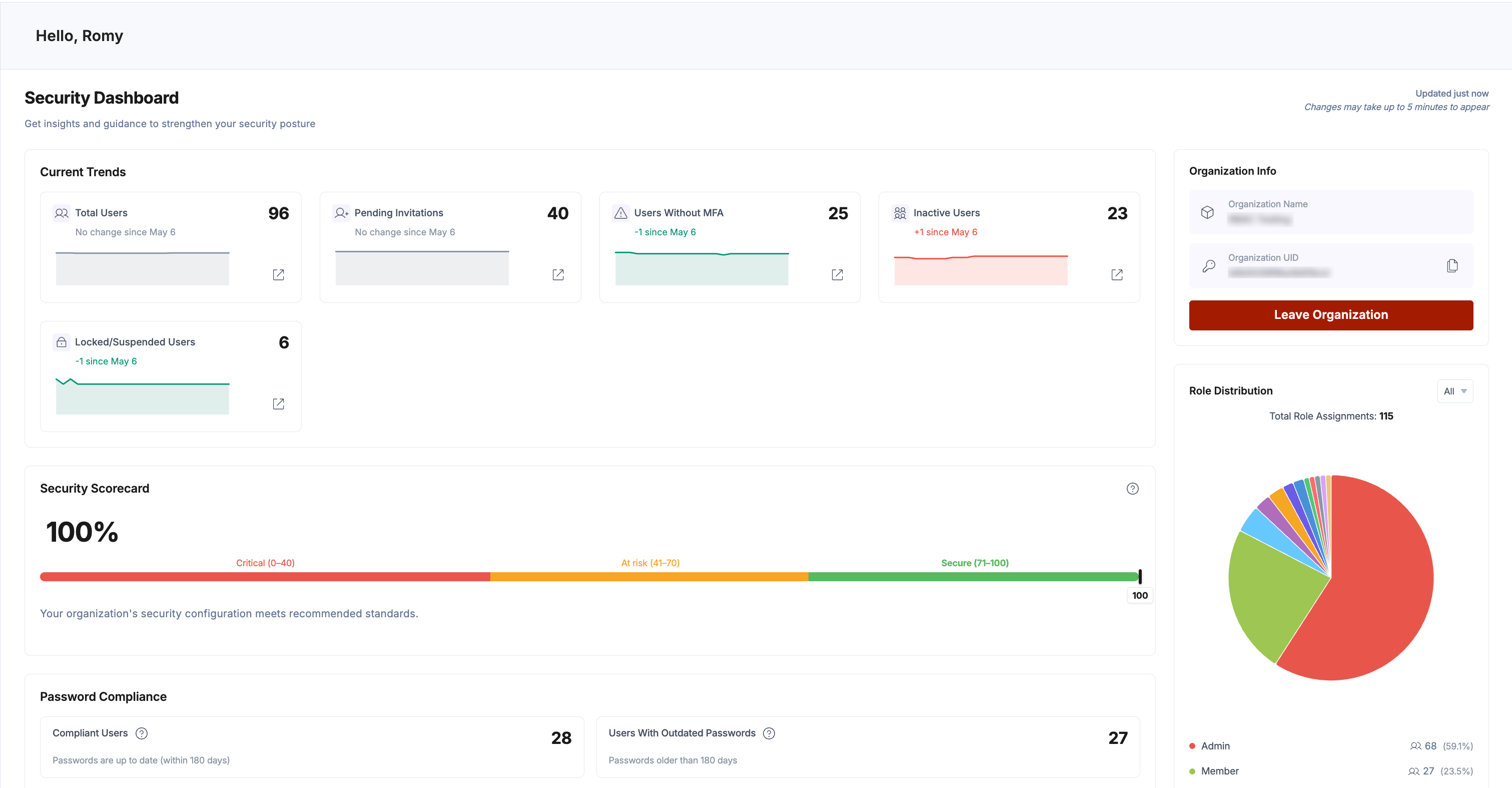
Gain a clearer, more actionable view of your organization’s security posture with the new Security Dashboard. Designed for admins and security-focused roles, this feature brings critical insights, activity tracking, and recommendations into a single, streamlined interface, helping you proactively manage risks and strengthen compliance.

Security Dashboard.png

Key Features

  • Security Dashboard Overview: Access a dedicated dashboard that replaces basic organization info for elevated roles, providing a unified view of security metrics, risks, and activity.
  • Current Trends Snapshot: Monitor key metrics like total users, inactive accounts, pending invitations, and users without MFA to quickly identify potential vulnerabilities.
  • Security Scorecard: Understand your organization’s security posture with a dynamic score (Critical, At Risk, Secure) based on weighted controls like SSO, MFA, and session policies.
  • Role Distribution Insights: Visualize how roles are assigned across your organization to prevent over-allocation of privileged access.
  • Password Compliance Tracking: Identify users with outdated passwords through categorized timelines, enabling better enforcement of password policies.
  • User Session Insights: Track active sessions, including long-lived sessions (60+ days), to reduce exposure from unattended logins.
  • Recent Activity Feed: Audit security-related events such as user changes, role updates, MFA resets, and configuration changes with severity indicators.

Stay ahead of potential threats with smarter visibility and actionable insights. The Security Dashboard empowers your team to continuously strengthen security and confidently manage your organization at scale.

Read our documentation for more information.

Unified role-based access control (RBAC) introduces finer control over who can administer an organization and what they can do within each product, two new Administration roles, and the ability to create custom roles per product.

Key Features

  • Redesigned user invite interface: Managing users and roles now happens in a completely redesigned interface that brings inviting users, assigning organization-level and product-level roles, and reviewing access into one consistent experience. The same experience extends to SSO identity provider role mapping, SCIM group-to-role mapping, and Teams.
  • New Administration roles: Two out-of-the-box roles join Owner, Admin, and Member at the organization level:
    • Security Manager: Manages an organization's identity and security configuration, including SSO, SCIM provisioning, security settings, and webhooks, with read-only visibility into users, roles, and teams. This removes the previous dependency on the Owner role for configuring SSO.
    • Product Analytics Viewer: Previously, viewing Analytics required Owner or Admin role access. This new role provides read-only access to organization information and analytics, without the ability to change settings or manage users.
  • Multi-role support: Users can now hold multiple organization-level roles at once. For example, a user can be both a Member and a Product Analytics Viewer without requiring elevated admin privileges.
  • Granular product-level permissions: RBAC now scopes access within each product, not only across the organization. Administrators can assign different levels of access per product, such as Administration and Assets, so each user receives precisely the access required for their tasks.
  • Custom roles per product: When the default roles do not match a team's responsibilities, administrators can create custom organization-level roles for a product in Administration by selecting permission categories and actions such as View, Create, Edit, and Delete.

What's Next for RBAC

This release is the first step in a broader rollout. Contentstack is extending RBAC adoption across the platform, with significant enhancements to CMS RBAC coming next, bringing the same granular, consistent access control to stacks and content management.

To learn more about Administration roles, product roles, and creating custom roles, refer to the documentation.

The Contentstack migration framework now supports Drupal as a legacy source and introduces single sign-on (SSO) authentication to the migration framework.

Key Enhancements:

  • Drupal support: Migrate content from Drupal 8, 9, 10, and 11 into a Contentstack stack using the migration framework workflow. Connect your Drupal MySQL database, validate the connection, select your destination stack, and map your content types during migration.
  • Asset migration from Drupal: Move images and media assets alongside your content by providing the base site URL and public asset path of your Drupal site during setup.
  • Flexible content-type mapping: Use the structure detected from your Drupal data as-is, or map Drupal content types to existing content types in your destination stack when you've already modeled your content in Contentstack.
  • Single sign-on (SSO) authentication: Authenticate the migration framework using OAuth 2.0. The tool requests only the permissions required to migrate content, keeping the access granted narrowly scoped to the task.

Note Drupal 7 is not supported. Drupal 7 has reached the end of life and is deprecated by the Drupal community.

For installation and setup, refer to the Migration Tool Setup Guide (Drupal) and the Authenticating the Migration Tool via SSO guide.

We are excited to announce the new Agent OS framework, featuring Agents and Polaris, and the launch of AI Credits. This update provides a more flexible and scalable way to manage and deploy artificial intelligence capabilities across your organization.

What’s New?

  • Agent OS (Agents & Polaris): Step into the next generation of automation with Agent OS.
    • Agents: Deploy autonomous, task-oriented AI agents designed to handle complex workflows with minimal oversight.
    • Polaris: Meet your new platform-wide chat assistant. Polaris is integrated across the entire ecosystem to provide instant support, answer queries, and help you perform AI tasks across your content.
  • AI Credits: We’re introducing a unified credit system to power your AI operations. This simplified consumption model provides greater visibility and control over your AI usage, ensuring your teams monitor and manage credits more effectively.
  • Analytics: To help monitor usage and performance trends, dedicated analytics dashboards are now available for Agents, Polaris, and AI Credits.

This release transforms how organizations access, manage, and scale AI capabilities with centralized controls, intelligent automation, and enterprise-ready experiences.

To learn more, refer to the Agent OS and AI Credits documentation.

We've introduced two enhancements that help you manage entry relationships and URL structures more efficiently while working in Contentstack.

Configure Default URL Patterns for URL Fields

Note: URL pattern configuration and advanced formatting options are available only with URL Management V2. Contact our support team to enable this feature.

You can now configure default URL patterns for URL fields while creating or editing content types.

With URL pattern configuration, you can:

  • Define consistent URL structures using static paths and dynamic placeholders
  • Use supported system fields, custom text fields, locales, and taxonomies in URL patterns
  • Automatically generate localized and structured entry URLs
  • Apply formatting rules such as casing, word separators, JSON mappings, fallback values, and regex transformations
  • Reduce manual URL creation errors and maintain consistent URL structures across entries

For example, you can define a pattern such as /blog/:locale/:field[title] to automatically generate localized blog URLs.

Refer to our documentation to learn how to configure URL patterns and formatting options.

Open Referenced Entries in a Sliding Panel

You can now open referenced entries in a sliding panel within the entry editor. Click the new Open in overlay icon next to a reference to view it without leaving the current page. You can also navigate deeper by opening up to five additional referenced entries in stacked panels and use breadcrumbs to switch between them.

This update reduces the need to open multiple browser tabs when working with nested references, making it easier to validate content relationships or make quick edits without losing your place.

Refer to the documentation on navigating referenced entries.

Note: This feature is plan-based and available to early access customers. Contact support to request access.

You can now publish entries in Contentstack with greater confidence and control with enhanced reference validation and preview workflows. The updated publishing experience helps you review, validate, and selectively publish referenced content before it enters the Publish Queue, reducing errors and rework.

What's New?

  • Review referenced content before publishing
    Use the Publish Review modal to review the parent entry and all associated references to understand what is published before content enters the Publish Queue.
  • Validate references before publishing
    Validate referenced entries and assets using the Validate Items modal to catch issues early and prevent publish failures.
  • Filter and select references precisely
    Choose to publish only the parent entry, specific references, first-level references, or all references to gain greater control over what goes live.
  • Monitor validation and publish progress
    Track validation tasks and publishing status through task windows to maintain visibility and confidence throughout the publishing process.

For more details, visit our documentation or contact our support team.

We are expanding the power of Automations by introducing real-time triggers for our most popular connectors. This update transforms your static workflows into reactive, event-driven systems that respond instantly to external actions.

New Connector Triggers

Our existing connectors for Cloudinary and Netlify have been updated with new trigger options to help you automate your media, deployment, and communication pipelines.

  • Cloudinary: Automate your digital asset management by triggering workflows based on any changes within your Cloudinary environment. Supported events include asset uploads, metadata modifications, folder creation, access control shifts, etc. Learn more about Cloudinary Trigger.
  • Netlify: Keep your development and content teams in sync with your deployment pipeline. You can now trigger automations when builds start, deployments are created, or when environments are locked or unlocked due to permission or configuration issues. Learn more about Netlify Trigger.

Navigation Updates

To support the continued expansion of our platform, we’ve streamlined the project navigation for a more scalable and organized experience.

Settings-related options are now consolidated within the Settings panel in the top navigation, making configuration and operational controls easier to access and manage.

You can now find the following under Settings:

  • Connected Apps
  • Audit Log
  • Execution Log
  • Project Variables

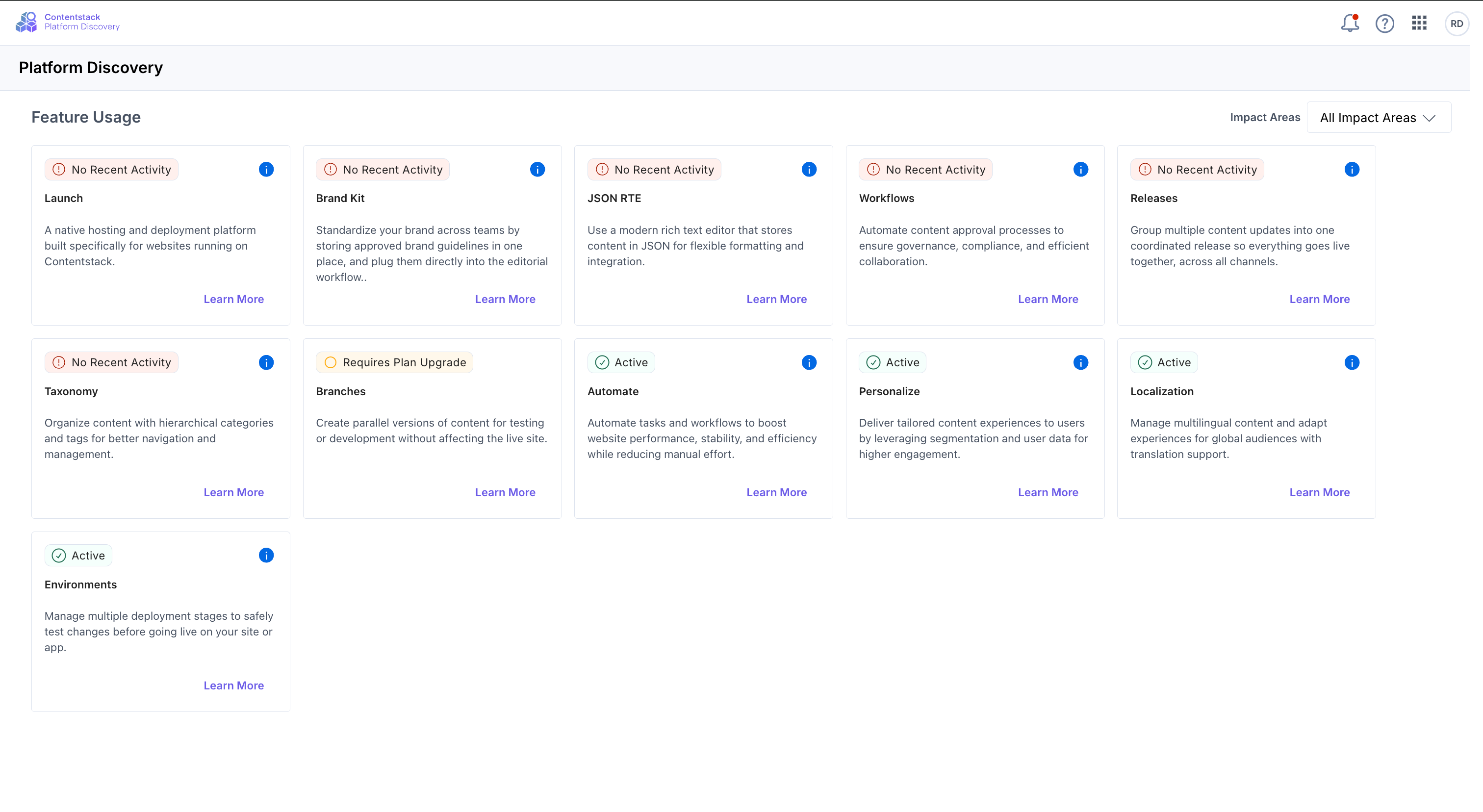
Platform Discovery is your new dashboard for exploring everything Contentstack has to offer. Get a unified view of every capability available to your organization, and spot the ones you are missing out on.

With this release you can:

  • Audit your stack: See a complete inventory of your features in one glance.
  • Find hidden value: Instantly identify features marked No Recent Activity, powerful tools you already have access to but aren’t leveraging.
  • Scale intelligently: See clear pathways to advanced capabilities (like Personalization or AI) that align with your growth goals.

Platform Discovery_Changelog.png

Where to find it: Open the "App Switcher" in the top navigation bar and select Platform Discovery.

Read our documentation for more information.

We’ve introduced new taxonomy enhancements in Contentstack that improve how teams manage, publish, release, and govern taxonomy, making it easier to manage taxonomy structures across environments and locales.

Publish Taxonomies Independently

You can now publish taxonomies independently, similar to entries. This allows you to manage taxonomy structures separately from content publishing workflows.

With Taxonomy Publishing, you can:

  • Publish an entire taxonomy and its complete term hierarchy
  • Publish to specific environments and locales
  • Select a branch and apply locale fallback hierarchies
  • Schedule publishing jobs (if enabled)
  • Automate taxonomy publishing through APIs

Learn more about publishing a taxonomy.

Nested Reference Publishing Now Supports Taxonomies

Nested Reference Publishing now includes taxonomy support. When you publish an entry using Send with References, any referenced taxonomies:

  • Appear in the Publish References modal
  • Are included in the publish job
  • Publish their complete hierarchy to the selected environments and locales

This helps maintain consistency between published entries and their associated taxonomy structures across environments.

Learn more about working with Nested Reference Publishing.

Add Taxonomies to Releases

You can now add taxonomies directly to releases and deploy taxonomy structures alongside related content changes.

You can add taxonomies to a release from:

  • The Taxonomy Details page
  • The Taxonomy List page
  • Entry references, where associated taxonomy terms are automatically included when references are added

This helps teams schedule taxonomy deployments, streamline localization workflows, and reduce publishing inconsistencies.

Learn more about adding a taxonomy to a release.

Granular Taxonomy Permissions for Custom Roles (Early Access)

You can now assign taxonomy management permissions to custom roles without granting full administrative access to the stack.

Custom role users can manage taxonomy structures using permissions such as:

  • Create
  • Read
  • Update
  • Publish/Unpublish
  • Delete

You can also apply exceptions to restrict access to specific taxonomies or actions.

This enhancement separates taxonomy structure management from entry-level taxonomy permissions, giving teams more precise access control and governance flexibility.

To learn more, refer to the Permissions on Taxonomies documentation.

We’re excited to introduce Contentstack Assets, a modern, AI-powered digital asset management experience built for teams that need to organize, govern, and reuse assets at scale.

This upgrade moves beyond stack-based asset management to deliver a centralized, structured, and reusable asset system across your organization. With support for shared asset spaces, custom metadata modeling, localization, AI-powered enrichment, and advanced governance controls, Contentstack Assets helps teams streamline operations and deliver consistent digital experiences faster.

Key Features

  • Centralized Asset Management Across Stacks: Manage assets in dedicated spaces and reuse them seamlessly across multiple CMS stacks, reducing duplication and improving consistency.
  • Spaces and Workspaces for Better Organization: Organize assets by brand, team, campaign, or region using independent spaces and isolated workspaces for experimentation and campaign workflows.
  • Custom Asset Modeling: Create custom asset types and user-defined metadata fields to structure assets around your business needs, from campaign information to licensing and compliance data.
  • Native Asset Localization: Manage multilingual versions of assets within a unified workflow, including localized metadata and asset variants with fallback language support.
  • AI-Powered Asset Enrichment: Automatically generate alt text and tags for images to improve discoverability, accessibility, and SEO while reducing manual effort.
  • Visual Markups for Interactive Experiences: Add hotspots and bounding boxes to images to power shoppable content and richer visual experiences.
  • Advanced Search and Filtering: Find assets faster using metadata-driven filters, saved views, color-based filtering, and intelligent search capabilities.
  • Asset Versioning and Governance: Track changes to both metadata and binaries with built-in version history and rollback support.
  • Enterprise-Ready Access Control: Manage permissions using predefined and custom roles with support for SSO and SCIM-based user provisioning.

Contentstack Assets lays the foundation for a more intelligent, scalable, and future-ready asset strategy. We’re excited to see how your teams use it to create faster workflows, stronger governance, and richer digital experiences.

Check our documentation for full details, or contact support to get started immediately.

We are excited to introduce Clearwinner, a new Marketplace app designed to automate the post-test cleanup process for finished A/B test experiences.

Traditionally, concluding an A/B test requires manually identifying variant changes, merging them into baseline entries, publishing updates, and archiving the test. Clearwinner eliminates this time-consuming workflow with a single-click solution.

Key Features:

  • Automated Winner Identification: Easily view tests where Personalize has identified a winning variant based on statistical confidence levels (Has_Won, Leading_significantly, or Leading).
  • One-Click Merge & Publish: Automatically merge winning variant content into your baseline entries and publish the updates to your live environment in one background process.
  • Integrated Cleanup: Automatically archive concluded tests in Personalize and permanently delete redundant variant data to maintain a clean CMS stack.
  • Bulk Operations: Select and process multiple winning tests simultaneously to streamline large-scale experimentation cycles.

To learn more, refer to the Clearwinner App Installation Guide.

We’re improving the Mappings feature in Advanced Settings to make it clearer how values are resolved and how to work with nested configuration data. It now includes a dedicated Template Substitution section and better examples for nested values.

Dynamic values can already be used in request headers and body, and now they also work in URLs and query strings.

With a single syntax, {{ var.NAME }}, you can apply dynamic values across the entire outbound request. This enables API versioning, multi-tenant routing, pagination, and more, all driven from your configuration without hardcoding.

Learn more about Introduction to Advanced Settings in Developer Hub.

Here’s an overview of the latest updates in Contentstack Launch:

  • User-Agent Support in Cache Priming:

    Cache priming requests now include a dedicated User-Agent header, allowing you to easily identify and filter them from regular traffic in your logs.

    Learn more in Identifying Cache Priming Traffic.

  • Cancel Active Deployments:

    You can now cancel an ongoing deployment in Launch, allowing you to stop unintended updates before they are applied.

    Learn more in Cancel Deployment.

  • Support for Node.js 24.x:

    We've added support for the Node.js 24.x runtime, ensuring compatibility with the latest Node.js features and improvements.

    Refer to the Supported Node.js Versions.

  • Build Machines for Launch Builds:

    Launch now offers multiple build machine tiers, enabling you to allocate appropriate CPU, memory, and disk resources for faster and more reliable builds.

    To learn more, refer to Build Machines on Launch.

  • Server Machine Tiers for Launch Functions:

    With new server machine tiers in Launch, you can control CPU and memory allocation for your functions, ensuring better performance and scalability based on workload needs.

    For more details, refer to Server Machines on Launch.

  • Launch “Warming Up” Screen for Idle Environments:

    Launch now supports an automated warm-up state for inactive environments, where sites briefly scale down and quickly reinitialize on the next request to ensure efficient resource usage without impacting availability.

Managing entries just got faster. You can now switch between Publish Status, Release Status, and Publish Rules directly from the Entry Status panel using a dropdown. You can also apply filters to refine the displayed data. Selected filters remain applied across all views.

This update helps you focus on specific entry details without navigating multiple sections. For example, you can filter by environment and quickly switch views to check publishing status, release progress, or approval rules in the same context.

Refer to the view entry status documentation for more details.

We’re adding enhancements to the Algolia app:

  • Stack Delivery Token Support: Added a new section in app configuration to fetch published data via the Content Delivery API for improved data synchronization.
  • Bulk Field Mapping: You can now add up to 30 field paths at once in the Mapping section by pasting values separated by commas, spaces, or semicolons, or by pressing the enter key.
  • Enhanced Search: Introduced a search function to find entries by Entry UID and Title in the Algolia Full Page app.

To learn more, refer to the Algolia App Installation Guide.

As part of our ongoing efforts to enhance platform security and reliability, we are deprecating legacy Content Management API versions /v1 and /v2. This change ensures that all users benefit from the latest performance improvements, security standards, and feature capabilities available in /v3 APIs.

ImportantThe legacy /v1 and /v2 CMA endpoints are now deprecated and will be officially decommissioned in 60 days.

We recommend reviewing your integrations and updating them to use the current API version to avoid any disruption.

What’s Changing
  • Deprecation of /v1 and /v2 APIs: Legacy API versions will be phased out and will no longer be supported.
  • Planned Access Restrictions:
    • /v1 endpoints will be blocked across all cloud environments.
    • /v2 endpoints will be restricted to AWS North America (AWS-NA) only during the transition period.
  • Shift to /v3 APIs: The latest API version is now the standard and actively supported across all environments.

This update helps us deliver a more secure and consistent API experience. We’re committed to supporting your transition, upgrade to /v3 today and take advantage of the latest improvements.

We’ve added enhancements to the XTM app:

  • Unified Field Management: Replaced separate inclusions or exclusions settings with a single Manage Fields section for easier control.
  • Multi-Branch Support: You can now translate entries in non-main branches.

    Note Existing users must update the app to activate this feature.

  • Unlimited Bulk Translation: Removed the entry translation limit for faster, high-volume processing.
  • Global Exclusions: Added a dropdown to exclude specific fields across all content types.
  • Automatic Filtering: Non-localizable fields are now automatically excluded from translation by default.

To learn more, refer to the XTM App Installation Guide.

Managing user access just got more powerful. Admins and organization owners can now take immediate action to secure their organization by logging out multiple users at once.

Select users in bulk from Administration > Users and immediately terminate their active sessions. Once triggered, all active sessions for the selected users are invalidated, ensuring they are logged out across all devices without delay. Take control of your organization’s security with faster, more efficient session management.

Check our documentation for full details, or contact support to get started immediately.

We’ve enhanced the Bulk Operations app to support larger datasets and smoother workflows:

  • Release Version 2.0: Supports references, higher selection limits, and improved API behavior. The release version available for the stack depends on your organization plan.
  • Revamped Tables with Pagination: All modules (Entries, Assets, Releases, and Find and Replace) now use a paginated table for improved performance and usability, along with upgraded item limits.
  • Configurable Asset Upload Limits: You can now upload assets based on your organization’s configured upload limit to better manage bulk assets operations.

To learn more, refer to the Bulk Operations App Installation Guide.

You can now use English - Uzbekistan (en-uz) as a locale in Contentstack to manage English-language content scoped to the Uzbekistan region.

Use this locale to manage region-specific variations, such as pricing, date formats, currency and localized messaging, without duplicating content or approximating wi.

To get started, add English - Uzbekistan (en-uz) from your stack’s Languages settings and create localized entries.

We’re introducing new enhancements to the Healthcheck app:

  • Version Outdated Notifications: A new notification system on the Overview page alerts if the app version is updated, displaying the current and minimum required version to ensure compatibility.
  • Unused Contentstack Features Display: The Overview page now lists unused Contentstack products (such as Launch, Personalize, etc.) to help users identify potential areas for integration.
  • New Unreferenced Assets Check: A dedicated check has been added to identify assets that have been created but are not currently referenced in any entries.
  • Enhanced Content Model Checks: Added 20+ content model checks.

To learn more, refer to the Healthcheck App Installation Guide.

Visual Editor now includes two enhancements that help you manage permissions and control how content is published.

Request Edit Access

You can request edit access when you do not have permission to modify an entry. The Request Edit Access option appears in the Form and canvas views.

Submit a request with an optional comment. Approvers can review the request and approve or reject it from the Status panel. It allows you to continue your workflow without switching tools or contacting approvers separately.

For more information, see the Request Edit Access documentation.

Publish With or Without References

You can choose to publish entries with or without references. During publishing, select whether to include all referenced items or only the selected entry.

This option helps you control how updates are deployed. For example, publish a specific change without affecting linked content, or include all dependencies to maintain consistency across pages.

We’ve introduced major improvements to the Trados app to enhance your experience and provide better visibility into translation projects.

Introduced Full Page UI Location

The app now supports a new Full Page UI location for managing translation projects directly within Contentstack.

Project creation remains the same, with the following enhancements:

  • You can quickly find projects using project search by name or filter them by status or translated language.
  • You can now view the entry version number in error logs for faster debugging.
  • You can recreate failed projects by clicking the Copy Project icon, which copies the existing project configuration.
  • You can automatically identify fields that are not supported for translation before creating a project.
Trados-v1-1-8-Full-Page-App

Note: The Stack Dashboard UI location will be deprecated soon.

During app configuration, enable Reference Handling to automatically include referenced assets in translated releases, ensuring all nested content is localized.

To learn more, refer to the Trados App Installation Guide.

We’ve added new enhancements to the Bynder app:

  • Multi-configuration Support: You can now create and manage multiple configurations for the Bynder app within a single stack.
  • Advanced Settings: A new section has been added to the app configuration, requiring a Client ID and Client Secret to enable API-driven features.
  • Login Bypass: An optional toggle that allows users to bypass the standard login screen when accessing the asset selector.
  • Asset Tracker: Monitor and track asset usage statistics directly within your Bynder portal asset dashboard.
  • OAuth Authentication: Supports a more secure authentication flow using the authorization code and refresh token grant type to generate app tokens.
  • Custom Field Flexibility: While each custom field is limited to one configuration, a single content entry can now support multiple Bynder custom fields, each pointing to different configurations.

To learn more, refer to the Bynder App Installation Guide.

We’re excited to introduce the Mux app, now available in the Contentstack Marketplace.

Mux is a video infrastructure platform that provides APIs and tools for encoding, streaming, hosting, and delivering on-demand and live video content at scale.

The Mux App streamlines video management by integrating Mux capabilities directly into your entry workflow. This secure integration with automated updates simplifies video operations and provides greater control right within Contentstack.

Mux-v1-0-Whats-New

Key features

  • Direct Video Uploads from Entries: Upload videos, track processing status, configure playback settings, and keep asset data automatically synced, all within your entry workflow.
  • Secure Webhook Integration: Automatically reflect video creation, processing, and deletion updates in your entries with secure webhook validation.
  • Flexible playback options: Choose Public playback for open access or enable Signed (private) playback for time-limited, restricted content.
  • Advanced Video Controls: Edit titles, configure captions, customize thumbnails, generate animated GIF previews, and manage MP4 renditions directly within the entry.
  • Configurable Upload Limits: Define the maximum number of videos allowed per entry to maintain structured content control.

To learn more, refer to the Mux App Installation Guide.

Here’s an overview of the latest updates in Contentstack Launch:

  • Analog Framework Support:
    Contentstack Launch now supports hosting projects built with the Analog framework, an open-source Angular-based meta-framework, with full compatibility for SSR, Static Rendering, ISR, and API Routes. You can configure build settings, environment variables, caching strategies, and sitemap generation, with application specs including a 30-second execution timeout, 1024 MB memory, and a read-only file system with a 500 MB /tmp directory.
    To get started, refer to the Quick Start Guide with Analog.
  • AstroJS Framework Support:
    Contentstack Launch now supports deploying projects built with the Astro framework, ensuring compatibility with existing build and deployment workflows for seamless hosting.
    To get started, refer to the Quick Start Guide with Astro.
  • Cache Revalidation Notifications:
    You can now monitor your cache revalidation limits in Contentstack Launch, giving you clear visibility into your usage and available capacity.
    To learn more, refer to Cache Revalidation Limits.
  • Analytics for Cache Revalidation:
    As part of your plan's existing cache revalidation limits, Contentstack Launch now introduces notifications to inform users when they are approaching or have reached their allowed limits. This improves transparency and allows users to take appropriate action before hitting the limit.

We’ve redesigned the Docs experience to make learning faster, clearer, and more connected.

Here’s what’s new:

  • Fresh look & feel
    Docs now align with Contentstack’s updated brand and design system: cleaner visuals, better readability, and a more modern experience.
  • Multi-product navigation
    Each product now has its own dedicated space. Go straight to what matters to you.
  • Docs and Academy, better together
    We’ve strengthened the connection between documentation and Academy courses. Move seamlessly between concepts and hands-on learning.
  • Light & Dark themes
    Switch between light and dark modes based on your preference, whether you’re browsing during the day or working late.
  • Improved UX & content flow
    Content is now better structured and easier to scan, helping you find answers faster with less friction.

Start exploring the new Docs experience now!

This release introduces updates to improve content modeling and the entry editing experience.

The enhancements include:

  • Default language and timezone: You can now set a preferred timezone and default language in your profile settings. The selected language is automatically applied when you open the entry list, reducing the need to switch it manually.
  • Field limit indicator banners: The Content Type Builder now displays indicators as you approach system limits:
    • At 80%, an early warning appears
    • At 100%, the limit is reached message appears

    These indicators apply to both the total number of fields and JSON Rich Text fields, helping you monitor limits while designing content types.

  • Horizontal layout for radio buttons: You can now display radio options horizontally in the entry editor. This layout makes it easy to view and select from a small set of options.