Enhancement:
- Scoped the DVR dependency strictly to the test target, preventing it from being bundled into production builds.

Stay up-to-date with all the improvements, features, and changes introduced to the product, APIs, docs, and other resources.
Subscribe to RSS FeedEnhancement:
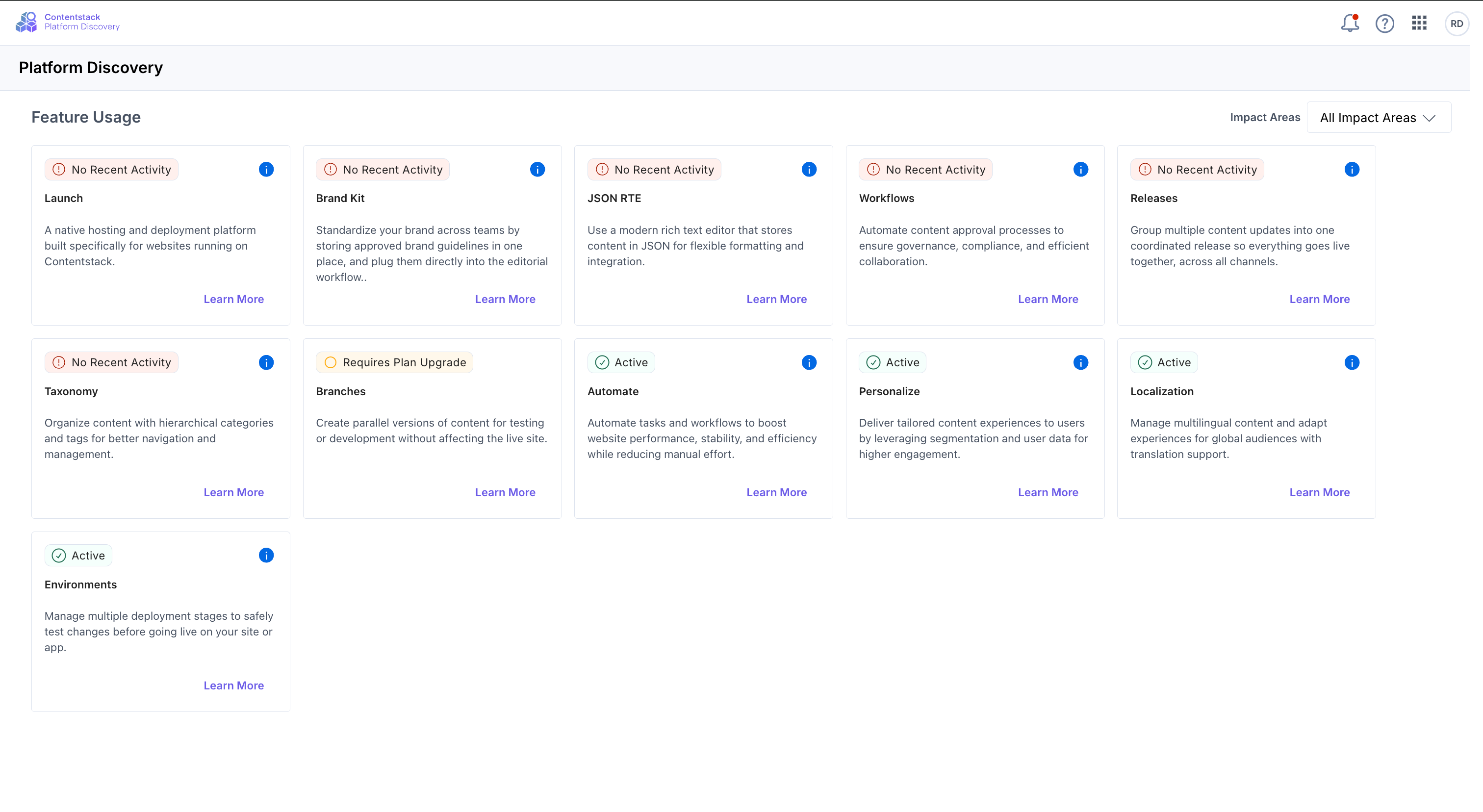
Platform Discovery is your new dashboard for exploring everything Contentstack has to offer. Get a unified view of every capability available to your organization, and spot the ones you are missing out on.
With this release you can:
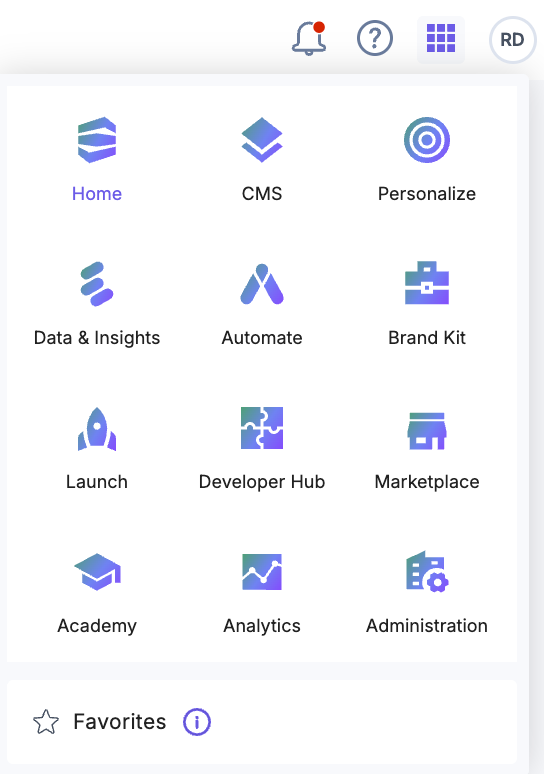
Where to find it: Open the "App Switcher" in the top navigation bar and select Platform Discovery.
Read our documentation for more information.
New Feature:
Enhancement:
Bug fix:
Security fix:
We’ve introduced new taxonomy enhancements in Contentstack that improve how teams manage, publish, release, and govern taxonomy, making it easier to manage taxonomy structures across environments and locales.
Publish Taxonomies Independently
You can now publish taxonomies independently, similar to entries. This allows you to manage taxonomy structures separately from content publishing workflows.
With Taxonomy Publishing, you can:
Learn more about publishing a taxonomy.
Nested Reference Publishing Now Supports Taxonomies
Nested Reference Publishing now includes taxonomy support. When you publish an entry using Send with References, any referenced taxonomies:
This helps maintain consistency between published entries and their associated taxonomy structures across environments.
Learn more about working with Nested Reference Publishing.
Add Taxonomies to Releases
You can now add taxonomies directly to releases and deploy taxonomy structures alongside related content changes.
You can add taxonomies to a release from:
This helps teams schedule taxonomy deployments, streamline localization workflows, and reduce publishing inconsistencies.
Learn more about adding a taxonomy to a release.
Granular Taxonomy Permissions for Custom Roles (Early Access)
You can now assign taxonomy management permissions to custom roles without granting full administrative access to the stack.
Custom role users can manage taxonomy structures using permissions such as:
You can also apply exceptions to restrict access to specific taxonomies or actions.
This enhancement separates taxonomy structure management from entry-level taxonomy permissions, giving teams more precise access control and governance flexibility.
To learn more, refer to the Permissions on Taxonomies documentation.
We are excited to announce the new Agent OS framework, featuring Agents and Polaris, and the launch of AI Credits. This update provides a more flexible and scalable way to manage and deploy artificial intelligence capabilities across your organization.
What’s New?
This release transforms how organizations access, manage, and scale AI capabilities with centralized controls, intelligent automation, and enterprise-ready experiences.
To learn more, refer to the Agent OS and AI Credits documentation.
We’re excited to introduce Contentstack Assets, a modern, AI-powered digital asset management experience built for teams that need to organize, govern, and reuse assets at scale.
This upgrade moves beyond stack-based asset management to deliver a centralized, structured, and reusable asset system across your organization. With support for shared asset spaces, custom metadata modeling, localization, AI-powered enrichment, and advanced governance controls, Contentstack Assets helps teams streamline operations and deliver consistent digital experiences faster.
Key Features
Contentstack Assets lays the foundation for a more intelligent, scalable, and future-ready asset strategy. We’re excited to see how your teams use it to create faster workflows, stronger governance, and richer digital experiences.
Check our documentation for full details, or contact support to get started immediately.
New Feature:
Enhancement:
Security fix:
New Features:
Enhancement:
We are excited to introduce Clearwinner, a new Marketplace app designed to automate the post-test cleanup process for finished A/B test experiences.
Traditionally, concluding an A/B test requires manually identifying variant changes, merging them into baseline entries, publishing updates, and archiving the test. Clearwinner eliminates this time-consuming workflow with a single-click solution.
Key Features:
To learn more, refer to the Clearwinner App Installation Guide.
New Feature:
Enhancement:
Security fix:
Bug fix:
Security fix:
Security fix:
Enhancement:
New Feature:
Enhancement:
New Feature:
We’re improving the Mappings feature in Advanced Settings to make it clearer how values are resolved and how to work with nested configuration data. It now includes a dedicated Template Substitution section and better examples for nested values.
Dynamic values can already be used in request headers and body, and now they also work in URLs and query strings.
With a single syntax, {{ var.NAME }}, you can apply dynamic values across the entire outbound request. This enables API versioning, multi-tenant routing, pagination, and more, all driven from your configuration without hardcoding.
Learn more about Introduction to Advanced Settings in Developer Hub.
Here’s an overview of the latest updates in Contentstack Launch:
User-Agent Support in Cache Priming:
Cache priming requests now include a dedicated User-Agent header, allowing you to easily identify and filter them from regular traffic in your logs.
Learn more in Identifying Cache Priming Traffic.
Cancel Active Deployments:
You can now cancel an ongoing deployment in Launch, allowing you to stop unintended updates before they are applied.
Learn more in Cancel Deployment.
Support for Node.js 24.x:
We've added support for the Node.js 24.x runtime, ensuring compatibility with the latest Node.js features and improvements.
Refer to the Supported Node.js Versions.
Build Machines for Launch Builds:
Launch now offers multiple build machine tiers, enabling you to allocate appropriate CPU, memory, and disk resources for faster and more reliable builds.
To learn more, refer to Build Machines on Launch.
Server Machine Tiers for Launch Functions:
With new server machine tiers in Launch, you can control CPU and memory allocation for your functions, ensuring better performance and scalability based on workload needs.
For more details, refer to Server Machines on Launch.
Launch “Warming Up” Screen for Idle Environments:
Launch now supports an automated warm-up state for inactive environments, where sites briefly scale down and quickly reinitialize on the next request to ensure efficient resource usage without impacting availability.
Publishing now validates required fields across all publish actions, including single entry, bulk, and release deployments. If you mark fields as mandatory in a content type or global field, the system validates all existing entries against the updated rules at publish time.
If an entry does not meet the updated requirements, it cannot be published until the required fields are completed. This ensures that all published entries align with the current content model.
Managing entries just got faster. You can now switch between Publish Status, Release Status, and Publish Rules directly from the Entry Status panel using a dropdown. You can also apply filters to refine the displayed data. Selected filters remain applied across all views.
This update helps you focus on specific entry details without navigating multiple sections. For example, you can filter by environment and quickly switch views to check publishing status, release progress, or approval rules in the same context.
Refer to the view entry status documentation for more details.
We’re adding enhancements to the Algolia app:
To learn more, refer to the Algolia App Installation Guide.
New Feature:
New Feature:
Enhancements:
Enhancements:
Bug & Security Fixes:
Bug & Security Fixes:
We’ve added enhancements to the XTM app:
Note Existing users must update the app to activate this feature.
To learn more, refer to the XTM App Installation Guide.
Managing user access just got more powerful. Admins and organization owners can now take immediate action to secure their organization by logging out multiple users at once.
Select users in bulk from Administration > Users and immediately terminate their active sessions. Once triggered, all active sessions for the selected users are invalidated, ensuring they are logged out across all devices without delay. Take control of your organization’s security with faster, more efficient session management.
Check our documentation for full details, or contact support to get started immediately.
We’ve enhanced the Bulk Operations app to support larger datasets and smoother workflows:
To learn more, refer to the Bulk Operations App Installation Guide.
You can now use English - Uzbekistan (en-uz) as a locale in Contentstack to manage English-language content scoped to the Uzbekistan region.
Use this locale to manage region-specific variations, such as pricing, date formats, currency and localized messaging, without duplicating content or approximating wi.
To get started, add English - Uzbekistan (en-uz) from your stack’s Languages settings and create localized entries.
We’re introducing new enhancements to the Healthcheck app:
To learn more, refer to the Healthcheck App Installation Guide.
Enhancements
New Feature
New Features
Enhancements
Enhancements
Bug Fix:
Fixed security vulnerabilities identified by Snyk by updating affected dependencies.
Bug & Security Fixes:
Resolved Snyk security vulnerabilities by upgrading dependencies in the following plugins:
Enhancement:
Deprecated:
Bug Fix:
Enhancement:
Enhancement:
Deprecated:
Enhancement:
Bug Fix:
Enhancement:
New Feature:
Introduced Utils.get_variant_aliases to retrieve variant alias strings from publish_details.variants.
Introduced Live Preview editable tagging (CSLP).
Added helpers in entry_editable.py for JS-compatible editable tagging.
Bug Fix:
Bug Fixes:
Bugs Fix:
Enhancements:
Visual Editor now includes two enhancements that help you manage permissions and control how content is published.
Request Edit Access
You can request edit access when you do not have permission to modify an entry. The Request Edit Access option appears in the Form and canvas views.
Submit a request with an optional comment. Approvers can review the request and approve or reject it from the Status panel. It allows you to continue your workflow without switching tools or contacting approvers separately.
For more information, see the Request Edit Access documentation.
Publish With or Without References
You can choose to publish entries with or without references. During publishing, select whether to include all referenced items or only the selected entry.
This option helps you control how updates are deployed. For example, publish a specific change without affecting linked content, or include all dependencies to maintain consistency across pages.
We’ve introduced major improvements to the Trados app to enhance your experience and provide better visibility into translation projects.
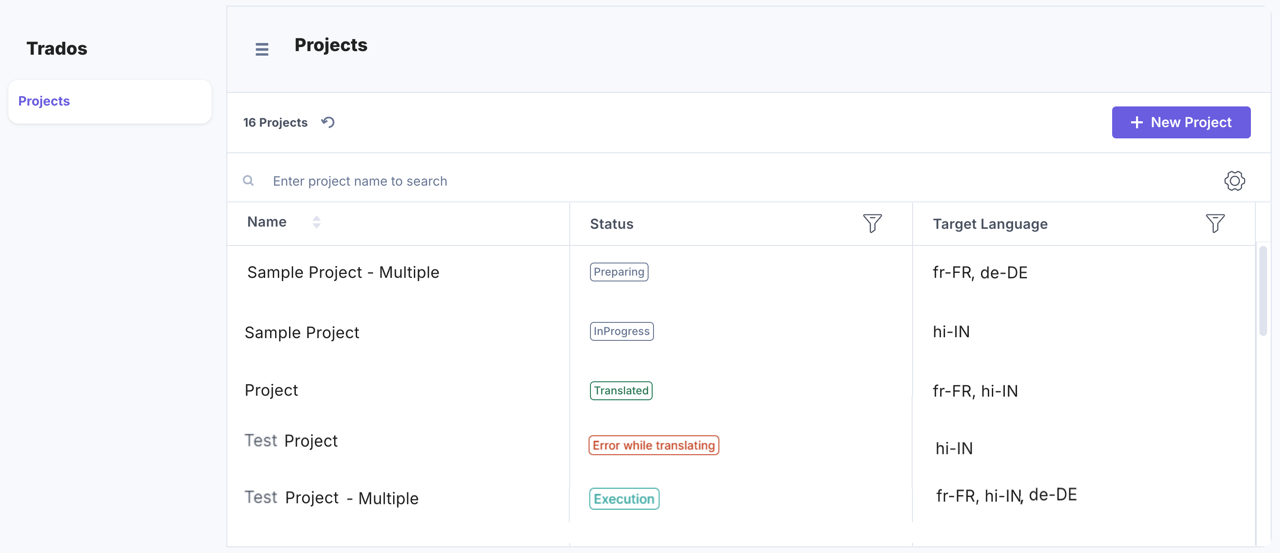
Introduced Full Page UI Location
The app now supports a new Full Page UI location for managing translation projects directly within Contentstack.
Project creation remains the same, with the following enhancements:
Note: The Stack Dashboard UI location will be deprecated soon.
During app configuration, enable Reference Handling to automatically include referenced assets in translated releases, ensuring all nested content is localized.
To learn more, refer to the Trados App Installation Guide.
We’ve added new enhancements to the Bynder app:
To learn more, refer to the Bynder App Installation Guide.
We’re excited to introduce the Mux app, now available in the Contentstack Marketplace.
Mux is a video infrastructure platform that provides APIs and tools for encoding, streaming, hosting, and delivering on-demand and live video content at scale.
The Mux App streamlines video management by integrating Mux capabilities directly into your entry workflow. This secure integration with automated updates simplifies video operations and provides greater control right within Contentstack.
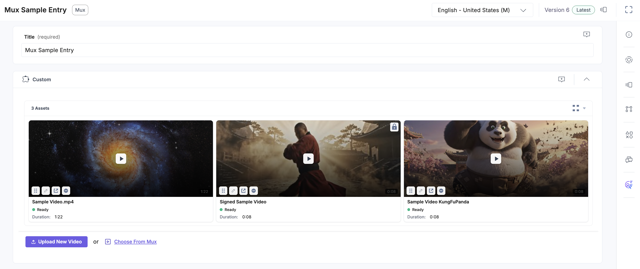
Key features
To learn more, refer to the Mux App Installation Guide.
Here’s an overview of the latest updates in Contentstack Launch:
New Features:
Enhancements:
Bug & Security Fixes:
Features:
Features:
Features:
Features:
Features:
Enhancement:
We’ve redesigned the Docs experience to make learning faster, clearer, and more connected.
Here’s what’s new:
Start exploring the new Docs experience now!
This release introduces updates to improve content modeling and the entry editing experience.
The enhancements include:
These indicators apply to both the total number of fields and JSON Rich Text fields, helping you monitor limits while designing content types.
Secure your workspace by automatically logging users out after a defined limit. This gives admins precise control over session duration and inactivity.
What’s New
Enable this feature by navigating to Administration > Security Configuration > Session Timeout. Check our documentation for full details, or contact support to get started immediately.
We’ve added enhancements to the Contentstack Shopify Integration:
To learn more, refer to the Contentstack Shopify Integration Guide.
Bug Fix:
Enhancement:
Bug Fix:
Bug Fix:
Enhancements:
We’ve introduced a new way to control how Live Preview generates preview links. Instead of relying only on static environment base URLs or entry-level URL fields, you can now define dynamic, pattern-based preview URLs that resolve at runtime using entry data, environment, locale, or taxonomy values.
You can now preview content that uses non-native URL fields, nested routing, taxonomy-driven URLs, or multiple domains. The same content can be previewed across regional domains or environments without duplicating entries or manually updating URLs.
With Custom Preview URLs, Live Preview reflects your real site structure more accurately, reducing broken or incorrect previews.
To get started, see the Custom Preview URLs in Live Preview documentation.
Security Fix:
Enhancement:
Enhancements:
Bug & Security Fixes:
Enhancements:
Enhancements:
Drafts and Auto Save help protect your work while editing entries in the entry editor.
Autosave automatically saves your changes as you edit, so if your browser crashes, you close a tab, or the page refreshes, your work is preserved. When you're ready to commit your changes, clicking Save creates a new official version.
When multiple users work on the same entry, Drafts and Auto Save helps maintain a structured editing experience:
For more information, refer to the Drafts and Auto Save documentation.
Note: This feature is currently part of an Early Access Program and may not be available to all users. Contact the Contentstack support team for more information.
Bug & Security Fixes:
Bug & Security Fixes:
Enhancements:
Bug Fix:
You can now add entries to a release directly from Visual Editor. Add a single entry while editing a page or select multiple entries in bulk.
Instead of navigating from the Entries module, content managers can prepare and organize content for deployment without leaving the visual page editing interface.
For example, if you update multiple components on a landing page, you can quickly select all related entries and add them to a release in one flow, helping teams coordinate launches more efficiently.
Learn more through the Add to Release in Visual Editor documentation.
We’ve redesigned the Academy to make learning faster, clearer, and more connected.
Ready to accelerate your expertise? The reimagined Academy delivers a more connected learning experience designed to take you from concept to creation in record time. Explore now!
This release delivers usability improvements that make stack management, content modeling, and entry workflows faster and more intuitive.
Together, these enhancements streamline everyday tasks, reduce context switching, and make working across stacks and entries more intuitive.
Here’s an overview of the latest updates in Contentstack Launch:
We’ve renamed Visual Builder to Visual Editor to better reflect how the experience is used today.
As the product has evolved, its core value has become clearer; this is where teams review, edit, and refine content visually. From making updates and previewing changes to validating content before it goes live, editing is at the heart of the experience. The new name aligns more accurately with what users actually do every day.
Note: This is a name change only. All functionality, workflows, and access remain the same, and no action is required from existing users. You may see Visual Editor referenced across the product documentation where Visual Builder previously appeared.
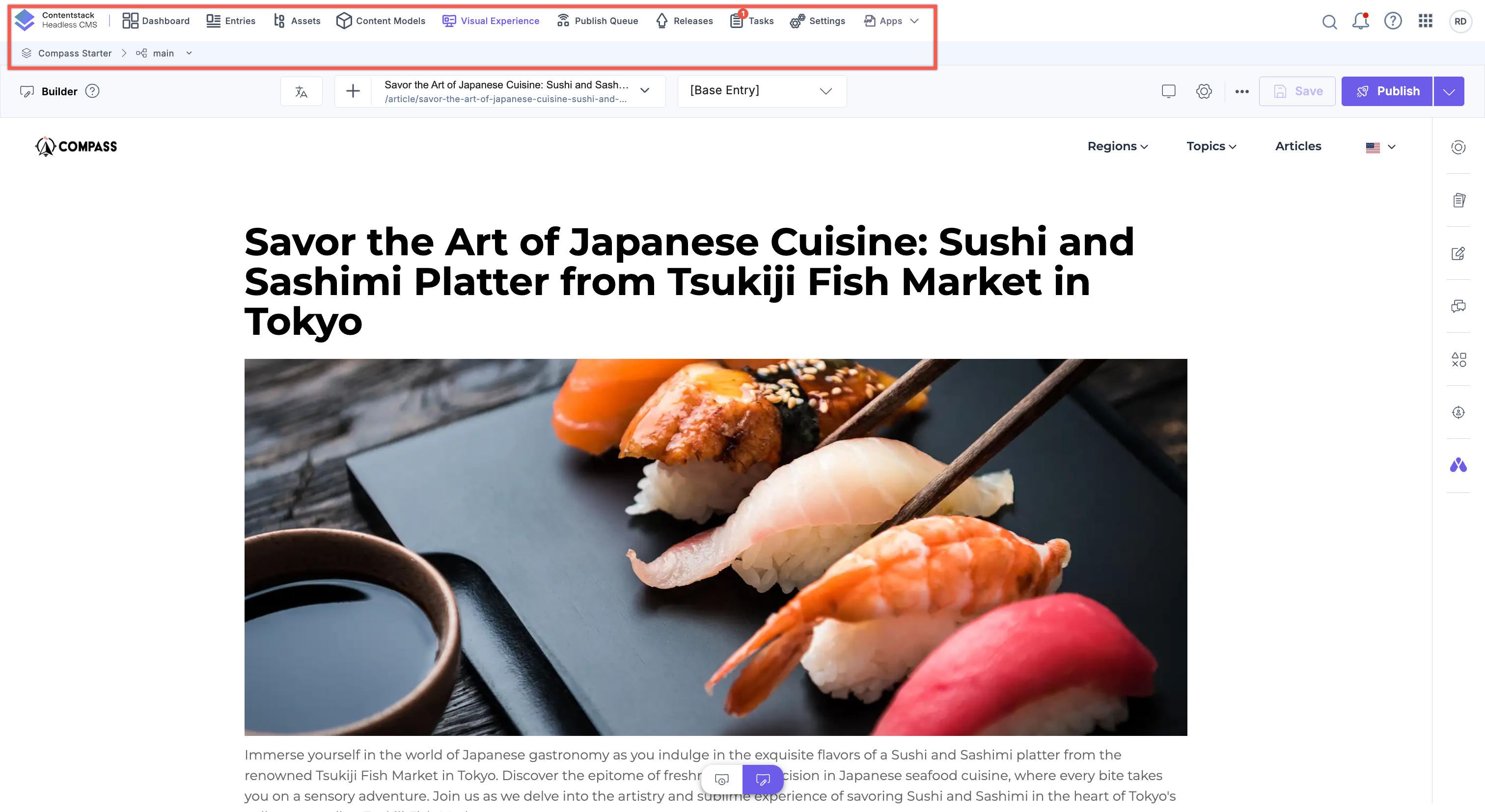
We’re excited to announce that Contentstack’s home screen and top navigation are now generally available to all users. After a successful early access phase, the legacy navigation experience has been fully sunset, making way for a smarter, cleaner, and more intuitive way to work across the platform.
What’s new?
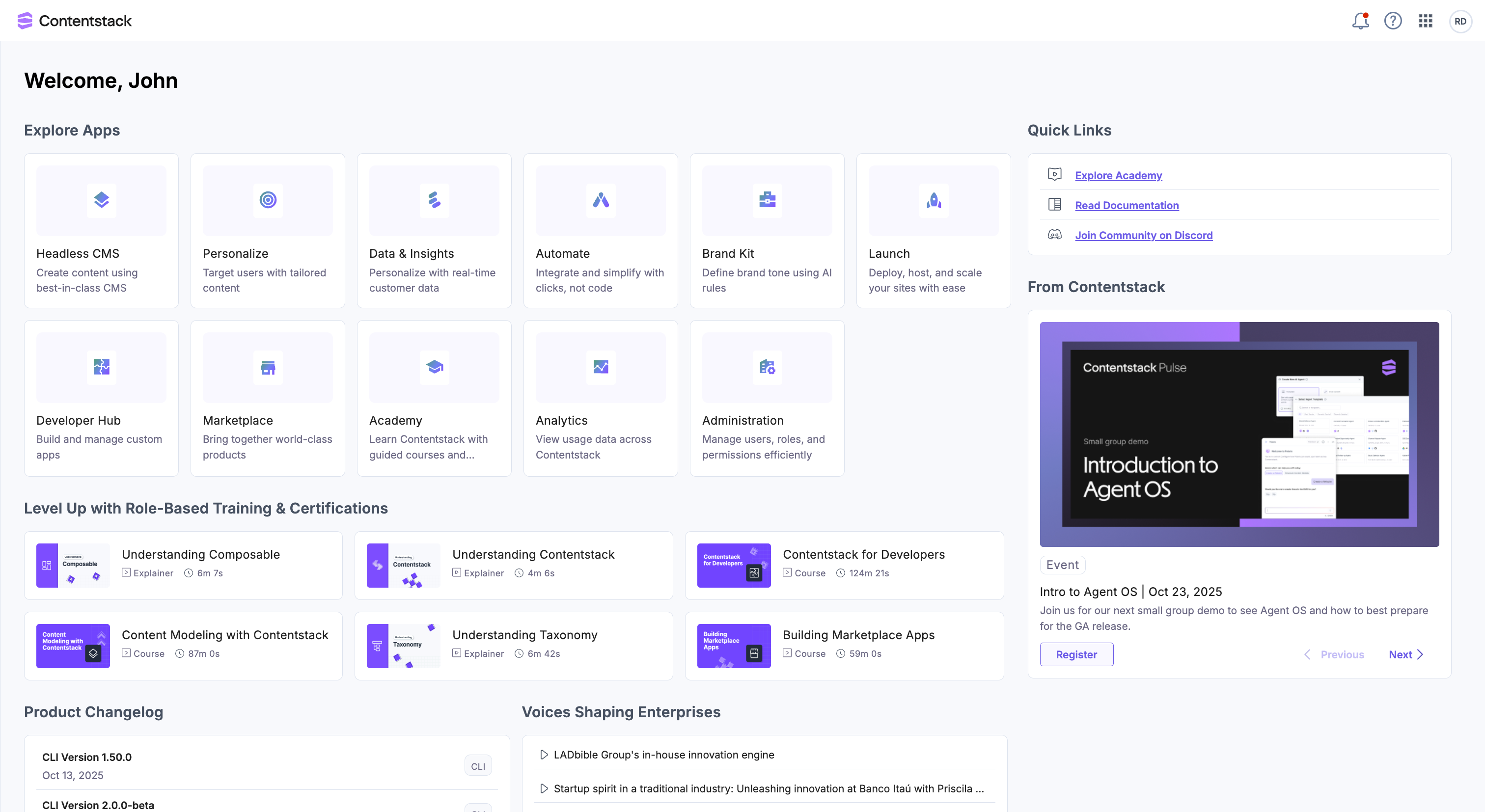
These enhancements are now generally available to all users.
Log in to Contentstack to explore the new look and feel today. For more information, refer to our documentation.
We’ve rolled out a series of powerful security enhancements to give you more control over your account and safeguard your Contentstack experience. From streamlined session management to smarter MFA workflows and proactive alerts, these updates are designed to keep your account more secure, without adding friction to your workflow.
Key Enhancements
These updates are part of our ongoing commitment to delivering a secure and seamless experience. Stay tuned, more improvements are on the way!
You can now manage entries directly from the Form panel in Visual Builder—without leaving the editing experience. In addition to editing fields, the Form panel now lets you import and export entries as JSON, rename entry versions, unlocalize localized entries, and delete entries.
These enhancements reduce context switching and make common entry management tasks faster and more intuitive. Content managers can import and export content, manage localization, and organize versions while viewing changes in real-time on the canvas.
For example, you can export an entry for reuse, import updated JSON to create a new version, or unlocalize an entry to revert to inherited content, all from the same panel.
To learn more, refer to the Visual Builder Form documentation, for detailed guidance on each entry management action.
You can now indent and outdent content in both the JSON Rich Text Editor and HTML-based Rich Text Editor, allowing you to visually offset paragraphs and headings with a click or keyboard shortcut (Tab and Shift + Tab).
This feature follows standard editor and accessibility behavior. The Indentation icon is added to the Rich Text Editor toolbar by default, including for existing content types.
For more information, refer to the Basic Formatting in JSON RTE and HTML-based Rich Text Editor documentation.
We’ve introduced an update that gives you more flexibility when duplicating entries in Contentstack. When copying an entry, you can now choose to copy only the current locale or all locales. If you copy the current locale from a non-master locale, Contentstack also includes its fallback content. This makes it easier to reuse content based on your workflow, whether you’re working in a single locale or duplicating content across all locales.
Learn more about Copy Localized Entries.
Stop wasting traffic on underperforming content. With Multi-Armed Bandit (MAB), Personalize now offers an automated way to manage your A/B test traffic.
Instead of manually monitoring tests or waiting weeks to declare a winner, MAB acts as an autopilot for your experiments. It detects which variant is driving the most conversions and automatically shifts more traffic to that winner, instantly.
With MAB, you can:
Note: MAB optimizes traffic flow, but it does not change your experiment’s conclusion rules. Test duration and winner declaration follow the same settings as your standard A/B Test experiences.
Learn more:
The Healthcheck app is now supported across all Contentstack regions, including AWS North America, AWS Europe, AWS Australia, Azure North America, Azure Europe, GCP North America, and GCP Europe, allowing you to install and use the app consistently.
If you need further assistance, contact us through the Support Portal.
To learn more, refer to the Healthcheck App Installation Guide.
Here’s an overview of the latest updates in Contentstack Launch:
Organization admins and owners can now manually unlock user accounts that have been locked due to excessive failed login attempts. This update allows for immediate account recovery directly from the Administration > Users tab, eliminating the need to contact support.
What’s New:
Note: The Unlock User option will not be available if the user is an org owner or belongs to multiple organizations, reach out to support to unlock your account.
This update empowers admins to resolve lockouts independently, ensuring secure and uninterrupted access for the entire team.
Read the Unlock Users document for more information.
We’ve introduced an update that makes navigating complex content structures more intuitive in Contentstack.
You can now mark any supported field inside a Modular Block or within a Global field marked as Multiple in a content type as its display title, making it easier to distinguish within the entry editor.
Learn more about Mark as Title.
We’ve introduced major enhancements to the Healthcheck app to improve usability and provide clearer, more actionable insights:
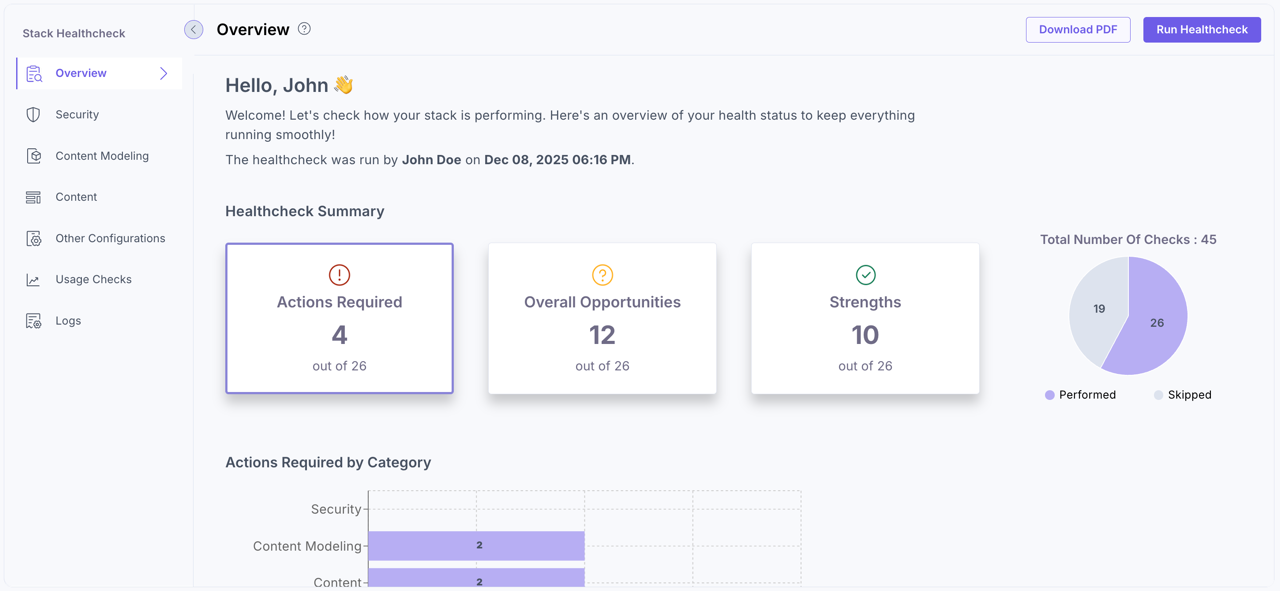
To learn more, refer to the Healthcheck App Installation Guide.
We’ve added new enhancements to the Brandfolder app:
To learn more, refer to the Brandfolder App Installation Guide.
Here’s an overview of the latest updates in Contentstack Launch:
You can now localize taxonomies and terms per locale, ensuring consistent structure across locales and branches. The new Taxonomy Localization feature allows you to display taxonomy terms in multiple languages without duplicating the hierarchy. Localizations can be applied to the entire taxonomy or specific terms directly from the Taxonomy Details page.
Each market can use localized labels for clarity, while administrators retain centralized control. Localization fallbacks ensure seamless behavior across branches and environments.
Key Benefits:
Learn how to enable and use this feature in our Taxonomy Localization documentation.
Note: Taxonomy Localization is a plan-based feature. Contact our support team to enable it for your organization. This feature is currently available for CMA use only. Publishing localized taxonomy names and terms to CDA is coming soon. You can begin preparing your localized structures now, but localized values will not appear in published content until publishing support is released.
Organization owners and admins can now reset Multi-Factor Authentication (MFA) for users—helping restore access when someone loses their authentication app or switches devices.
What’s New
Refer to Organization Users and Bulk Operations on Organization Users for more information.
Introducing Allowed Email Domains—a new security enhancement that gives organization owners and admins tighter control over who can be added to their organization. This feature lets you define which email domains are permitted, ensuring only trusted users gain access.
Key Highlights:
By implementing this feature, you reinforce your organization’s security posture and ensure that only authorized enterprise users are granted access, supporting a Zero Trust model from the very first step.
Ready to tighten your access controls? Head to Administration > Security Configuration to get started. Read our documentation for more information.
We’re introducing Advanced Settings in Developer Hub, a powerful new way for Apps to integrate with external APIs securely and efficiently, without the need for a custom backend. With this feature, developers can now store, manage, and inject sensitive credentials directly within Contentstack Apps, enabling seamless and secure integrations.
Key Capabilities:
You can now streamline and secure your app integrations using these new configuration options in Developer Hub:
Advanced Settings eliminates the need for custom backend systems by enabling developers to manage external API interactions entirely within Contentstack. It simplifies secure integration with services like AI models, analytics platforms, and third-party SaaS APIs.
Learn more about Advanced Settings and Build an App With Advanced Settings in Developer Hub.
As teams strive to deliver personalized digital experiences faster, traditional handoffs often slow them down. Studio is a visual experience builder that bridges the gap between design, development, and content composition. Studio integrates seamlessly with Contentstack’s CMS, empowering teams to compose dynamic experiences backed by structured content.
Key Highlights:
For example, a marketing user can update a homepage hero banner or create a campaign page using pre-approved components, all while maintaining design system guardrails and data integrity.
This results in faster iteration, reduced developer dependency, and consistent brand experiences.
Note: Studio is launching in Early Access and will be rolled out to customers in phases. Contact the support team to get access.
Read the Studio documentation to learn how to set up your first project, style components, and manage compositions
We’ve introduced the Bulk Export Entries feature to help teams manage large sets of content efficiently and maintain data consistency across the content lifecycle.
Key Benefits:
The Bulk Export Entries feature provides a structured and consistent way to handle multiple entries at once.
For more details, visit our documentation or contact our support team.
We’ve introduced new capabilities and enhancements to the Salesforce Commerce app:
To learn more, refer to the Salesforce Commerce App Installation Guide.