Use Cases
This capstone section ties together everything covered in the course by walking through six end-to-end implementation patterns that teams deploy most often on the Lytics platform. Each use case maps a business objective to the specific audiences, experiences, flows, exports, and measurement approaches needed to execute it. By the end of this section you will have a repeatable implementation template for unknown-to-known conversion, lead capture, lead nurture and conversion, customer suppression, server-side conversion event export, and personalized product recommendations.
Unknown to Known
Learning Objectives
By the end of this section, you will be able to:
- Design a strategy for converting anonymous visitors to identified users
- Implement identity collection touchpoints using forms, gated content, and progressive profiling
- Measure unknown-to-known conversion rates and track improvement over time
Unknown to Known
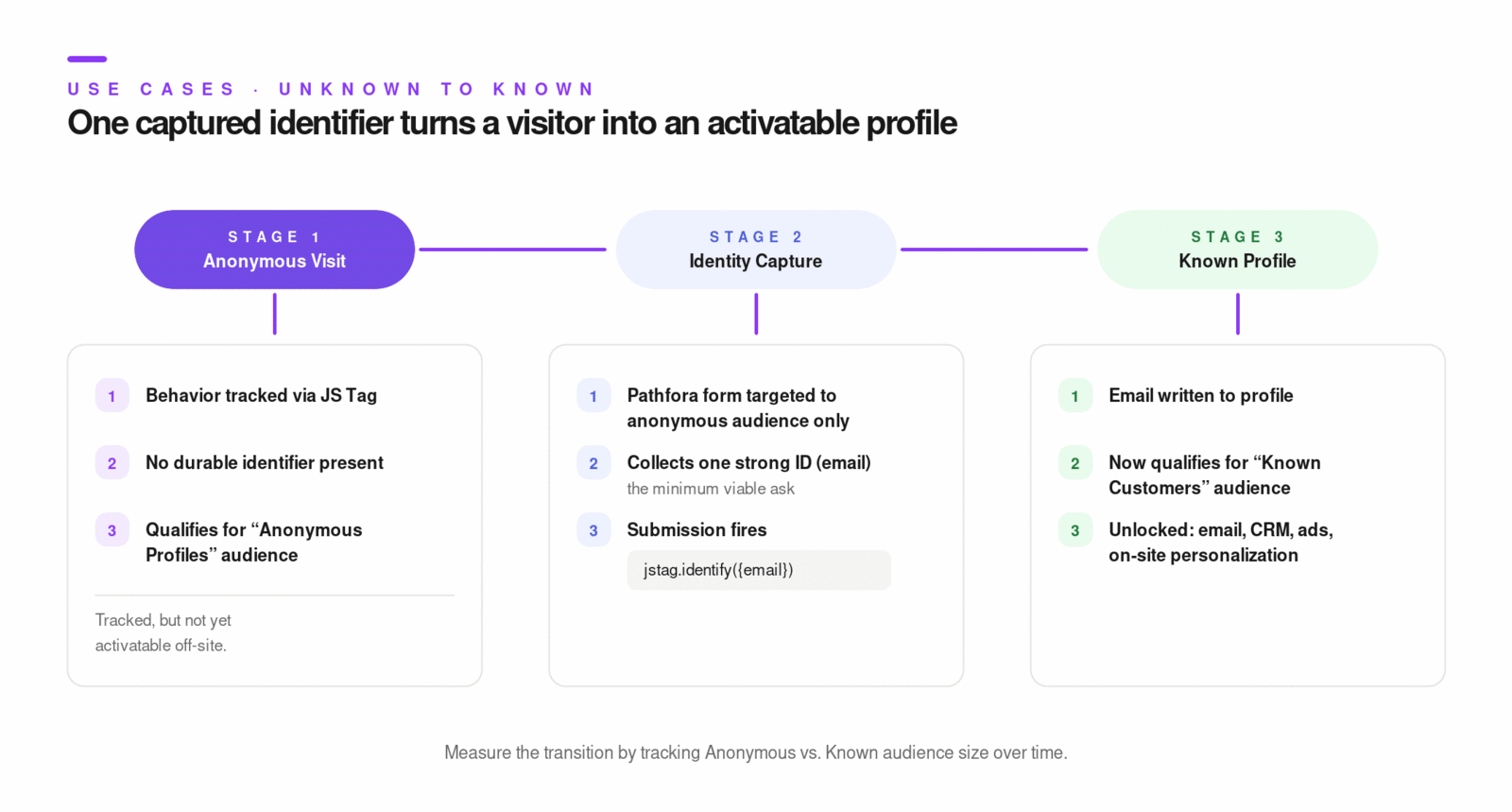
This use case turns anonymous web traffic into known profiles with strong identifiers (typically email), then uses that identity in downstream activation channels.
Core references:
Key Concepts
- Anonymous vs known profile state:
- anonymous: behavior tracked, no strong identifier,
- known: email or other durable ID present.
- Identity capture touchpoint: Pathfora form, inline form, registration flow, or backend event.
- Strong identifier strategy:
- collect minimum required ID first (email),
- progressively collect additional attributes later.
- Measurement pattern:
- audience size comparison of anonymous vs known,
- campaign impressions (
ly_impressions) and conversions (ly_conversions) for capture experiences.
Step-by-Step
- Verify JS Tag is installed and collecting events.
- Ensure required profile/audience fields are surfaced for web personalization use.
- Build or validate audiences for anonymous and known states.
- Launch identity-capture experience targeted to anonymous audience only.
- Submit known identifier into profile (via form submission and/or explicit identify call).
- Confirm profile transition from anonymous to known.
- Create reporting component comparing anonymous vs known audience trend over time.
Examples
// Explicit identity capture fallback in custom flow
jstag.identify({
  email: "[email protected]",
  first_name: "Casey",
});
// Pathfora lead capture targeted to anonymous audience
jstag.on("pathfora.publish.done", function () {
  var module = new pathfora.Form({
    id: "lead-capture-form",
    layout: "slideout",
    theme: "dark",
    headline: "Stay updated",
    msg: "Share your email for product updates",
    formElements: [{ type: "email", required: true, label: "Email", name: "email" }],
  });

  pathfora.initializeWidgets({
    target: [{ segment: "anonymous_profiles", widgets: [module] }],
  });
});
Diagrams & Screenshots
Summary
The unknown-to-known pattern begins with a clear distinction between anonymous and known profile states and a capture touchpoint — typically a Pathfora form — targeted exclusively to anonymous visitors. The identity signal collected (usually email) is written to the profile and triggers the transition to known status, unlocking that profile for all downstream activation channels that require a durable identifier.
Documentation Links
Capture Leads
Learning Objectives
By the end of this section, you will be able to:
- Design lead capture experiences tailored to visitor segments and page context
- Configure audience-targeted lead forms that appear to the right users at the right time
- Route captured leads to downstream systems such as CRM and marketing automation platforms
Capture Leads
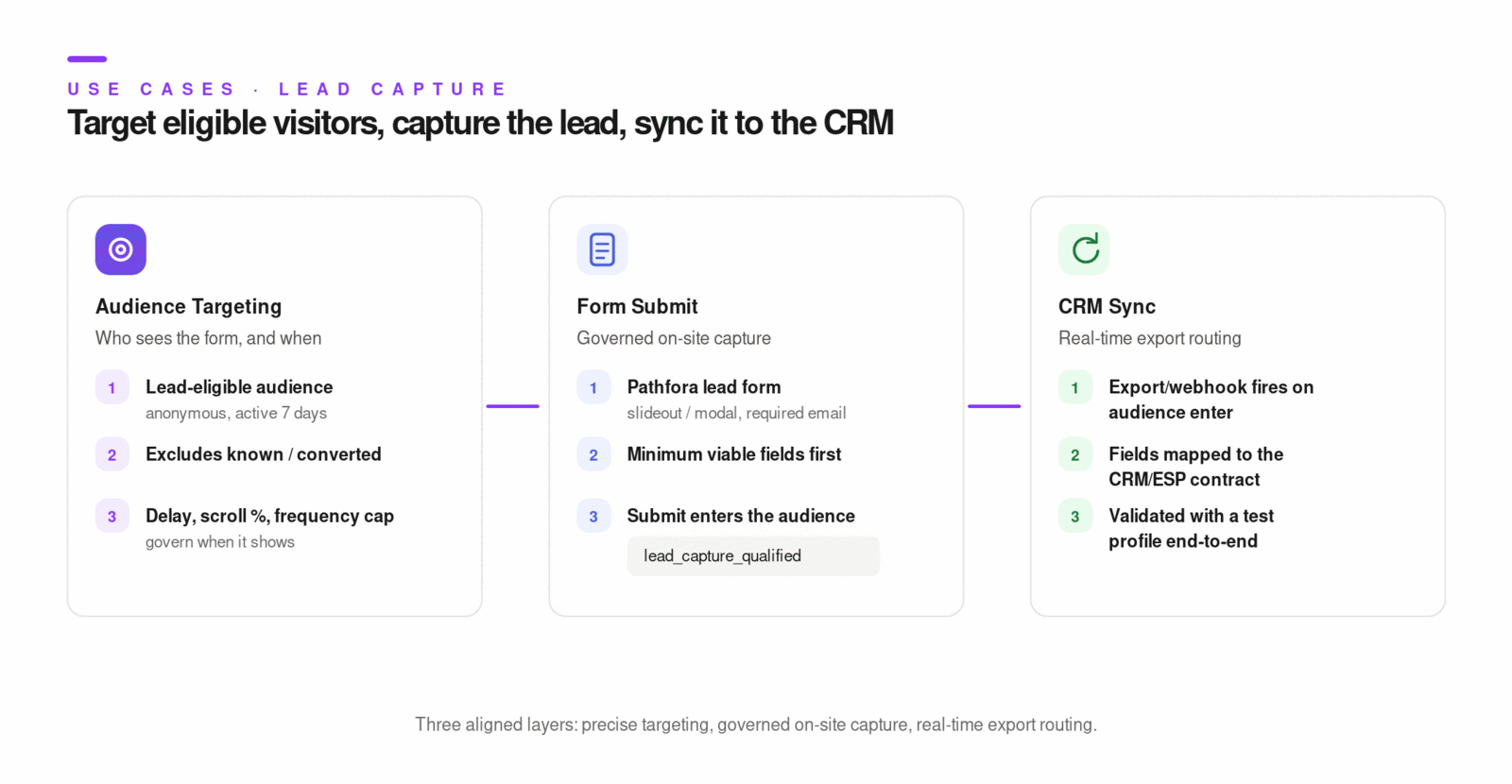
Lead capture builds on unknown-to-known by adding targeting controls, conversion-safe UX, and reliable downstream routing.
Key Concepts
- Audience-first lead capture:
- do not show lead form to users already known,
- tailor trigger by behavior and intent.
- Display governance:
- trigger timing (delay, scroll, pageviews, exit intent),
- frequency caps per session and lifetime.
- Form design:
- collect minimum viable data first,
- enforce required email where needed.
- Routing pattern:
- use export jobs or webhook audience triggers to sync captured leads to CRM/ESP in real time.
Step-by-Step
- Build a lead-eligible audience (example: anonymous users active in last 7 days).
- Build an exclusion audience for known or already-converted users.
- Configure Pathfora lead form:
- layout and copy,
- required fields,
- target audience,
- display conditions,
- frequency limits. - Configure downstream export:
- webhook or integration destination,
- field mapping,
- enter/exit trigger behavior,
- optional backfill. - Validate end-to-end with test profile:
- form shows for eligible profile,
- submission updates profile,
- export event arrives downstream.
Examples
Lead capture trigger policy example:
- Show on blog pages only
- Show after 20 seconds OR 50% scroll
- Max 1 time per session
- Hide permanently after successful submit
{
  "id": "15761203643149024539",
  "data": {
    "email": "[email protected]",
    "segment_events": [
      { "event": "enter", "slug": "lead_capture_qualified" }
    ]
  }
}
Diagrams & Screenshots
Summary
Effective lead capture requires three aligned layers: an audience that precisely identifies who should see the form (excluding already-known users), a Pathfora experience configured with intent-aligned triggers and frequency governance, and a downstream export job that routes captured leads to the CRM or ESP in real time. Validating the full pipeline with a test profile before launch confirms each layer is functioning correctly.
Documentation Links
Convert Lead
Learning Objectives
By the end of this section, you will be able to:
- Design lead nurturing flows that guide prospects toward conversion
- Create targeted on-site experiences for known leads based on engagement and intent signals
- Measure lead conversion effectiveness and optimize the funnel
Convert Lead
This use case connects audience progression, flow orchestration, and on-site/off-site actions to move known leads to conversion.
Key Concepts
- Nurture orchestration: Flows coordinate trigger, wait, split, and export actions.
- Behavior-based progression: users move by audience/state changes rather than fixed one-size-fits-all sequencing.
- Conversion event definition: conversion should be an explicit audience condition (purchase, demo booked, MQL threshold reached).
- Mutual exclusion logic: converted users should be removed from acquisition-stage messaging paths.
Step-by-Step
- Define lead lifecycle audiences:
- new lead,
- marketing-qualified lead,
- sales-qualified,
- converted customer. - Build a flow triggered by lead-entry audience.
- Add nurture sequence:
- wait step(s),
- conditional split(s) by profile attributes or engagement,
- export step(s) to email/CRM/ads. - Add suppression or exit branch for converted users.
- Optionally add Pathfora experience for high-intent known leads on key pages.
- Track stage conversion with audience movement and experience/flow metrics.
Examples
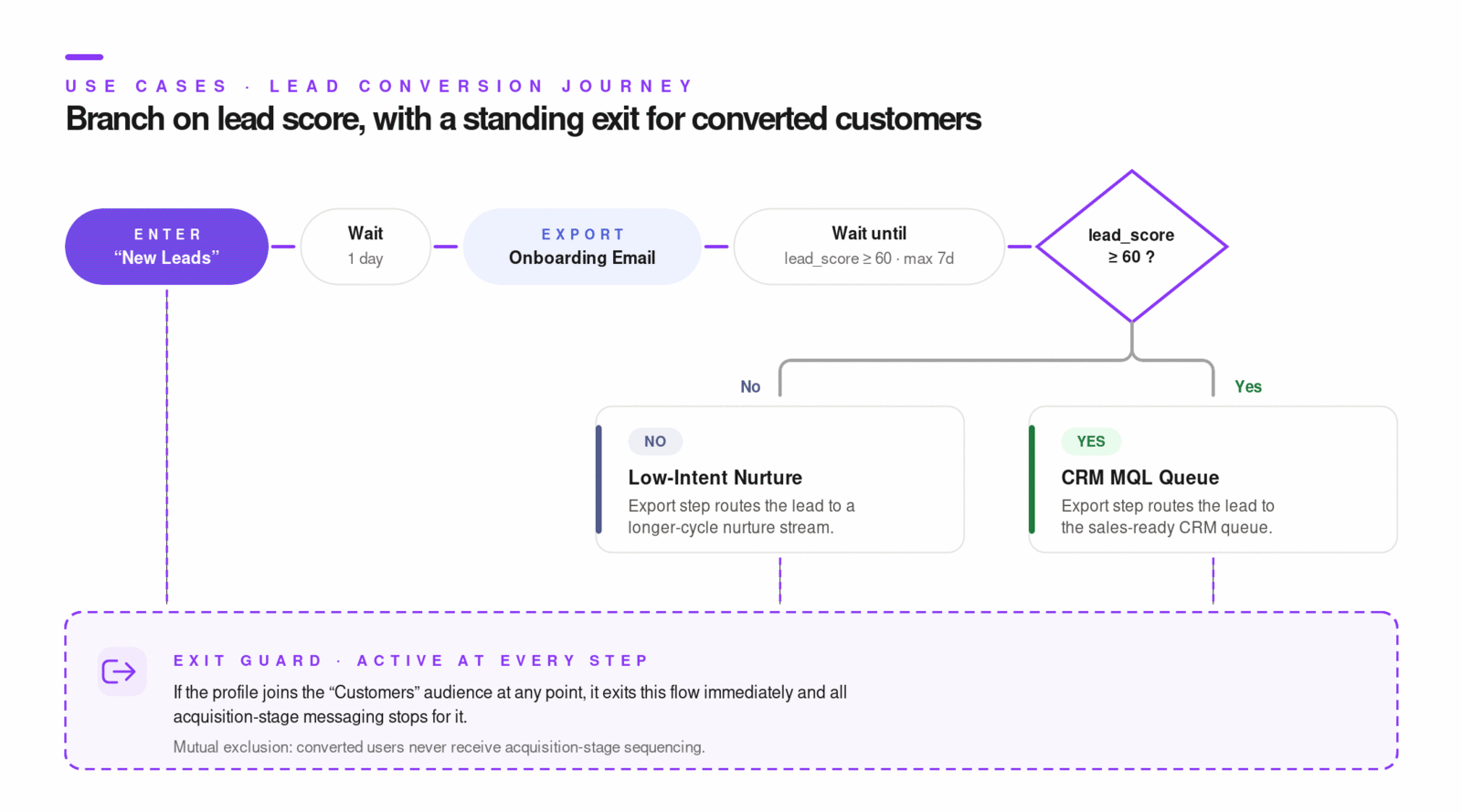
Lead nurture flow pattern:
Trigger: Added to "new_leads"
-> Wait: 1 day
-> Export: onboarding email
-> Wait until lead_score >= 60 (max 7 days)
-> Split: lead_score >= 60?
   Yes -> Export to CRM MQL queue
   No  -> Export to low-intent nurture stream
-> Exit if user joins "customers"
// Refresh profile and campaign eligibility on SPA route changes
router.onRouteChange(function () {
  jstag.pageView();
  jstag.loadEntity();
});
Diagrams & Screenshots
Summary
Lead conversion orchestration depends on four well-defined lifecycle audiences (new lead, MQL, SQL, converted customer), a flow that routes profiles through nurture steps and splits on behavioral signals like lead score, and a clear exit condition that removes converted users from acquisition messaging. Adding a Pathfora experience for high-intent known visitors on key conversion pages closes the on-site channel alongside the off-site email and CRM touchpoints.
Documentation Links
Suppress Existing Customer
Learning Objectives
By the end of this section, you will be able to:
- Build suppression audiences for existing customers using profile attributes and behaviors
- Configure exclusion rules in advertising and marketing destinations
- Validate that suppression is working correctly by testing audience membership and exports
Suppress Existing Customer
Suppression protects budget and customer experience by excluding people who have already converted or should not receive acquisition messaging.
Key Concepts
- Suppression audience: explicit audience for existing customers (example: purchase exists).
- Acquisition audience: include prospect criteria and exclude suppression audience.
- Goal-level suppression rule:
- suppression can be safely applied at overall audience level,
- avoid exclusions that break downstream conversion-stage logic.
- Destination parity: suppression must be consistent across all acquisition channels.
Step-by-Step
- Define
existing_customersaudience (purchase/order/subscription criteria). - Define acquisition audience as prospects excluding existing customers.
- Apply acquisition audience to all paid or outreach destinations.
- For server-side destinations, configure enter/exit trigger exports so suppression updates propagate quickly.
- Test with known customer and known prospect profiles.
- Monitor audience size drift and destination sync health.
Examples
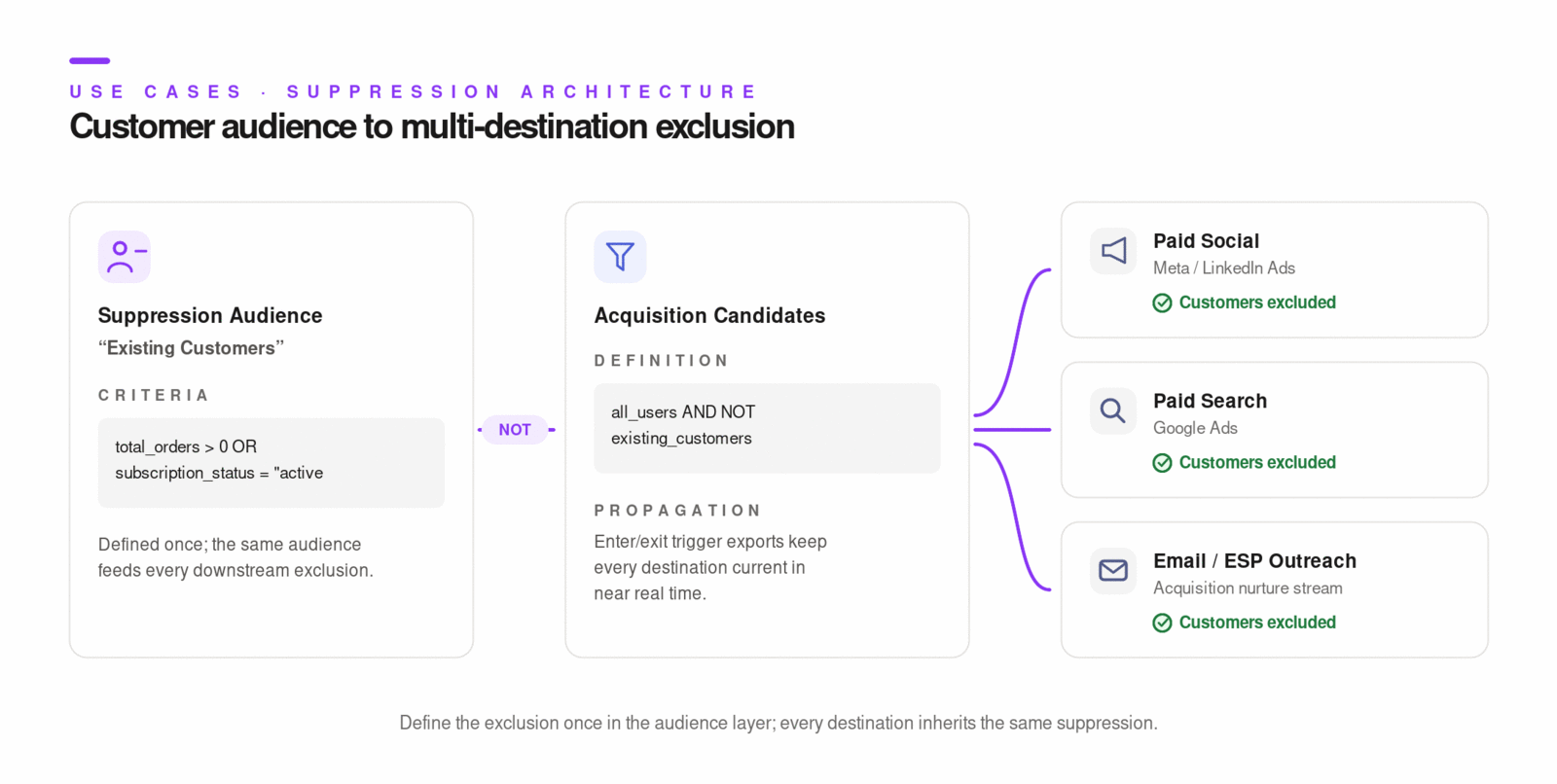
Audience pattern:
- existing_customers: total_orders > 0 OR subscription_status = "active"
- acquisition_candidates: all_users AND NOT existing_customers
Validation checks:
- Known customer appears in suppression audience
- Known customer does not appear in acquisition audience
- Destination receives expected exit/remove event for customer profile
Diagrams & Screenshots
Summary
Customer suppression is an audience-first approach: define existing customers precisely, build acquisition audiences that exclude them explicitly, and apply that exclusion consistently across every paid and outreach destination. Enter/exit trigger exports ensure suppression propagates to destinations in near real time when a prospect converts, protecting both budget and customer experience.
Documentation Links
Conversion API
Learning Objectives
By the end of this section, you will be able to:
- Use the Conversion API for offline and server-side event tracking
- Structure conversion events correctly with required fields and proper formatting
- Validate that conversions are attributed to the correct user profiles
Conversion API
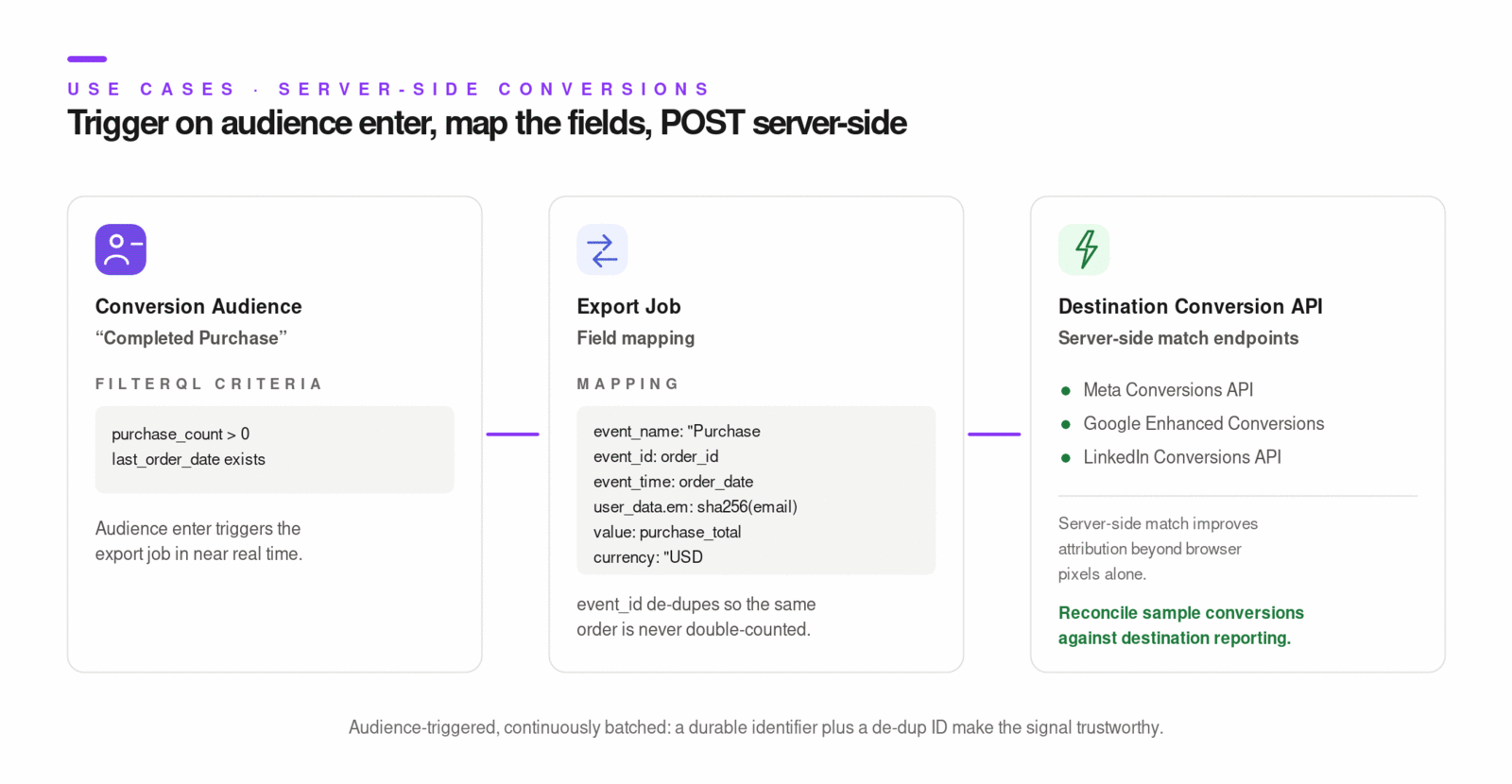
This pattern has two layers:
- capture conversion intent in Lytics profile/events,
- export server-side conversion events to destination conversion APIs (Meta, Google, LinkedIn, etc.).
Key Concepts
- Server-side conversion sync improves matching and measurement reliability.
- Identity fields are mandatory (email/phone and/or platform IDs depending on destination).
- De-duplication fields like event ID/order ID are critical for clean attribution.
- Trigger model:
- most conversion API exports are audience-triggered,
- many run continuously in batched near-real-time cycles.
Step-by-Step
- Define conversion audience in Lytics (example: completed purchase or offline close).
- Ensure required identifiers are present and normalized on profile.
- Configure destination conversion API export job (Meta/Google/LinkedIn).
- Map required fields:
- event name/type,
- timestamp,
- user identifiers,
- currency/value where applicable,
- de-dup/event ID when supported. - Choose trigger events (enter, exit, or both) and optional existing-user backfill.
- Start job and validate destination-side acceptance.
- Reconcile sample user conversions between Lytics and destination reporting.
Examples
// Capture conversion signal into Lytics from web app
jstag.send({
  event: "conversion",
  campaign_id: "spring_offer",
  variation_id: "variant_a",
  currency: "USD",
  value: 25.99,
});
[
  {
    "event_name": "Purchase",
    "event_id": "sample-event-id",
    "event_time": 1654729272,
    "user_data": {
      "em": "<sha256-email>"
    },
    "custom_data": {
      "currency": "USD",
      "value": 123
    }
  }
]
Diagrams & Screenshots
Summary
Server-side conversion event export provides ad platforms with a richer, more reliable signal than browser-side pixels alone. The pattern requires a well-defined conversion audience in Lytics, normalized identity fields on profiles, and correctly mapped export jobs that include event name, timestamp, user identifiers, and de-duplication IDs. Validating destination-side acceptance and reconciling sample conversions confirms the pipeline is working before scaling.
Documentation Links
Product Recommendation
Learning Objectives
By the end of this section, you will be able to:
- Configure product and content recommendation strategies within the platform
- Deliver personalized recommendations via Pathfora experiences or the API
- Measure recommendation engagement and conversion to evaluate effectiveness
Product Recommendation
This use case delivers content or product suggestions personalized to each user's affinity profile.
Key references:
Key Concepts
- Prerequisite pipeline:
- content must be classified,
- topic graph and affinities need enough processing time (commonly 24-48 hours after setup).
- Collection-scoped recommendations:
- use content collections to control recommendation corpus,
- API uses
contentsegmentas collection selector. - Delivery methods:
- Lytics Experience in UI,
- Pathfora recommend widget,
- JS Tag recommend plugin,
- direct recommendation API.
- Quality control:
- audience-to-collection affinity alignment should be moderate/high.
Step-by-Step
- Verify classification coverage and interest signals exist on profiles.
- Select or create content collection for recommendation scope.
- Choose delivery surface:
- modal/slideout recommendation,
- inline recommendation blocks,
- custom API-powered placement. - Configure audience targeting and page placement rules.
- Launch and validate recommendation response quality.
- Measure clicks and downstream conversion behavior.
- Iterate on collection scope, ranking, and placement.
Examples
// JS Tag recommendation request
jstag.recommend(
  {
    collection: "all_content",
    limit: 3,
    visited: true,
    shuffle: false,
  },
  function (items) {
    console.log("recommendations", items);
  }
);
// Pathfora recommendation widget snippet
var module = new pathfora.Message({
  id: "content-rec-sample",
  layout: "slideout",
  headline: "Recommended for you",
  recommend: { collection: "all_content" },
  variant: 3,
});

pathfora.initializeWidgets({
  target: [{ segment: "all", widgets: [module] }],
});
API endpoint pattern:
GET /api/content/recommend/{cid}/user/{fieldName}/{fieldVal}?contentsegment={collection_id}&limit=3
Diagrams & Screenshots

Summary
Personalized recommendations depend on a functioning content classification pipeline and sufficient affinity signal on profiles before delivery quality is meaningful. Once the prerequisite pipeline is in place, you scope recommendations via content collections, choose a delivery surface (Lytics Experience UI, Pathfora widget, JS Tag plugin, or direct API), and measure engagement to iterate on collection scope and placement. Audience-to-collection affinity alignment is the primary quality lever.
Documentation Links
What You've Learned
This section brought together the full Lytics platform across six end-to-end use cases. Unknown-to-known and lead capture establish the identity foundation that makes everything else possible. Lead conversion and customer suppression apply that identity data to lifecycle orchestration and budget protection. Conversion API export closes the measurement loop by feeding high-fidelity signals back to ad platforms. Product recommendations put content affinity scores to work as a direct personalization surface. Each pattern is a repeatable template — the specific audiences, experiences, flows, and exports change per client, but the structural logic is consistent across implementations.
Key Terms
📘 Unknown Profile — A Lytics profile for a visitor who has been tracked behaviorally but has no strong identifier (such as email) present. Can be targeted for identity capture but cannot be activated in most off-site channels.
📘 Known Profile — A Lytics profile that has at least one durable identifier (typically email) present. Eligible for activation across all channels including email, CRM, and paid media.
📘 Identity Capture Touchpoint — A mechanism through which a visitor's identifier is collected and written to their profile: a Pathfora form, a registration flow, a backend identify call, or an imported CRM record.
📘 Suppression Audience — An audience representing users who should be excluded from acquisition messaging — typically existing customers or recently converted leads.
📘 Conversion API — A server-side integration pattern in which Lytics exports conversion events directly to ad platform APIs (Meta, Google, LinkedIn), bypassing browser-side pixel limitations to improve match rates and attribution accuracy.
📘 Content Collection — A curated subset of classified content items used to scope recommendation responses. Collections control the corpus from which the recommendation engine selects items for a given user.
📘 Lead Score — A profile attribute that quantifies a lead's readiness to convert, typically computed from engagement frequency, recency, and depth. Used as a conditional split criterion in lead nurture flows.
