Tag
The Lytics JavaScript tag is the primary mechanism for collecting behavioral data from your website and surfacing profile data back to the browser for personalization. Getting the tag right — from initial installation through consent handling, cookie configuration, and identity stitching — determines the quality of the data that flows into every downstream process. This section covers what the tag does, how to customize it for your event taxonomy, how to work with the SDK programmatically, and how to configure consent and identity behavior correctly.
What is the Tag
Learning Objectives
By the end of this section, you will be able to:
- Explain what the Lytics tag does and how it differs from the broader SDK
- Understand how the tag collects behavioral data from web pages
- Verify that the tag is correctly installed and firing on your site
What Is the Tag
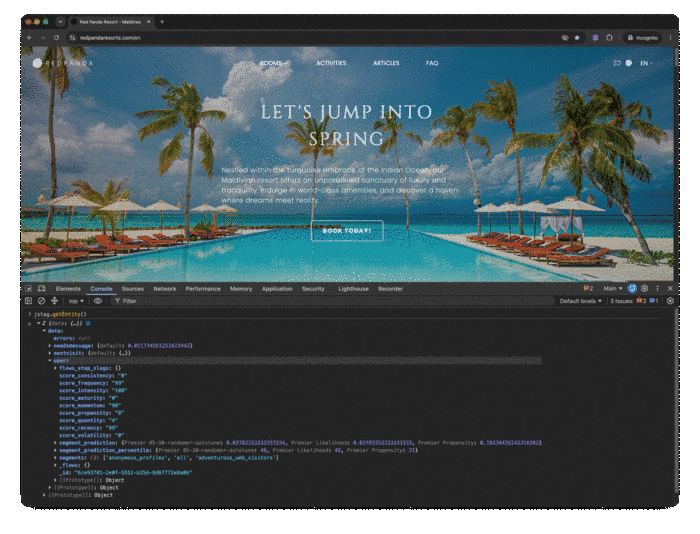
The Lytics JavaScript tag (jstag) is your web collection runtime. It runs in the browser, creates or reads the visitor _uid, sends behavioral events to Lytics, and can load profile data back into the page for audience-aware personalization. The profile payload returned to the browser for the current visitor — called the entity — includes audience membership (segments) by default and can include additional surfaced profile fields.
The distinction that matters in implementation:
- The tag snippet loads and initializes jstag on your site.
- The SDK runtime is the executable jstag API surface (send, pageView, loadEntity, entityReady, getid, and related methods).
By default, the tag sends page-level and browser-level context, including fields like _e (event type), url, _ref, _uid, _ts, _device, _nmob, and _v (tag version). You then add your own event payloads on top of this baseline.
Key Concepts
- Automatic collection baseline: Initial pageview and page metadata are captured once the tag is initialized.
- Event stream output: jstag.send() pushes custom behavioral payloads into your configured stream.
- Asynchronous profile loading: Entity/profile access happens asynchronously and should use callbacks or listeners.
- Verification modes: Use both UI verification and browser checks.
Step-by-Step
- Install the Lytics tag snippet from the Lytics app for your account CID.
- Load a tagged page and confirm no JavaScript initialization errors in console.
- In console, run jstag.config.version to verify the runtime is present.
- Trigger a test event:
jstag.send({ event: "academy_tag_install_test" });
- In Network tools, confirm outbound collection requests to the Lytics endpoint.
- In Lytics, validate that stream/event data arrives for the test payload.
Examples
// Basic event collection
jstag.send({
  event: "cta_click",
  cta_name: "request_demo",
  page_type: "pricing"
});
// Manual pageview when needed (for route-based tracking patterns)
jstag.pageView();
Diagrams & Screenshots

Summary
The Lytics tag (jstag) is a browser-side runtime that collects behavioral events and returns profile data for personalization. The tag snippet loads the SDK, which exposes the full jstag API for sending events, managing identity, and loading the entity payload. Verification requires both browser developer tools (console and network inspection) and confirmation that data arrives in the Lytics event stream.
Documentation Links
Customizations
Learning Objectives
By the end of this section, you will be able to:
- Configure custom events to capture business-specific user interactions
- Integrate the Lytics tag with data layers (e.g., Google Tag Manager data layer)
- Customize tag behavior including event filtering, field mapping, and conditional loading
Customizations
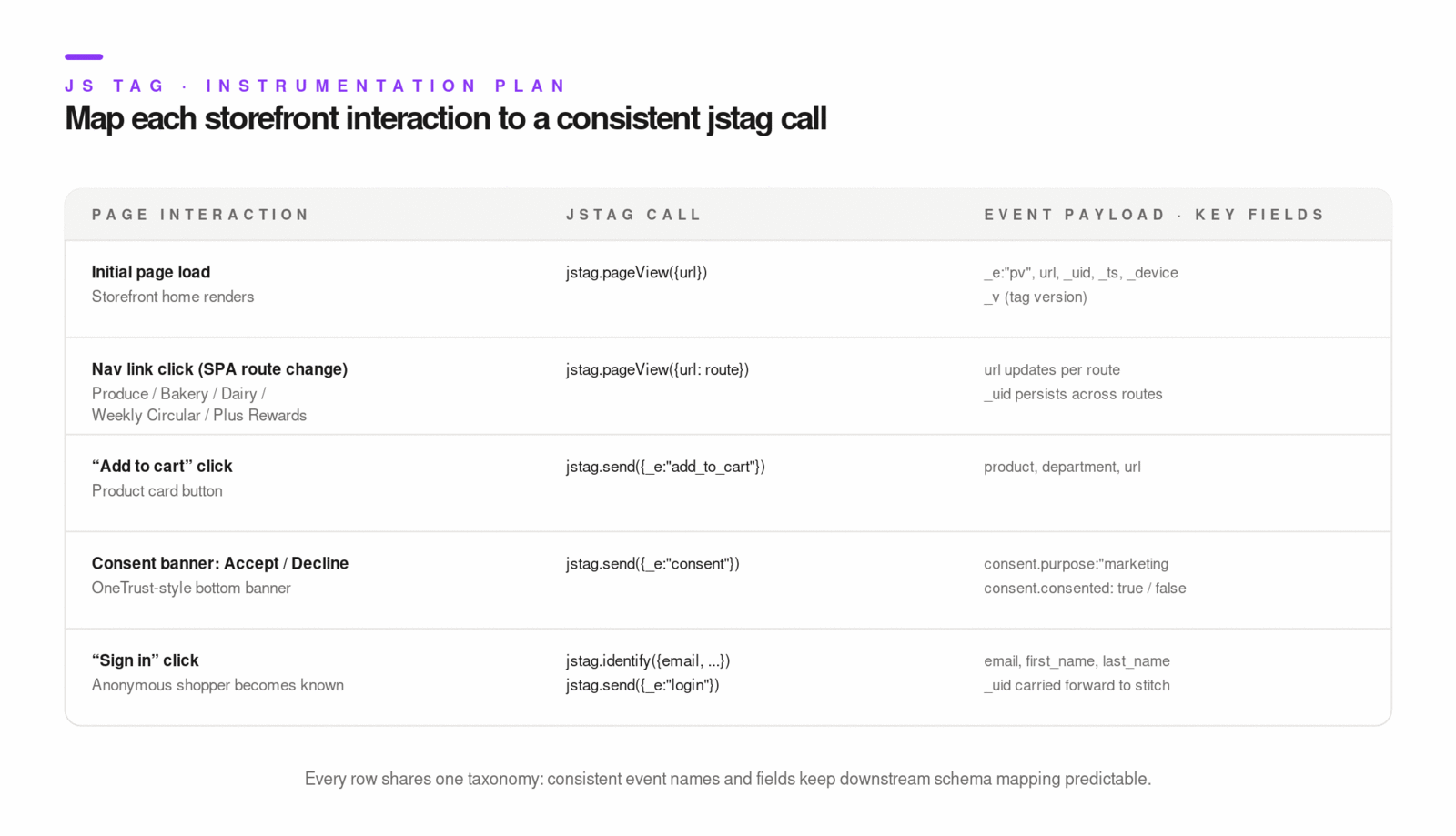
A production tag implementation should not stop at default pageview collection. You should explicitly capture high-value behaviors (product views, form starts, submits, purchases, trials, churn signals) and normalize naming so downstream schema mapping is predictable.
The runtime and account settings support several customization points:
- Runtime config such as stream, loadid, qsargs, cookie, sessecs, and entity lookup options.
- Account-level options for custom data layer variables and custom cookie keys to auto-collect.
- Entity callbacks to push Lytics audience data into external tools (for example, GTM dataLayer pushes).
Key Concepts
- Stream strategy: Use explicit stream names when separating domains or source systems.
- Query parameter forwarding: qsargs allows deterministic pass-through of selected URL params.
- Data layer ingestion: You can merge site/app data layer values into Lytics payloads for richer events.
- Downstream sync hooks: Audience membership can be pushed into tools through entityReady callbacks.
Step-by-Step
- Define an event taxonomy (event names and required fields) before coding.
- Configure default stream behavior in jstag.init when needed.
- Add explicit jstag.send() calls at important interaction points.
- Add selected query params to qsargs if campaign/attribution context is needed.
- If using GTM, push entity audiences into window.dataLayer using an entityReady callback.
- Validate in browser network + data layer inspection + downstream tool preview mode.
Examples
jstag.init({
  cid: "YOUR_CID",
  stream: "web_behavior",
  loadid: true,
  qsargs: ["utm_source", "utm_medium", "utm_campaign"]
});
// Custom conversion event with business context
jstag.send({
  event: "subscription_started",
  plan: "pro",
  billing_cycle: "annual",
  value: 299.00,
  currency: "USD"
});
// Push Lytics audiences into GTM dataLayer
jstag.entityReady((_, entity) => {
  const segments = entity?.data?.user?.segments || [];
  window.dataLayer = window.dataLayer || [];
  window.dataLayer.push({
    event: "set_lytics_audiences",
    lytics_audiences: segments.join(",")
  });
});
Diagrams & Screenshots
Summary
A production tag implementation goes beyond default pageview collection by instrumenting high-value user interactions with explicit jstag.send() calls and a defined event taxonomy. Runtime configuration options control stream routing, query parameter forwarding, and entity lookup behavior. Entity callbacks bridge Lytics audience data into external tools like GTM, enabling downstream targeting without requiring separate integrations.
Documentation Links
Working with SDK
Learning Objectives
By the end of this section, you will be able to:
- Use SDK methods programmatically to send events, identify users, and retrieve profile data
- Implement advanced data collection patterns such as SPA tracking and dynamic event properties
- Handle SDK lifecycle events including initialization, readiness callbacks, and error handling
Working with SDK
The JS SDK is asynchronous and event-driven. Treat entity access and identifier access as async operations, and keep page-level collection separate from profile reload behavior.
Core method groups you will use most:
- Collection: send, identify, page, pageView
- Identity utility: getid, setid
- Profile/entity: loadEntity, entityReady, getEntity, unloadEntity
- Execution control: blocked + unblock workflow when you need delayed dispatch
Key Concepts
- identify is a semantic alias of send: use it when the payload is identity-focused.
- entityReady is passive: it listens for entity loads; it does not trigger load itself.
- loadEntity is explicit: call it when route changes or context changes require profile refresh.
- SPA pattern: call pageView() on route changes and loadEntity() when personalization state must refresh.
Step-by-Step
- Initialize jstag with your account CID and required options.
- Register entityReady once in app bootstrap code.
- Instrument user interactions with send and identity updates with identify.
- In SPAs, hook your router to call pageView() after each route render.
- Call loadEntity() when route context changes affect targeting or experiences.
- Avoid getEntity() unless you are sure entity has already loaded (inside entityReady is safe).
Examples
jstag.entityReady((_, entity) => {
  const segments = entity.data?.user?.segments || [];
  console.log("Current Lytics segments", segments);
});
// SPA route handler example
function onRouteChange(route) {
  jstag.pageView({ route });
  jstag.loadEntity({ route });
}
// Identity-focused send
jstag.identify({
  email: "[email protected]",
  customer_id: "cust_12345",
  event: "user_identified"
});
Diagrams & Screenshots
Summary
The JS SDK is asynchronous throughout — entity access, identifier retrieval, and profile loading all operate via callbacks and listeners rather than synchronous returns. The four core method groups (collection, identity utility, profile/entity, and execution control) cover the full range of implementation needs from basic event sending to SPA route tracking. Register entityReady once at bootstrap, use loadEntity explicitly when personalization context changes, and avoid getEntity outside of confirmed entity-ready contexts.
Documentation Links
Consent Management
Learning Objectives
By the end of this section, you will be able to:
- Integrate consent state collection into tag and SDK events
- Apply opt-in and opt-out behavior so data collection honors user preferences
- Design consent data structures that support enforceable segmentation rules
Consent Management
Consent in Lytics is both a collection concern and an activation concern. You need to capture consent events with enough context to enforce policy in segmentation and downstream export filters.
Recommended consent payload components:
- consented status (true/false)
- purpose or consent type
- optional context (location, documents, source form, timestamp context)
From the SDK side, jstag includes consent controls (optIn, optOut) and an internal consent-blocking model. The source also includes OneTrust consent integration (onetrust.consent) that can block/allow sends based on accepted categories.
Key Concepts
- Granular consent model: design per-purpose consent, not one global boolean for all activation.
- Profile materialization: map consent fields into schema with merge behavior that preserves the latest state.
- Enforcement path: use consent audiences + global job segment filters to prevent restricted exports.
- Runtime controls: opt-out should stop sends and clear tag cookies.
Step-by-Step
- Define your consent taxonomy (purpose names, accepted/denied states, and context fields).
- Instrument explicit consent events from forms/CMP callbacks using jstag.send.
- Map consent events into profile fields in Schema (usually map fields with merge rules).
- Build building-block audiences (for example, has_marketing_consent, no_marketing_consent).
- Apply consent exclusion filters to destination jobs so restricted profiles are not activated.
- If using OneTrust, configure accepted categories and test both accept/deny paths.
Examples
jstag.send({
  event: "consent_update",
  consent: {
    purpose: "email_marketing",
    consented: true,
    documents: ["terms_v2026_01"],
    location: "US"
  }
});
// OneTrust-aware pseudocode pattern
// on accept: jstag.optIn()
// on deny: jstag.optOut()
Summary
Consent management in Lytics spans collection, schema, segmentation, and activation. Capture consent events with purpose, status, and context fields, map them into profile schema with appropriate merge behavior, build consent-state audiences to reflect current opt-in status, and apply those audiences as exclusion filters on destination export jobs. The optIn and optOut SDK controls handle runtime enforcement, and OneTrust integration provides a CMP-native path for accepting or blocking collection based on consent categories.
Documentation Links
Custom Cookie Settings
Learning Objectives
By the end of this section, you will be able to:
- Configure cookie-related SDK settings for identity and session handling
- Understand session TTL and cookie key behavior in jstag v3
- Validate cookie behavior across domains and browsers
Custom Cookie Settings
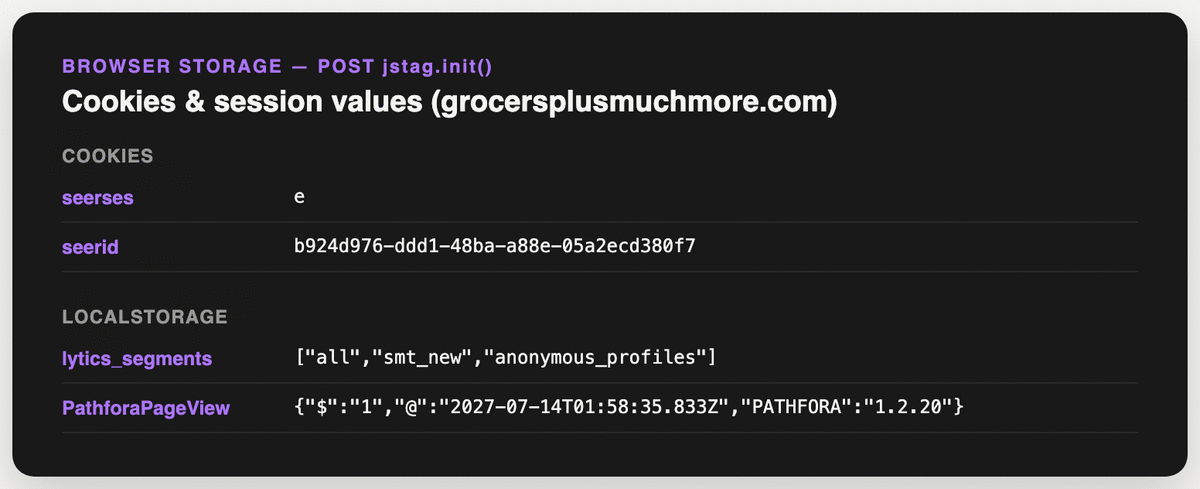
Cookie behavior directly affects profile continuity and session logic. In jstag configuration, the key cookie settings are:
- cookie (default seerid): stores _uid
- sesname (default seerses): session cookie name
- sessecs (default 1800): session cookie TTL in seconds
Account settings also provide:
- Custom Cookie Keys: additional cookie names that the SDK should automatically collect.
- Related client-side integration toggles that rely on runtime IDs and audience sync behavior.
Key Concepts
- _uid persistence: stable cookie behavior is foundational to anonymous profile continuity.
- Session boundary: sessecs controls when a new session starts after inactivity.
- Collection vs control: collecting custom cookies is separate from changing the core _uid cookie.
- Troubleshooting primitive: getCookie, setCookie, deleteCookie, clearCookies are available for debugging.
Step-by-Step
- Start with default cookie settings unless you have a clear domain or governance requirement.
- If needed, set custom names for cookie and sesname in jstag.init.
- Set sessecs to match your measurement/session strategy.
- Configure any additional auto-collected cookie keys in account settings.
- Validate in browser storage tools across navigation, inactivity windows, and subdomains.
- Confirm downstream identity continuity after deployment.
Examples
jstag.init({
  cid: "YOUR_CID",
  cookie: "my_uid_cookie",
  sesname: "my_session_cookie",
  sessecs: 1800
});
// Debugging utilities
console.log(jstag.getCookie("my_uid_cookie"));
jstag.setCookie("academy_test", "true", 300);
jstag.deleteCookie("academy_test");
Diagrams & Screenshots
Summary
Cookie configuration in jstag controls the names and TTLs of the _uid and session cookies that underpin anonymous profile continuity and session boundary detection. Default settings work for most implementations, but custom domain requirements or governance policies may require renaming cookies or adjusting session TTL. Validate cookie behavior in browser storage tools across navigation patterns and subdomain boundaries, and confirm that identity continuity holds in the downstream profile data before considering the deployment complete.
Documentation Links
ID Resolution Considerations
Learning Objectives
By the end of this section, you will be able to:
- Explain how tag-collected identifiers feed the Lytics identity graph
- Use loadid, _uid, and custom identity fields appropriately for profile stitching
- Avoid common over-merge and identity-conflict pitfalls in tag-based implementations
ID Resolution Considerations
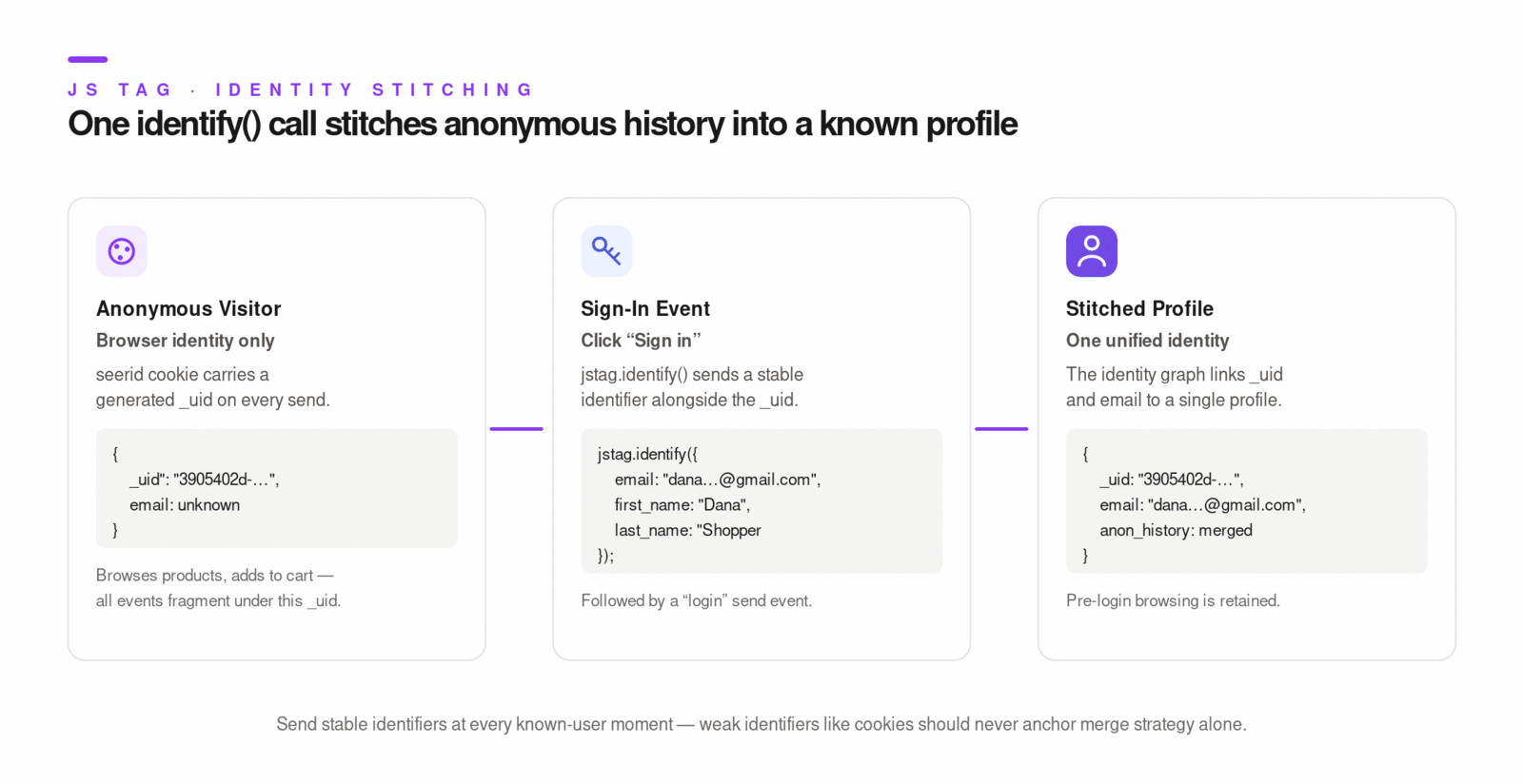
The tag contributes identity evidence on every send. At minimum, it contributes browser identity (_uid). As more identifiers are sent (email, login ID, CRM ID), Lytics can stitch fragments into richer unified profiles. An identity fragment — a unit of profile evidence associated with one identity key/value pair — is created or updated each time the tag sends an event carrying a recognized identifier. Fragments are connected when events carry multiple identifiers together.
The most important implementation decisions are:
- Whether to enable loadid for broader cross-domain/cross-context linking.
- Which custom identifier fields you send during known-user moments.
- Whether to configure entity lookup with entity.byFieldKey / entity.byFieldValue when authenticated identity should drive profile retrieval.
Key Concepts
- Identifier strength and ranking: strong identifiers (for example, stable customer IDs or verified email keys) should anchor strategy; weak identifiers (cookies) should not dominate merge decisions.
- Known-user transitions: login/signup events should include stable IDs to link anonymous and known behavior.
- Override caution: setid and custom entity lookup are advanced tools; misuse can fragment or over-merge profiles.
- Schema alignment: identifier fields must be mapped and governed in schema and identity rules.
Step-by-Step
- Define your identity key hierarchy before deployment (cookie, email, customer ID, device IDs).
- Ensure anonymous traffic consistently carries _uid from tag sends.
- On authentication events, send stable first-party identifiers with the same event.
- If needed, configure entity lookup by known ID for authenticated experiences.
- Review identity behavior in Identity tooling and merge statistics.
- Adjust identity ranks/rules in schema strategy before scaling campaigns.
Examples
// Known-user bridge event after login
jstag.send({
  event: "login_success",
  customer_id: "cust_12345",
  email: "[email protected]"
});
// Entity lookup by custom profile field (advanced usage)
jstag.init({
  cid: "YOUR_CID",
  entity: {
    byFieldKey: "customer_id",
    byFieldValue: "cust_12345"
  }
});
For broader identity strategy details, see ID Resolution and align tag behavior with your identity rule design.
Diagrams & Screenshots
Summary
Every tag send contributes identity evidence to the Lytics identity graph. Anonymous sessions carry _uid as a cookie-based fragment; login and signup events bridge anonymous and known behavior by sending stable identifiers alongside the _uid. The key implementation decisions — whether to enable loadid, which identifier fields to send at known-user moments, and how to configure entity lookup for authenticated experiences — should be made before deployment and aligned with your identity rule and rank configuration in the platform.
Documentation Links
What You've Learned
The Lytics tag is the browser-side foundation of your data collection and personalization strategy. You've seen how the tag snippet initializes the jstag SDK runtime, how that runtime sends behavioral events and loads the entity payload for audience-aware personalization, and how to verify correct installation. You've configured custom events for business-specific interactions, integrated with data layers, and used SDK methods to handle the full lifecycle from initialization through SPA route tracking. You've also covered consent enforcement at the collection layer, cookie configuration for session and identity continuity, and how tag-collected identifiers feed the identity graph to stitch anonymous and known behavior into unified profiles.
Key Terms
📘 jstag — The Lytics JavaScript SDK runtime. The tag snippet loads and initializes jstag in the browser; the SDK exposes the full API surface for event collection, identity management, and entity loading.
📘 Entity — The profile payload returned to the browser for the current visitor. By default, it includes audience membership (segments) and can include additional surfaced profile fields. Access it asynchronously via entityReady or loadEntity.
📘 _uid — The anonymous visitor identifier stored in the browser cookie (default cookie name: seerid). It is the foundation of anonymous profile continuity and is present on every tag send.
📘 loadEntity — An explicit SDK call that triggers retrieval of the current visitor's entity payload from Lytics. Use it when route context changes require a profile refresh; it is distinct from entityReady, which passively listens for entity loads.
📘 Identity Fragment — A unit of profile evidence associated with one identity key/value pair. Fragments are created or updated each time the tag sends an event carrying a recognized identifier, and are stitched together when events carry multiple identifiers.
📘 Consent Blocking — The SDK mechanism (optIn / optOut) that starts or stops event collection based on the visitor's consent state. When optOut is called, sends are halted and tag cookies are cleared.
📘 sessecs — The session cookie TTL setting in jstag configuration (default: 1800 seconds). It controls when a new session is recorded after a period of inactivity.
