ID Resolution
Identity resolution is the process by which Lytics connects data about the same real person across devices, channels, and sessions into a single unified profile. Without a deliberate identity strategy, you end up with fragmented data, over-merged profiles, and audiences you cannot trust. This section covers how the identity graph works, what causes profiles to become unhealthy, which tools you use to investigate and debug identity behavior, and how to maintain identity integrity as an ongoing operational discipline.
Identity Graph
Learning Objectives
By the end of this section, you will be able to:
- Explain how Lytics models identity as a graph of linked identifiers and fragments
- Configure identity keys and ranks to control merge behavior
- Validate graph behavior using UI and API tools before moving to activation
How the Identity Graph Works
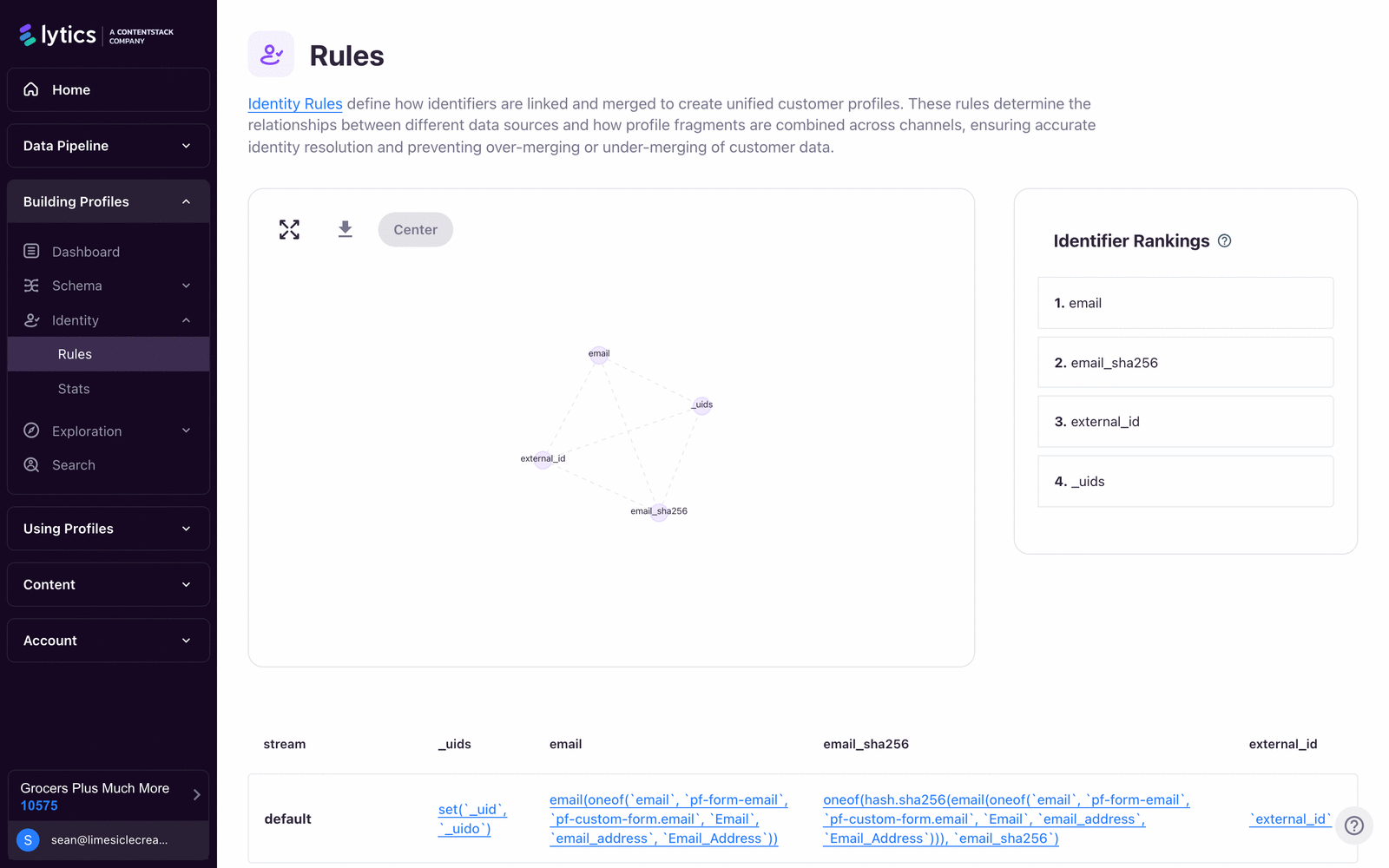
Lytics stores identity as a graph. An identity key is a field used to recognize a user across events — for example email, _uids, or a customer ID. Each identity key value is represented as a node called an identity fragment — the stored data associated with one identity key/value pair, plus its links to other fragments. Links between fragments are represented as edges, and a profile is the traversed set of connected fragments.
At ingestion time, Lytics evaluates the incoming event and:
- Reads identity keys present on the event.
- Creates or updates fragments for those keys.
- Stitches fragments together when the event provides evidence that identifiers belong to the same real person.
- Traverses neighboring fragments to materialize the current profile.
This means profile resolution is not a simple one-row lookup. It is a graph traversal problem with merge constraints and guardrails.
Deterministic Identity Resolution
For implementation work in Lytics, identity stitching follows deterministic rules — but the resolved graph is shaped by both your configuration (identity keys, ranks, schema) and the identifier co-occurrences present in incoming events. That means stitch outcomes can change as new evidence arrives (for example, a previously unseen email appearing alongside a known cookie). Build and validate your identity strategy using deterministic rules and controlled event samples before activation, and plan to re-verify behavior after any schema or rank change.
Identity Key Strength and Rank
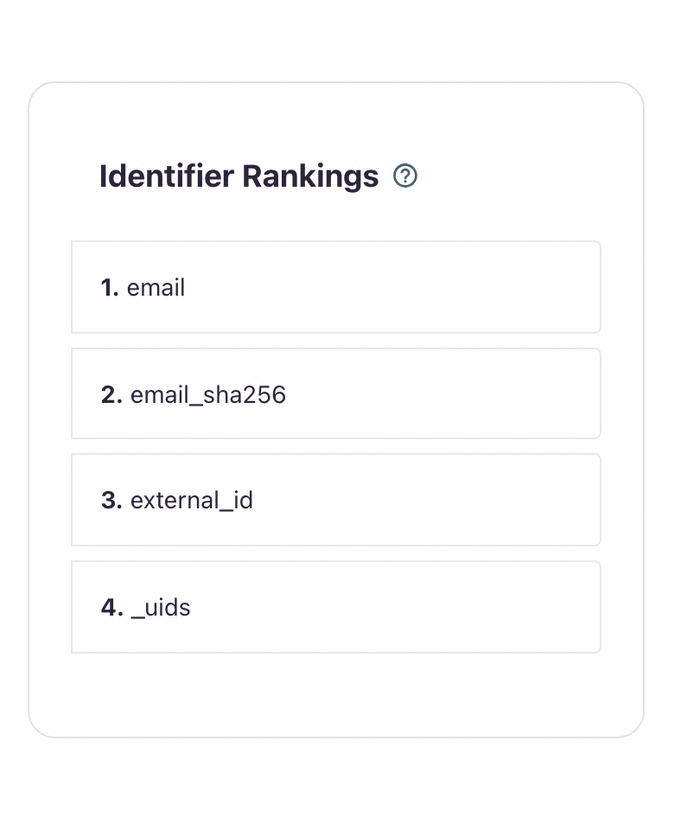
Not all identifiers should have equal weight. In practice:
- Strong, stable IDs (for example: authenticated customer ID, normalized email) should be ranked higher.
- Volatile IDs (for example: browser cookies) should be ranked lower.
In merge conflicts, higher-ranked identity keys win. This is a core protection against over-merging.
Graph Guardrails and Compaction
The platform applies traversal guardrails and profile-breaking thresholds to prevent pathological graphs:
- Traversal controls include max-lookups and max-neighbors settings, with max-traversal pressure surfaced in profile metadata.
- Lytics tracks traversal and neighbor pressure in profile metadata (for example
_max_traversals,_num_max_neighbors).
To keep graphs maintainable over time, Lytics also runs graph compaction workflows. Backend compactor registration includes composite_compactor, stale_id_compactor, rank_overlink_compactor, and rank_compactor.
Implementation Steps
- In Conductor, open Identity > Rules and review current identifier fields and rank order.
- Confirm identity-key field types and capacities in schema (for example, set limits on multi-value keys where appropriate).
- Verify route-level graph output via Identity Explorer and via API (
/v2/identity/:table/:field/:value). - Validate network topology with
/v2/schema/:table/networkto confirm expected node/edge relationships. - Use Profile Simulator (
/conductor/schema/simulate) when testing major identity-rule changes before production rollout.
Example: Conflict Resolution
If profile A is anchored by email=A and profile B by email=B, and a new event links a shared cookie to both, the rank model determines which side keeps the merge path. This is why rank governance is operationally critical and should not be changed casually.
Diagrams & Screenshots
Summary
The identity graph models each identifier value as a fragment node and links fragments together when events provide evidence they belong to the same person. Profile materialization is a graph traversal over those linked fragments, not a simple lookup. Strong identifiers should be ranked higher than volatile ones so that merge conflicts resolve in favor of the most reliable data. Rank configuration is operationally critical — changes to it can materially alter how profiles are unified across your entire dataset.
Documentation Links
Unhealthy Profiles
Learning Objectives
By the end of this section, you will be able to:
- Identify what makes a profile unhealthy in Lytics and why it matters for activation
- Diagnose which limit or data pattern is causing profile failure
- Apply remediation steps that reduce unhealthy profile volume over time
What "Unhealthy" Means
Lytics defines unhealthy profiles as profiles where traversal/materialization fails, commonly due to one or more of:
- Max neighbors limits
- Max traversals/lookups limits
- Oversized profile or fragment payloads
When a profile is unhealthy, Lytics excludes it from audience evaluations, exports/triggers, and enrichment processing (including behavioral scoring and content affinity calculations).
What Data Remains on an Unhealthy Profile
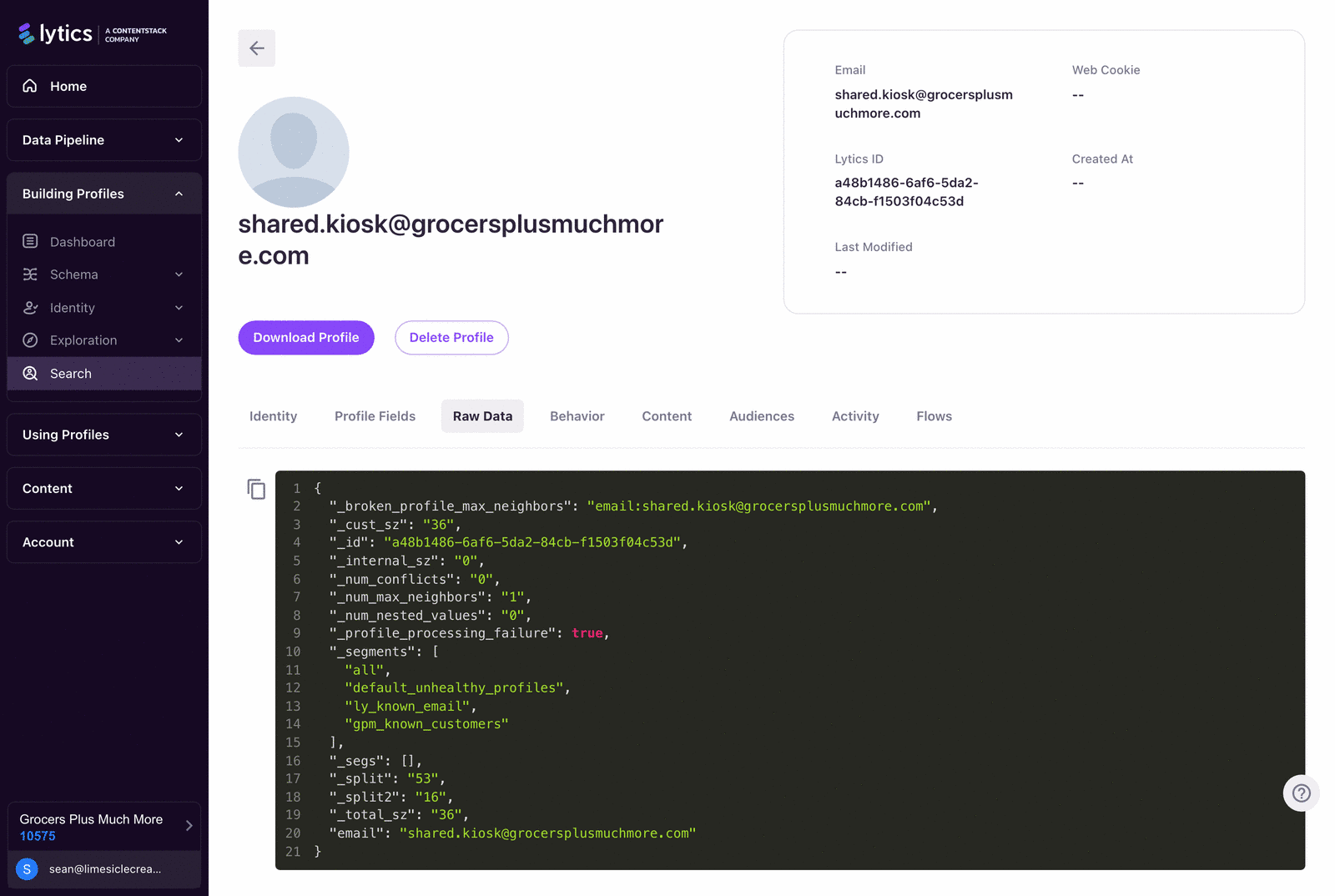
Unhealthy profiles retain identity-critical and diagnostic fields, including by-fields and key metafields such as:
_profile_processing_failure_num_max_neighbors_max_traversals_broken_profile_broke_max_size_broken_profile_broke_max_fragment_size_broken_profile_max_neighbors_broken_profile_nested_count
This is consistent with backend behavior that marks broken profiles and reduces them to a minimal keep-set of identity and diagnostic fields.
How to Detect Unhealthy Profiles
Use all three layers:
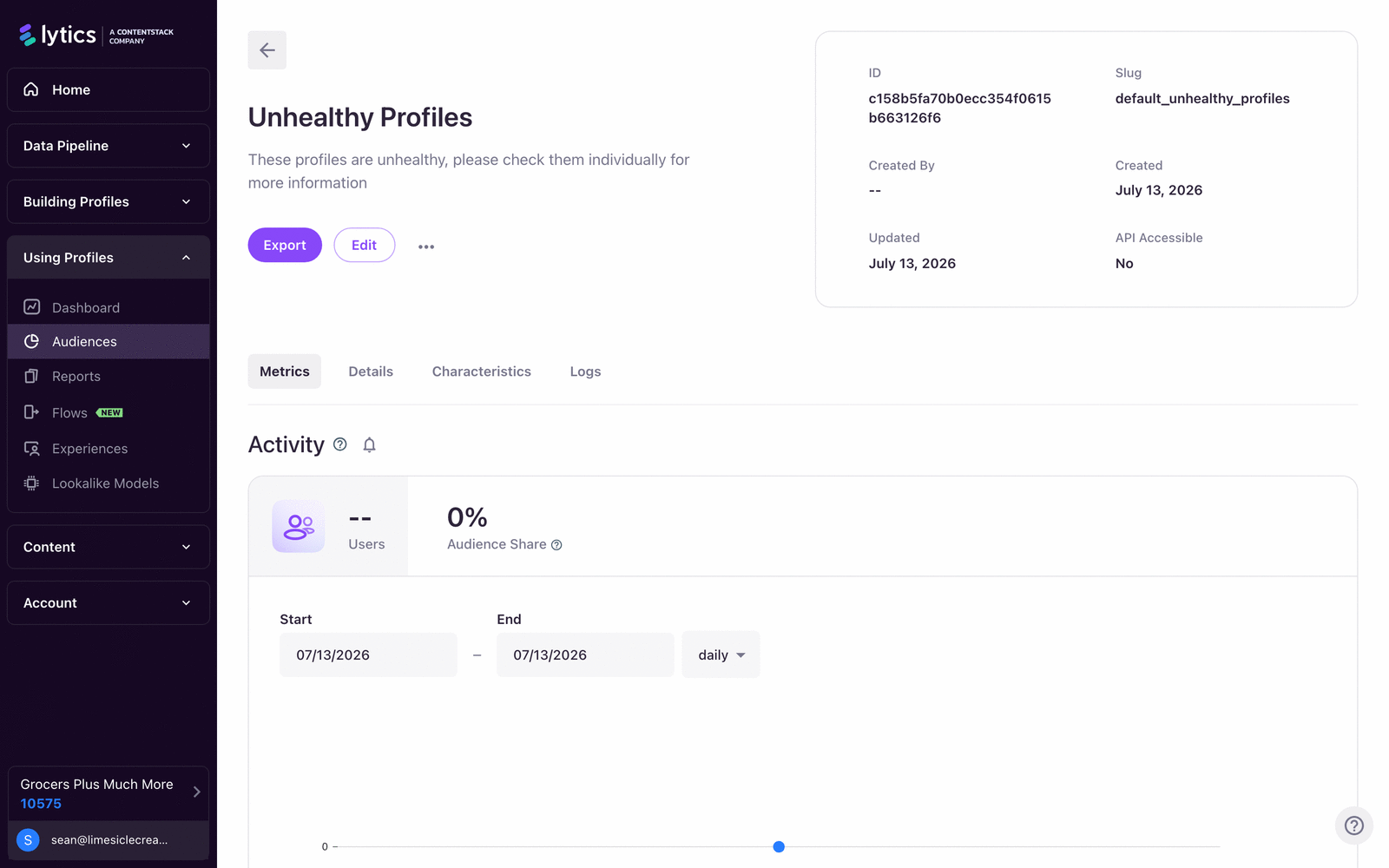
- Default audience:
default_unhealthy_profiles(filter:_profile_processing_failure = true). - Profile-level inspection in Identity Explorer for traversal and size indicators.
- Trend monitoring of unhealthy audience size versus total active profiles.
Remediation Workflow
- Identify the failure type (
neighbor,traversal,size, or nested-field explosion). - Trace offending identifiers and streams on affected profiles.
- Correct schema and mapping hygiene:
- Add/adjust caps for high-cardinality set fields.
- Reduce accidental many-to-many linking keys.
- Re-rank identifiers to prioritize stable keys. - Reprocess appropriately:
- Some issues require replay.
- Others resolve through normal re-evaluation after corrected events. - Track post-fix unhealthy trend for at least one scoring cycle.
Example Failure Pattern
A shared device or kiosk can cause one cookie to accumulate many unrelated emails, driving max-neighbor pressure. If cookie rank is too high or email constraints are weak, you can over-link the graph and eventually produce unhealthy profiles.
Diagrams & Screenshots
Summary
Unhealthy profiles are those where Lytics cannot complete graph traversal or materialization — typically because max-neighbor, max-traversal, or payload-size limits are exceeded. When a profile is unhealthy, it is excluded from all audience evaluations, enrichment, and activation exports. Remediation follows a consistent workflow: identify the failure type using _profile_processing_failure and related meta fields, trace the offending identifiers, correct schema and rank configuration, reprocess as needed, and monitor the unhealthy trend through at least one scoring cycle before declaring the issue resolved.
Documentation Links
Identity Tools
Learning Objectives
By the end of this section, you will be able to:
- Navigate identity investigation tools in the Lytics UI with confidence
- Use the core identity API endpoints for lookup, network inspection, and GDPR deletion workflows
- Trace browser-side identity behavior from JS Tag and Pathfora integrations
UI Tools (Conductor)
The UI exposes identity investigation through three primary surfaces:
- Identity > Rules for key/rank strategy configuration.
- Identity > Stats for aggregate identity-health insights.
- Search (
/conductor/identity/explorer) for profile-level investigation.
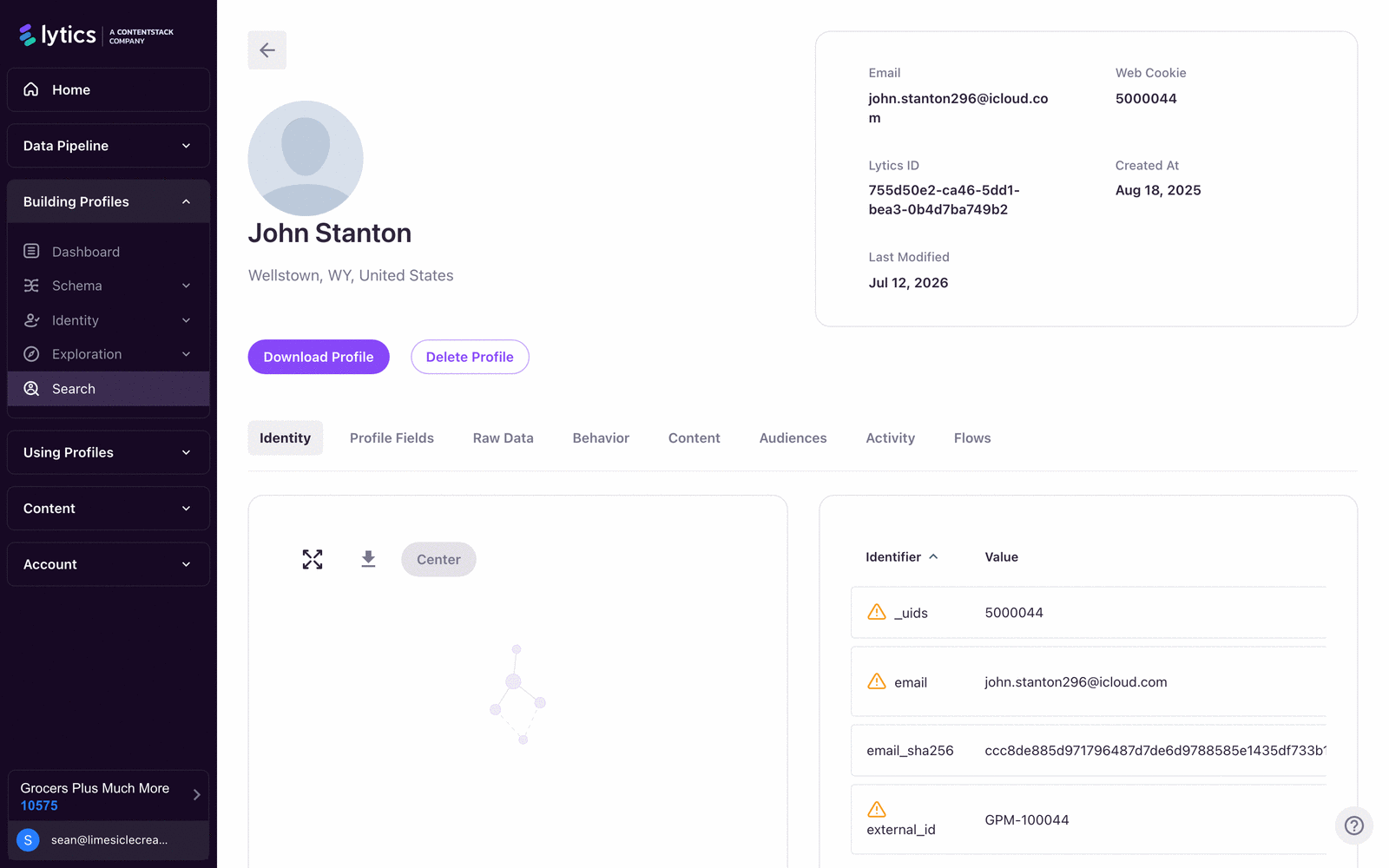
In Identity Explorer, you can:
- Visualize fragments and conflicts (graph + table).
- Inspect profile fields, raw data, behavior, audiences, and activity.
- Download a profile snapshot.
- Trigger profile deletion (GDPR path), with asynchronous completion.
API Tools
Primary identity endpoints in current backend routes:
POST /v2/identity/lookupGET /v2/identity/:table/:field/:valueDELETE /v2/identity/:table/:field/:valueGET /v2/identity/deletestatus/overviewGET /v2/identity/deletestatus/:reqidGET /v2/identity/deletestatus/listGET /v2/schema/:table/network
The identity response model centers on:
entity(materialized profile payload)fragments(fragment-level keys, neighbors, streams, conflict state, and neighbor-limit signals)
Profile Simulator for Pre-Production Testing
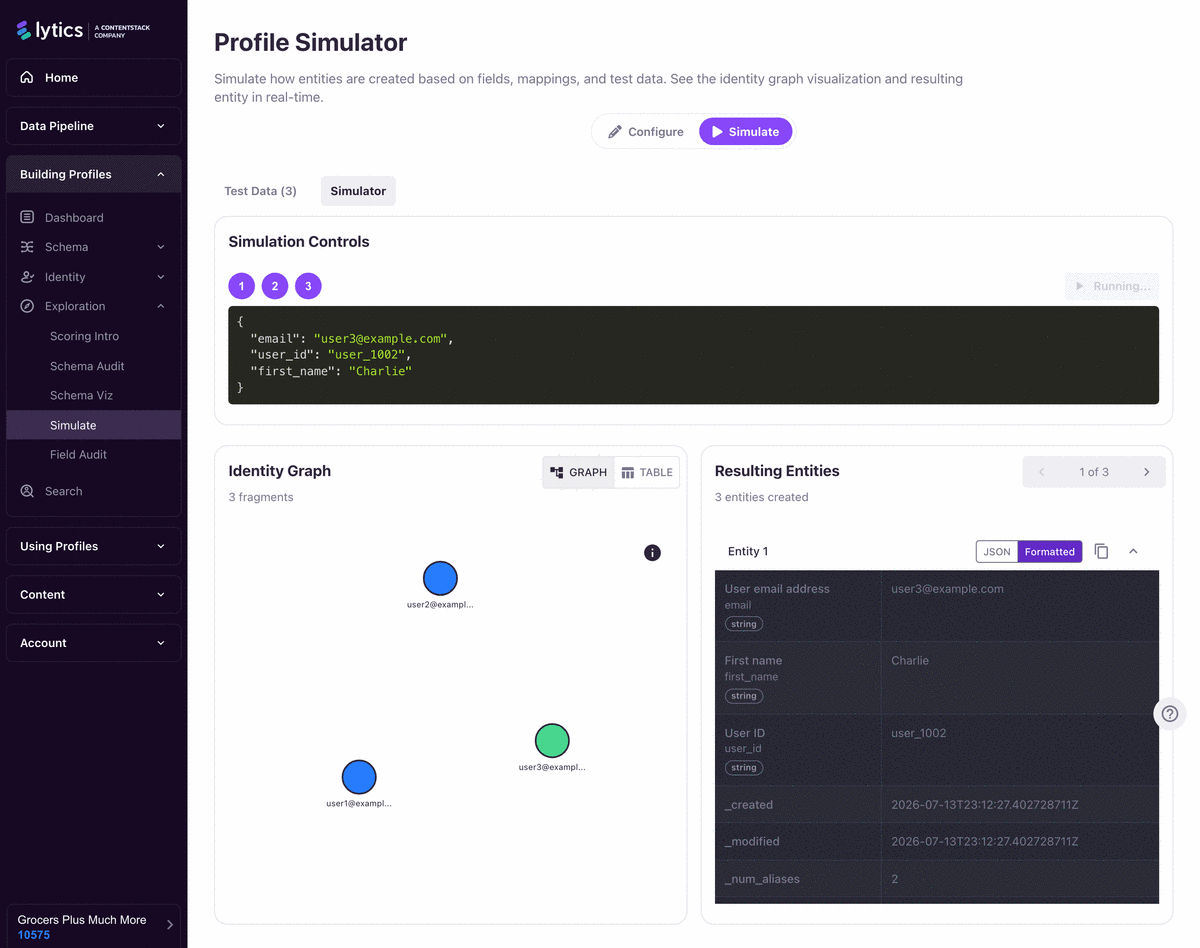
The UI Profile Simulator uses /v2/simulate-entity-analysis and returns step-wise identity analyses. Use it when you want to test field/mapping/rank changes against representative events before committing schema updates.
Browser-Side Identity Tooling (JS Tag + Pathfora)
jstag3 and Pathfora are part of the operational identity toolchain for web experiences:
jstag.getid(callback)retrieves the current ID asynchronously.jstag.setid(id)sets the current ID cookie value.jstag.identify(...)is an alias ofsend(...).jstag.loadEntity,entityReady,getEntity, andgetSegmentsdrive client-side personalization and segment-aware behavior.- Default JS Tag cookie name is
seerid, storing_uidby default. - Pathfora targeting requires JS Tag segment data; if not available, targeted modules will not initialize as expected.
- Pathfora entity templates read identity/profile data from
window.jstag.getEntity()(or legacywindow.lio.data) and support fallback/default handling.
Investigation Playbook
- Start with a known identifier in Identity Explorer.
- Confirm profile-level fields and segment memberships.
- Call identity API for fragment-level details and conflict/neighbor-limit signals.
- Check identity rules/ranks and schema mappings for merge misconfiguration.
- Validate web identifier flow (
getid, cookie name, entity load timing) if issue originates in browser personalization. - Confirm impact scope using unhealthy-profile and affected-audience trends.
Diagrams & Screenshots
Summary
Identity investigation in Lytics spans three layers: the UI (Identity Explorer for fragment-level inspection, Identity Stats for aggregate health), the API (/v2/identity endpoints for lookup, deletion, and network topology), and the browser (JS Tag methods for reading and setting identifiers, and Pathfora for segment-driven experiences). The investigation playbook starts with a known identifier in the Explorer, confirms profile fields and audiences, then drops into the API for fragment-level detail before checking rules and schema for misconfiguration.
Documentation Links
Data Integrity
Learning Objectives
By the end of this section, you will be able to:
- Define practical identity integrity standards for implementation teams
- Build a monitoring and response workflow for identity degradation
- Introduce safe change controls for schema and identifier-rank updates
Integrity Principles
Treat identity quality as an operating discipline, not a one-time setup:
- Use stable primary identifiers first. Keep weak identifiers lower-ranked.
- Bound cardinality. Avoid unbounded set fields for IDs and nested structures.
- Separate collection from trust. You can collect many identifiers, but do not rank all of them equally.
- Assume drift. Browser IDs rotate, integrations change shape, and mappings regress unless monitored.
- Control change blast radius. Rank and identity-rule changes can materially alter profile unification.
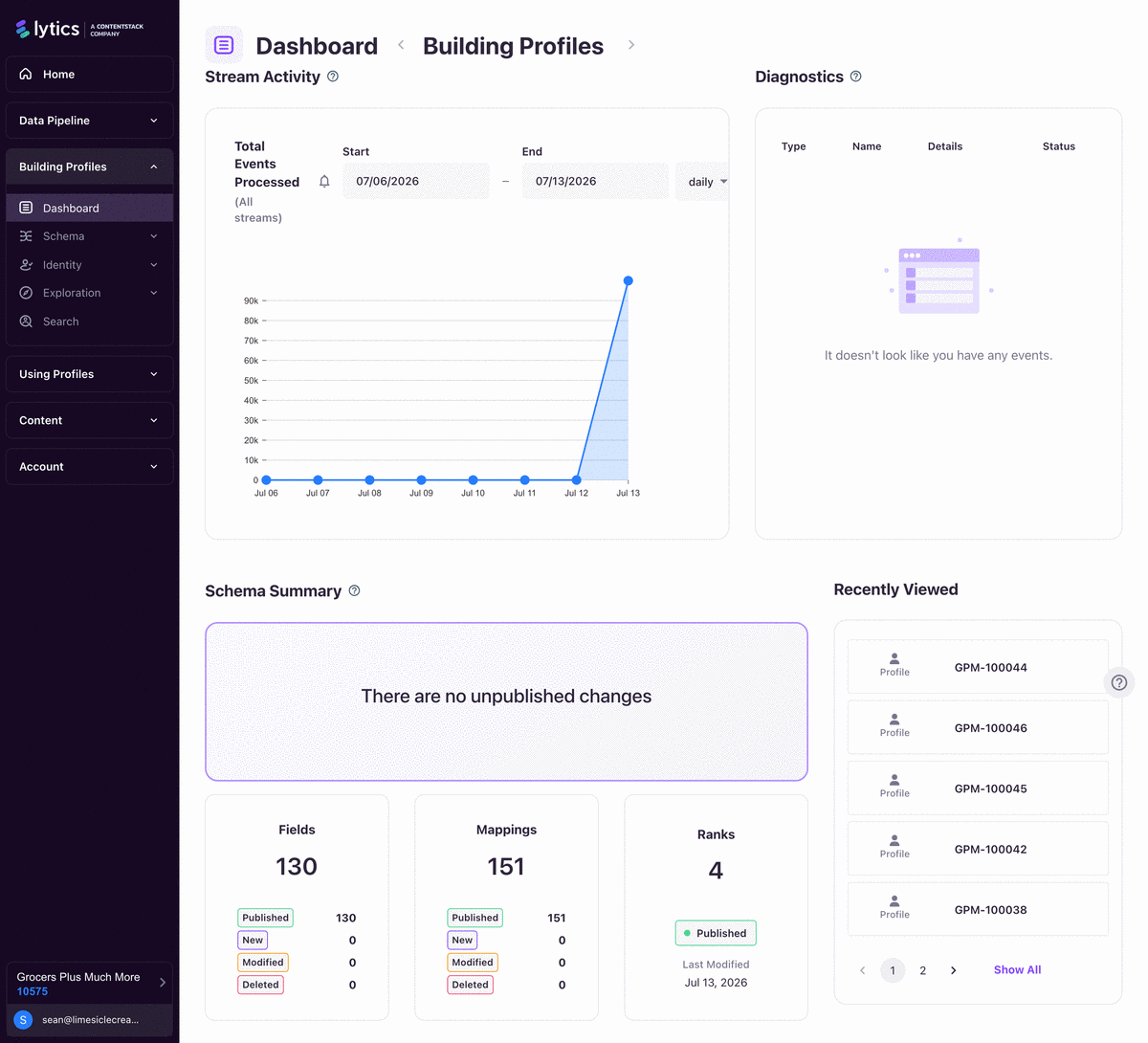
Operational Metrics to Monitor
Track at least:
- Volume and rate of
default_unhealthy_profiles - Distribution of
_profile_processing_failurecauses - Profiles with
_num_max_neighborsand_max_traversalspressure - Oversize indicators (
_total_sz,_num_nested_values, broken-size flags) - Segment count anomalies after schema/rank changes
Runbook: Identity Health Incident
- Detect: unhealthy profile spike or audience drift.
- Contain: freeze non-essential schema/rank changes.
- Diagnose: isolate stream(s), identifier(s), and merge path causing the break.
- Correct: update mappings/ranks/caps and deploy with explicit rollback criteria.
- Recover: replay or re-evaluate profiles as required.
- Verify: compare pre/post metrics and confirm activation counts normalize.
- Document: capture root cause and prevention controls.
Governance Controls
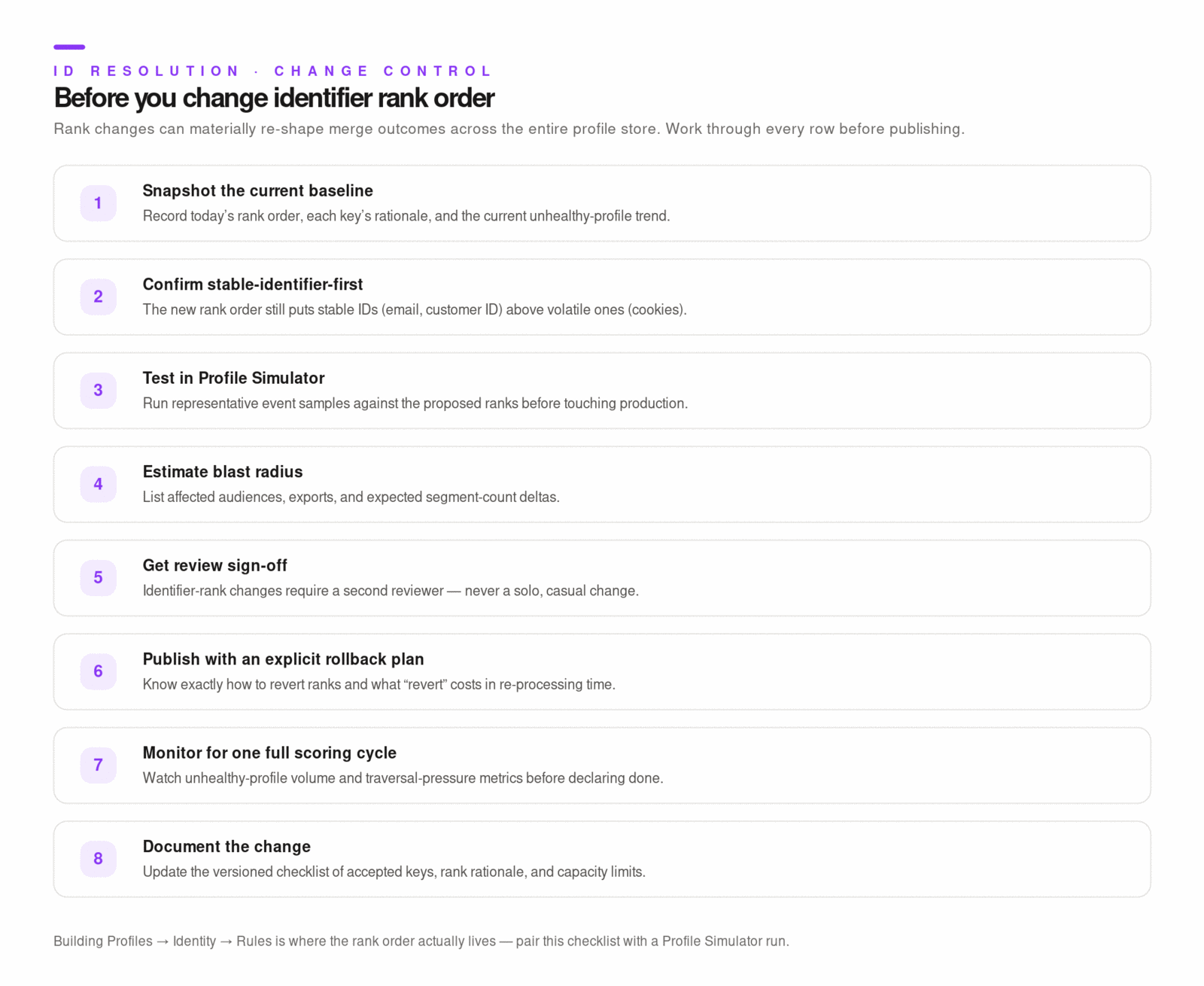
- Require review for identifier-rank modifications.
- Test identity-rule changes in simulator before production rollout.
- Gate releases on unhealthy-profile trend checks.
- Keep a versioned checklist of accepted identity keys, rank rationale, and capacity limits.
Source-Verified Implementation Notes
Backend/account settings include explicit controls for:
traversal_max_lookupstraversal_max_neighborstraversal_max_neighbors_by_tablegraphcompact
Use these controls deliberately and only with a clear rollback plan.
Diagrams & Screenshots
Summary
Identity integrity is an ongoing operational discipline, not a one-time configuration task. The five core principles — stable identifiers first, bounded cardinality, separated collection from trust, assumed drift, and controlled change blast radius — form the foundation of a maintainable identity strategy. Monitor unhealthy profile volume, failure cause distribution, and traversal pressure on a regular cadence. When an identity health incident occurs, follow the seven-step runbook: detect, contain, diagnose, correct, recover, verify, and document. All schema and rank changes should go through the Profile Simulator and be gated on post-change metric validation before being considered complete.
Documentation Links
What You've Learned
Identity resolution in Lytics is the process of connecting all data about the same real person into a single unified profile through a graph of linked identity fragments. You've learned how the graph is built and traversed, how identifier rank determines merge behavior when conflicts arise, what causes profiles to become unhealthy and how to remediate them, which UI and API tools support identity investigation, and how to maintain identity integrity as a production operating discipline. With a well-governed identity strategy, your audiences are reliable, your activations reach the right people, and your enrichment data reflects reality.
Key Terms
📘 Identity Key — A field used to recognize a user across events (for example:
_uids, customer ID). Identity keys are configured with a rank that determines their priority in merge conflict resolution.📘 Identity Fragment — A unit of profile evidence associated with one identity key/value pair. Fragments are connected (stitched) when events carry multiple identifiers together, and a profile is materialized by traversing the connected graph of fragments.
📘 Identity Graph — The graph structure Lytics uses to represent relationships between identity fragments. Each identifier value is a node; links between identifiers (established by co-occurrence on events) are edges.
📘 Unhealthy Profile — A profile where graph traversal or materialization has failed due to exceeding max-neighbor, max-traversal, or payload-size limits. Unhealthy profiles are excluded from audience evaluation, enrichment, and activation exports.
📘 Profile Simulator — A UI tool that runs step-wise identity analysis against test events using
/v2/simulate-entity-analysis. Use it to validate identity-rule and schema changes before production rollout.📘 Graph Compaction — A set of backend workflows (
composite_compactor,stale_id_compactor,rank_overlink_compactor,rank_compactor) that keep the identity graph maintainable by cleaning up stale and over-linked fragments over time.
