Ongoing Maintenance
A successful Lytics implementation does not end at launch. Profiles drift, schemas accumulate unused fields, consent policies change, and integrations break. This section covers the operational disciplines that keep a production Lytics account healthy over time: account health monitoring, schema auditing, day-to-day operational shortcuts, consent compliance maintenance, and data flow validation. Each topic includes a repeatable process you can operationalize with your team.
Account Health
Learning Objectives
By the end of this section, you will be able to:
- Identify key account health metrics including data volume, profile counts, and integration status
- Set up proactive health monitoring with alerts and dashboards
- Establish a regular health check cadence with defined responsibilities and review schedule
Account Health
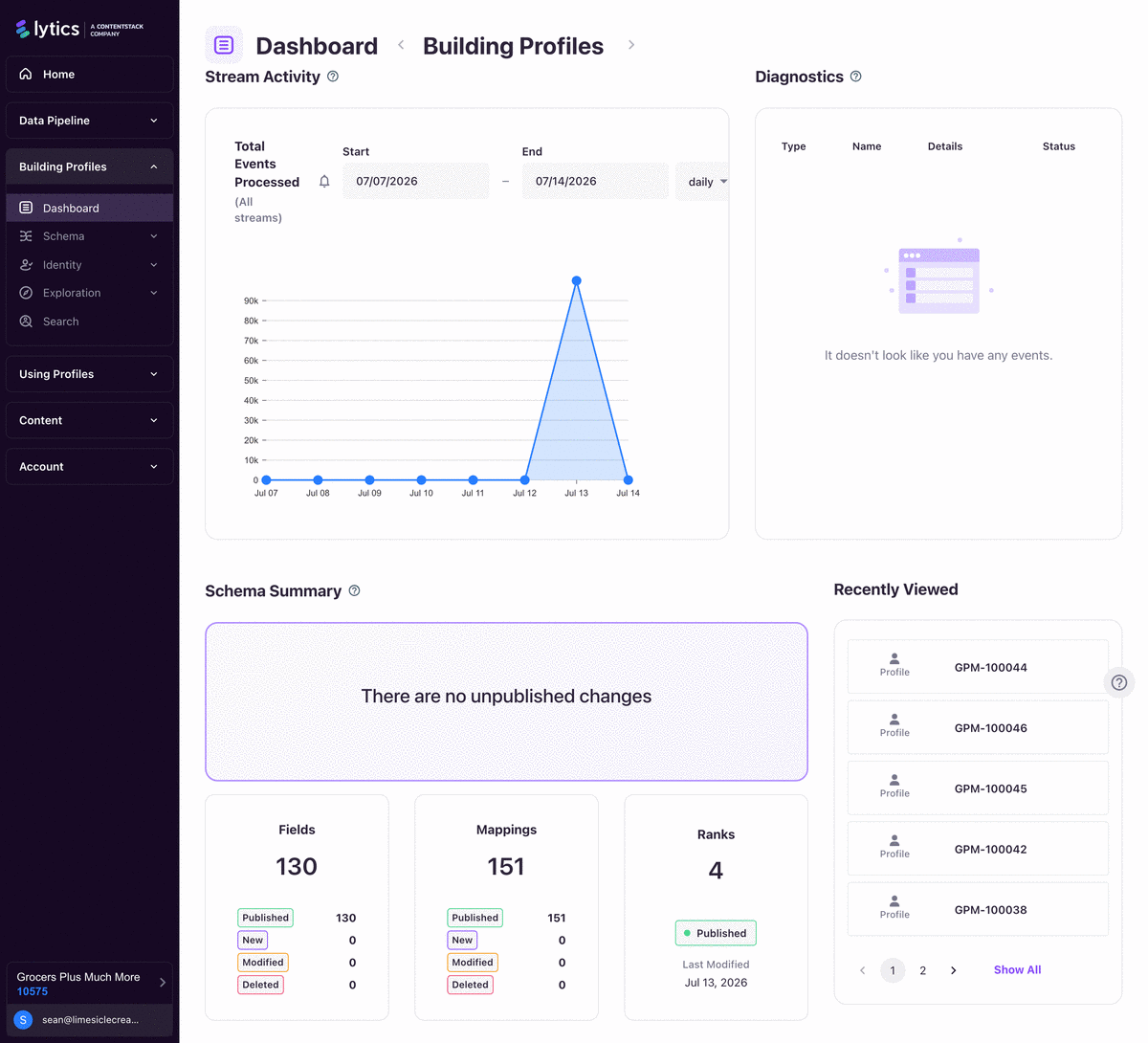
Healthy Lytics accounts are maintained, not assumed. The right pattern is continuous monitoring plus scheduled operational review.
Primary references:
Key Concepts
- Core health signals:
- ingest continuity,
- workflow status,
- quota/volume trends,
- destination delivery health.
- Metric API heartbeats:
monitoring_heartbeat(platform integration runtime health),collection_count(ingress event volume),stream_count(stream-level throughput).- Alert channels: Slack, Microsoft Teams, and email.
- Job-state awareness:
- Running,
- Sleeping,
- Failed,
- Paused,
- Completed.
Step-by-Step
- Configure account-level alert routing:
- operations channel for global alerts,
- owner-specific alerts for critical workflows. - Enable alerts for high-priority sources and destinations.
- Build a recurring health cadence:
- daily: check failed jobs and unusual volume drops,
- weekly: review job trends and quota consumption,
- monthly: review runbook updates and ownership. - Track usage from Vault Usage:
- inbound events,
- outbound events,
- quota meter progression. - Inspect failing jobs in Conductor diagnostics and logs, then resume/restart after remediation.
Examples
Suggested alert policy:
- Critical imports/exports: alert on Error + Failed + prolonged Sleeping
- Non-critical jobs: alert on Failed only
- One daily digest channel + immediate paging for critical pipelines
Heartbeat alert threshold guideline:
Do not alert on a single missed minute.
Use a multi-minute missing window (for example 5 minutes) to reduce false positives.
Diagrams & Screenshots
Summary
Account health monitoring requires both continuous alerting and a scheduled review cadence. Configure alert routing for critical jobs first, then build a daily/weekly/monthly review rhythm that covers failed jobs, quota consumption, and runbook currency. The monitoring_heartbeat, collection_count, and stream_count metrics are the primary signals to watch; use multi-minute windows for heartbeat alerts to reduce false positives.
Documentation Links
Schema Audit
Learning Objectives
By the end of this section, you will be able to:
- Conduct a schema audit to review all fields, types, and mappings
- Identify stale or unused fields that can be deprecated or removed
- Clean up and optimize the schema for performance and clarity
Schema Audit
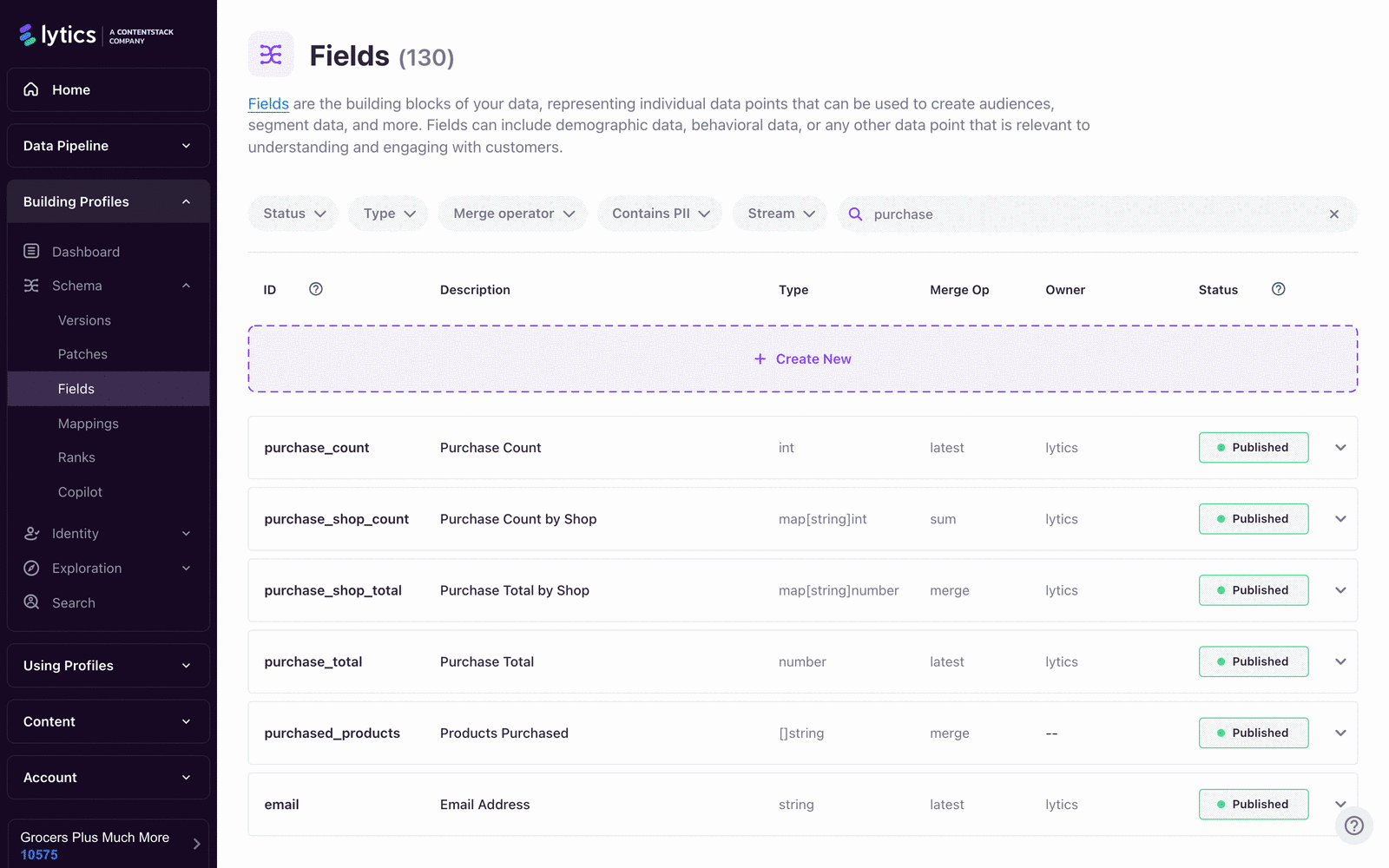
Schema drift is one of the most common long-term causes of poor segmentation quality and operational confusion.
Primary references:
Key Concepts
- Schema Audit focus areas:
- which fields are populated,
- which fields are actually used in audiences,
- which fields merge multiple streams,
- which field types may be expensive (especially complex
mappatterns). - High-value table columns:
- sources,
- users with field,
- cardinality,
- times used.
- Field quality lifecycle:
- active,
- candidate for deprecation,
- deprecated/retired.
Step-by-Step
- Open Data > Schema Audit.
- Filter by:
- users with field threshold,
- data stream,
- field name search. - Review visual summary:
- percentage of fields with data,
- percentage used in audiences,
- multi-stream merge usage. - Export or document candidate cleanup list:
- no data,
- no audience usage,
- obsolete campaign fields,
- duplicate semantic fields. - Validate dependencies before cleanup:
- audience definitions,
- destination mappings,
- templates and downstream queries. - Apply cleanup incrementally, then re-audit after one cycle.
Examples
Monthly schema audit rubric:
- Keep: populated + actively used
- Investigate: populated but never used
- Remove/deprecate: unused + obsolete + no active downstream dependency
Common anti-pattern:
Many near-duplicate fields for the same concept (e.g., email_1, email_addr, emailAddress).
Standardize to one canonical field and map sources accordingly.
Diagrams & Screenshots
Summary
Schema drift accumulates silently and degrades segmentation quality over time. A monthly schema audit using the Schema Audit view gives you a structured way to identify fields that are populated but unused, unused and obsolete, or duplicating existing concepts. Always validate audience, destination, and template dependencies before removing any field, and apply cleanups incrementally to avoid unintended side effects.
Documentation Links
Tips and Tricks
Learning Objectives
By the end of this section, you will be able to:
- Apply operational shortcuts and efficiency patterns for routine maintenance tasks
- Avoid common maintenance gotchas that can cause data issues or downtime
- Streamline routine tasks with repeatable processes and automation where possible
Tips and Tricks
These practices reduce operational noise and shorten recovery time when issues occur.
Key Concepts
- Name everything clearly:
- jobs, authorizations, audiences, and flows should encode purpose and owner.
- Separate streams by intent:
- behavioral events vs profile attribute updates,
- avoid mixed semantics in one stream where possible.
- Avoid over-hidden stream keys:
- hidden keys cannot be restored from UI (API/support path required).
- Webhook timing guardrail:
- time-window audience triggers for webhooks should use at least 30 minutes.
- Runbook over tribal knowledge:
- each critical job needs owner, dependency map, and recovery procedure.
Step-by-Step
- Standardize naming conventions account-wide.
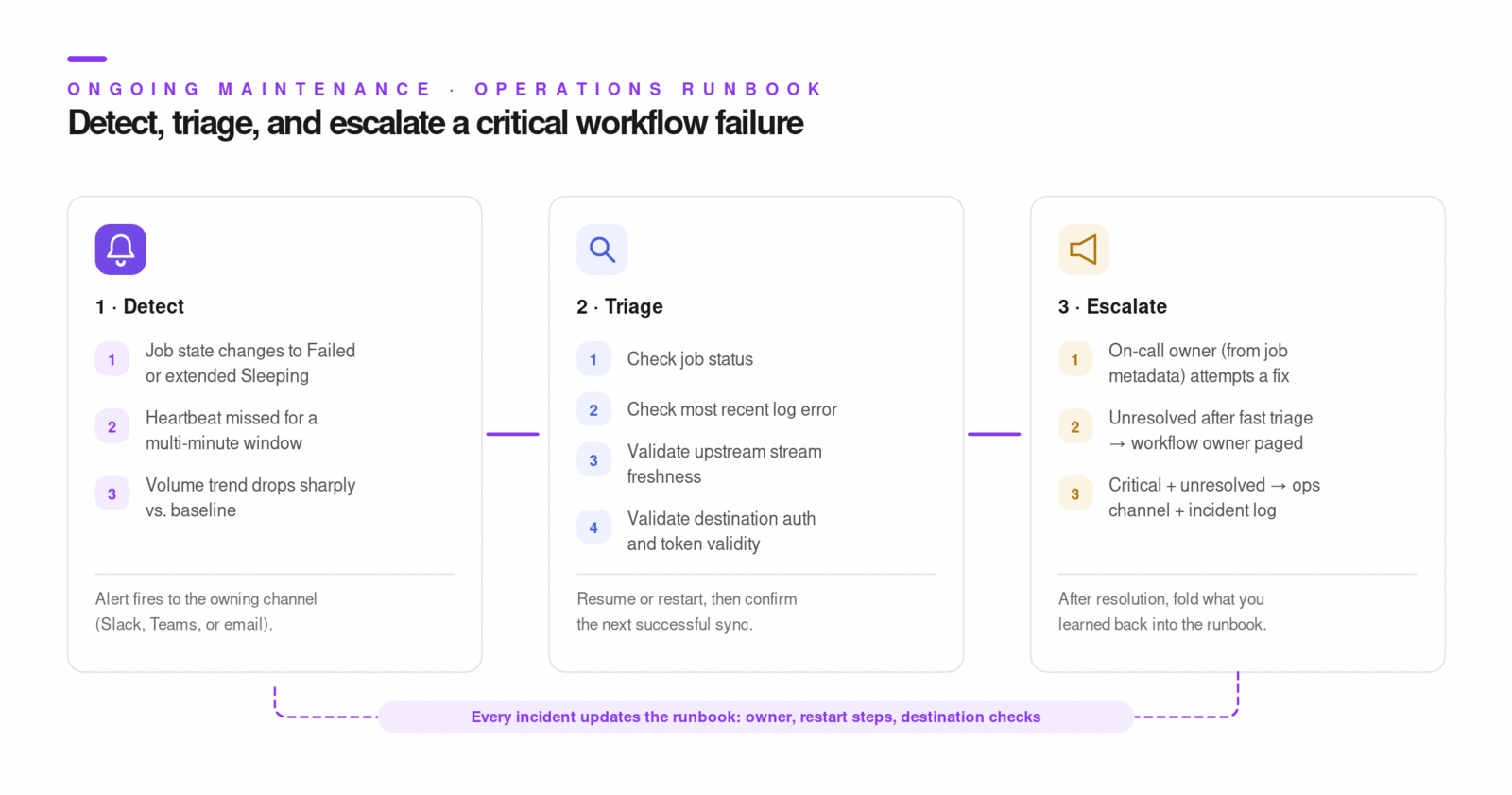
- Add owner metadata and escalation route to each critical job.
- Build a "top 10 critical workflows" runbook with:
- expected cadence,
- acceptable lag,
- restart steps,
- destination-side checks. - Add monthly dry-run incident drills for the highest-risk jobs.
- Keep a change log for schema and audience definition updates.
Examples
Job label convention:
[SourceOrDestination]-[Purpose]-[OwnerTeam]-[Cadence]
Example: SFMC-Export-MQLLifecycle-MarketingOps-Realtime
Fast triage pattern:
1) Check job status
2) Check most recent log error
3) Validate upstream stream freshness
4) Validate destination auth/token validity
5) Resume/restart and verify next successful sync
Diagrams & Screenshots
Summary
Operational efficiency in Lytics comes from disciplined naming, stream separation, and documented runbooks. Encoding purpose and owner into every job name makes triage faster. Separating behavioral event streams from profile attribute update streams reduces mapping confusion. A written runbook for each critical workflow — with restart steps and destination-side checks — converts tribal knowledge into recoverable process. Periodic dry-run drills surface gaps before real incidents do.
Documentation Links
Consent Handling
Learning Objectives
By the end of this section, you will be able to:
- Maintain consent compliance as privacy regulations evolve and new requirements emerge
- Update consent flows when legal or business requirements change
- Audit consent implementation to verify it matches current policy and regulatory needs
Consent Handling
Consent maintenance is both legal and technical. The implementation must stay aligned with policy changes, not just initial launch requirements.
Primary references:
Key Concepts
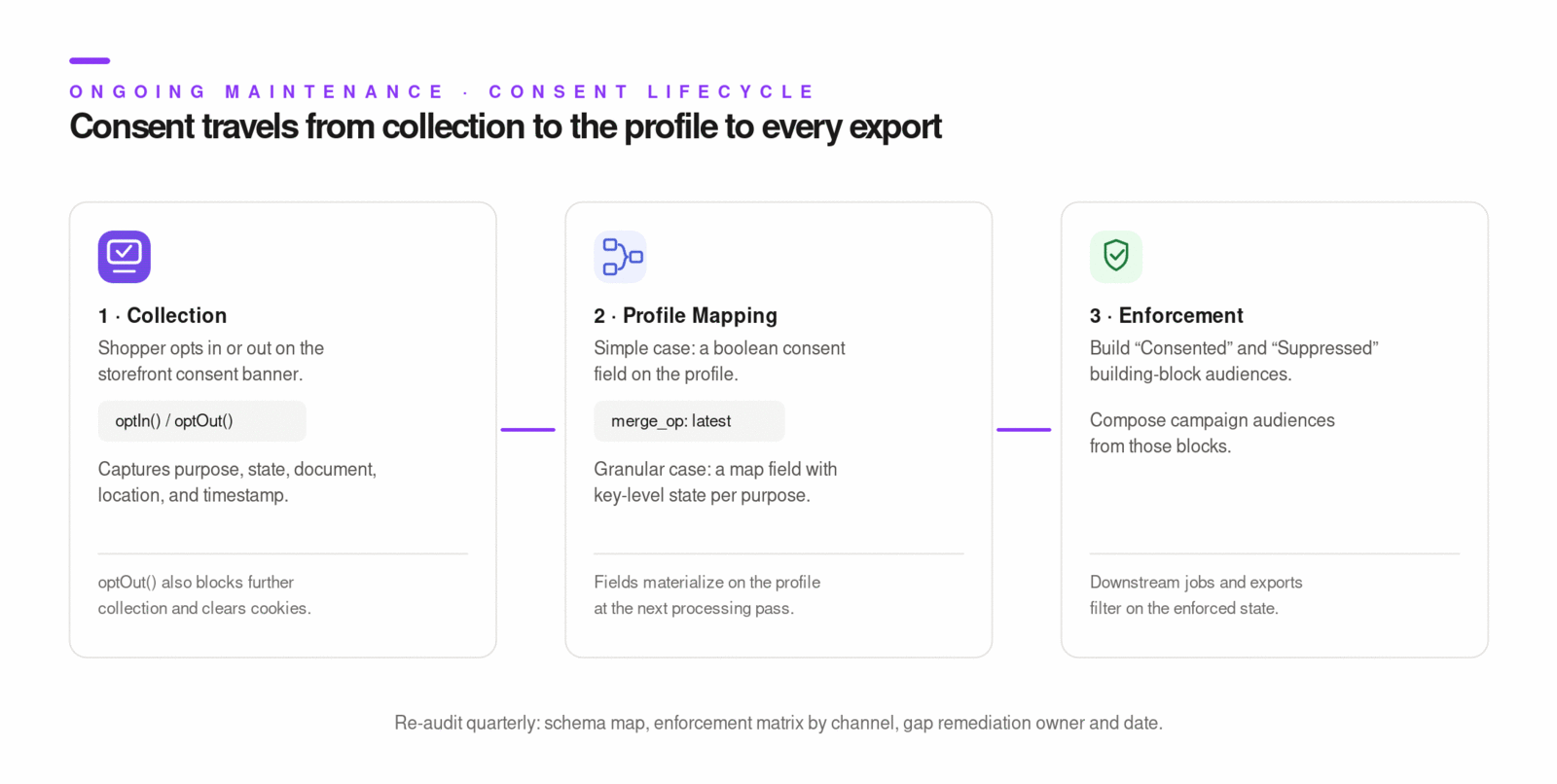
- Consent model dimensions:
- purpose,
- state (
consentedtrue/false), - source/document,
- location,
- timestamp.
- Field design strategy:
- simple cases: string/boolean with
latestmerge behavior, - granular cases: map field with merge semantics for key-level state.
- Audience enforcement:
- build consented/not-consented building-block audiences,
- compose campaign audiences using those blocks.
- Tag-level enforcement:
- JS Tag consent plugin can block data collection until opt-in,
optIn()resumes collection,optOut()blocks and clears cookies,- OneTrust integration can drive this behavior from consent categories.
Step-by-Step
- Review current legal/policy requirements with legal/privacy owner.
- Validate consent schema still supports required granularity.
- Audit mappings for all consent-related events and channels.
- Validate segment enforcement:
- required-consent audiences,
- suppression audiences for opt-out users. - Validate web/mobile SDK consent flows (including tag blocking behavior).
- Re-test downstream job filters that depend on consent audiences.
- Document policy change date and technical deployment date.
Examples
// Web consent event example
jstag.send({
  event: "form-submit",
  consent: {
    purpose: "marketing",
    consented: true,
    documents: ["terms_2026_01"],
    location: "US",
  },
});
Quarterly consent audit outputs:
- Active consent schema map
- Audience enforcement matrix by channel
- Gaps and remediation owner/date
Diagrams & Screenshots
Summary
Consent compliance requires ongoing maintenance as privacy regulations and business policies evolve. Your consent schema must support the granularity your legal requirements demand — simple boolean fields for straightforward cases, map fields for purpose-level or jurisdiction-level granularity. Audience-based enforcement (consented vs. suppressed building blocks) is the most reliable way to propagate consent state into downstream jobs. Run a quarterly audit that produces a current schema map, an audience enforcement matrix by channel, and a documented gap remediation plan.
Documentation Links
Data Flow Validation
Learning Objectives
By the end of this section, you will be able to:
- Validate that data continues to flow correctly across all integrations and sources
- Debug data flow interruptions by tracing events from source to profile
- Set up data flow monitoring to detect issues before they impact audiences and campaigns
Data Flow Validation
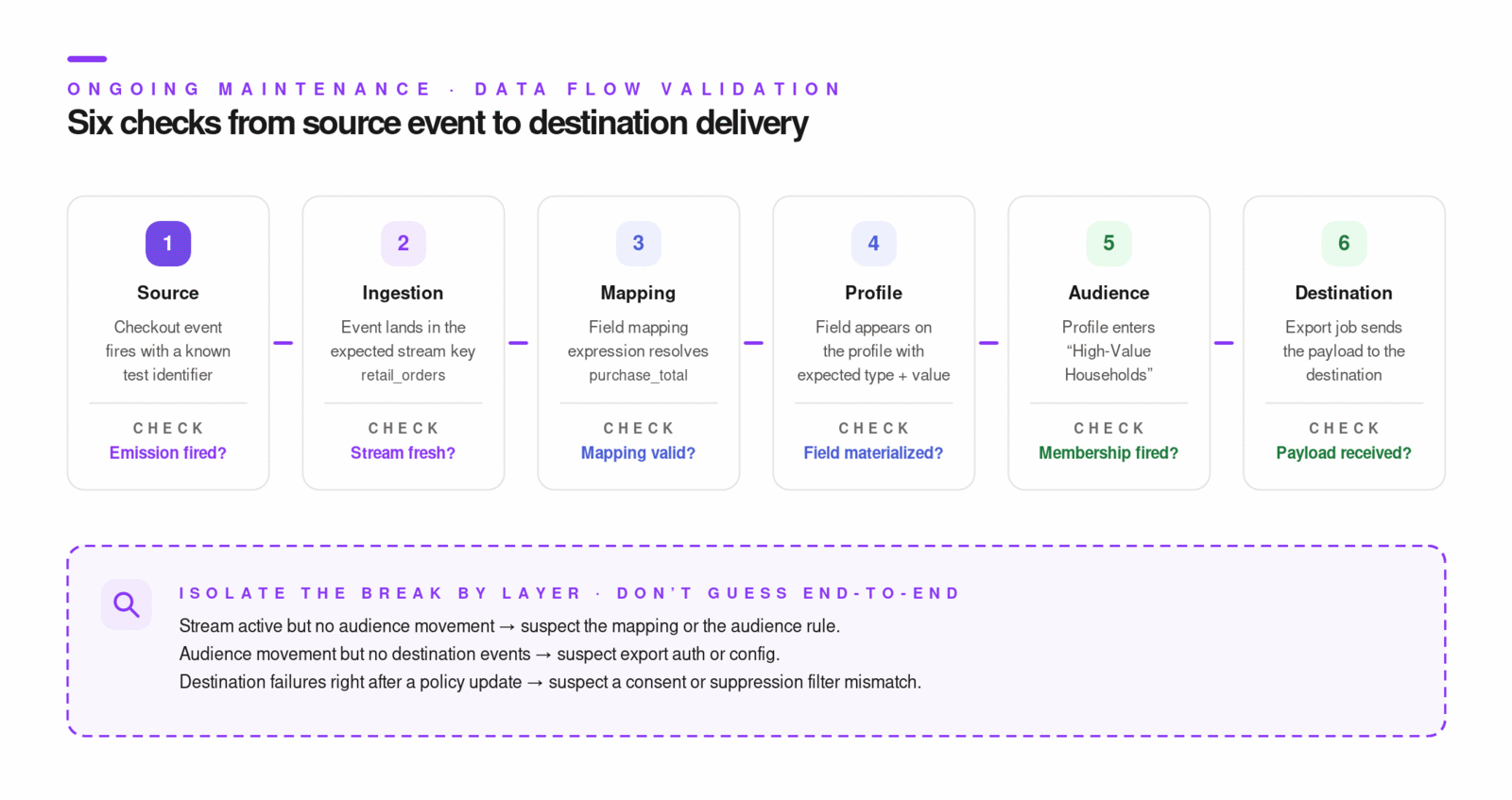
Data flow validation should confirm the full path: source event -> stream key -> schema mapping -> profile field -> audience membership -> activation/export.
Primary references:
Key Concepts
- Stream-level checks:
- event ingress trend,
- last message received,
- raw key first/last seen and sample values.
- Job-level checks:
- status transitions,
- sync/error events,
- configuration integrity,
- authorization validity.
- Profile-level checks:
- mapped field appears with expected type/value,
- audience entry/exit reflects expected behavior.
- Activation-level checks:
- destination receives expected payload,
- trigger events (enter/exit/change) fire as configured.
Step-by-Step
- Validate stream ingestion at Conductor > Pipeline > Streams.
- Inspect raw key sample values for changed payload formats.
- Validate field mappings and resulting profile materialization.
- Validate target audience membership changes for test users.
- Validate destination job logs and payload delivery.
- If failure exists, isolate by layer:
- source emission,
- ingestion,
- mapping,
- audience,
- destination. - Remediate, resume/restart job, and confirm successful sync event.
Examples
End-to-end test event checklist:
- Send deterministic test event with known unique identifier
- Confirm event appears in expected stream
- Confirm mapped profile field updates
- Confirm audience enter/exit event
- Confirm destination payload receipt
Common interruption patterns:
- Stream active but no audience movement -> mapping or audience rule issue
- Audience movement but no destination events -> export auth/config issue
- Destination failures after policy update -> consent/suppression filter mismatch
Diagrams & Screenshots
Summary
Data flow validation is a layered diagnostic process: confirm ingestion at the stream level, verify field mapping at the profile level, check audience membership changes, then validate destination payload delivery. Isolating failures by layer — source, ingestion, mapping, audience, destination — is the fastest way to narrow the root cause. Sending a deterministic test event with a known identifier is the most reliable end-to-end check after any schema change, integration update, or consent policy modification.
Documentation Links
What You've Learned
Ongoing maintenance is the operational discipline that protects the quality of your Lytics implementation over time. You now have repeatable processes for monitoring account health with alerts and cadenced reviews, auditing the schema to remove drift and unused fields, applying operational efficiency patterns that reduce triage time, keeping consent implementation aligned with evolving legal requirements, and validating end-to-end data flow across all integrations. These are not one-time tasks — they are the recurring practices that distinguish a well-operated production account from one that degrades silently.
Key Terms
📘 Schema drift — The gradual accumulation of unused, duplicated, or mistyped fields in the profile schema, typically caused by onboarding new data sources without retiring old ones. Drift degrades segmentation quality and increases operational confusion.
📘 Health cadence — A structured schedule of account health reviews, typically daily (failed jobs and volume drops), weekly (job trends and quota), and monthly (runbook updates and ownership review).
📘 Consent enforcement — The use of audience-based suppression and inclusion rules to ensure that only profiles with the required consent state are included in downstream jobs and activations.
📘 Data flow validation — A layered diagnostic process that confirms data moves correctly from source event through stream ingestion, schema mapping, profile materialization, audience membership, and destination delivery.
📘 Runbook — A documented operational procedure for a critical job or workflow, including expected cadence, acceptable lag, restart steps, and escalation path. Runbooks convert tribal knowledge into recoverable process.
