

The real cost of asset sprawl (and how to fix it with Contentstack Assets)

Share
Most content teams have accepted asset chaos as part of the job. Searching across drives, re-uploading files, chasing approvals and publishing the wrong version have become routine friction points that quietly drain time and budget.
This post breaks down what disconnected asset management is actually costing your team and how Contentstack Assets is built to fix it.Managing digital assets comes with a hidden cost for most teams. It shows up every time someone can’t find the right image, re-uploads the same file into another tool or delays a launch because nobody knows which version is approved.
Most teams have accepted that friction as part of the job, but it doesn’t have to be.

The problem with how most teams manage assets
For most organizations, assets are spread across shared drives, cloud storage platforms and disconnected tools. When a content author needs an image, they end up jumping between tabs, downloading files and manually uploading them into the systems where work actually happens.
The friction adds up quickly.
Disconnected workflows
When assets live outside the CMS, every handoff becomes manual. Teams spend time moving files between systems, tracking versions and fixing downstream errors caused by outdated or duplicate assets.
Operational Inefficiency
Without structured metadata and intelligent search, teams rely on folders, inconsistent tagging and institutional knowledge to find what they need. As asset libraries grow, finding the right file becomes slower and harder to manage.
Fragmented storage systems
Most asset management approaches today are still centered around storage, folders and file organization rather than the workflows teams use every day. As content operations become faster and more complex, those disconnected systems create friction instead of helping teams move faster.
What disconnected asset management is actually costing you
The cost of disconnected asset management rarely appears on a budget line, which is why it often goes unnoticed.
Here’s a simple example:
Assumptions
10 team members regularly working with digital assets
Average hourly cost of $50 per employee
45 minutes lost per day searching for assets, re-uploading files, managing approvals, or correcting version issues
240 working days per year
The math
45 minutes per day = 180 lost hours per employee annually
180 hours × $50/hour = $9,000 lost per employee each year
Across a 10-person team, that’s $90,000 annually in wasted time alone
And that doesn’t include licensing costs, storage overhead, middleware, rework, delayed launches or the operational risk of publishing outdated assets.
Introducing Contentstack Assets
Contentstack Assets is an integrated asset management capability built for the Contentstack Agentic Experience Platform. Instead of managing content and assets across separate systems, teams can manage both in one place with shared governance and a centralized source of truth.
Asset Spaces
Spaces are independent groups that organize assets by brand, region, team or partner, each with its own role-based access controls. External agencies and vendors can be added into a dedicated Space without exposing internal systems. Because Spaces are separate from CMS stacks, assets can power multiple stacks, email tools, and applications via API.
AI-Powered Metadata
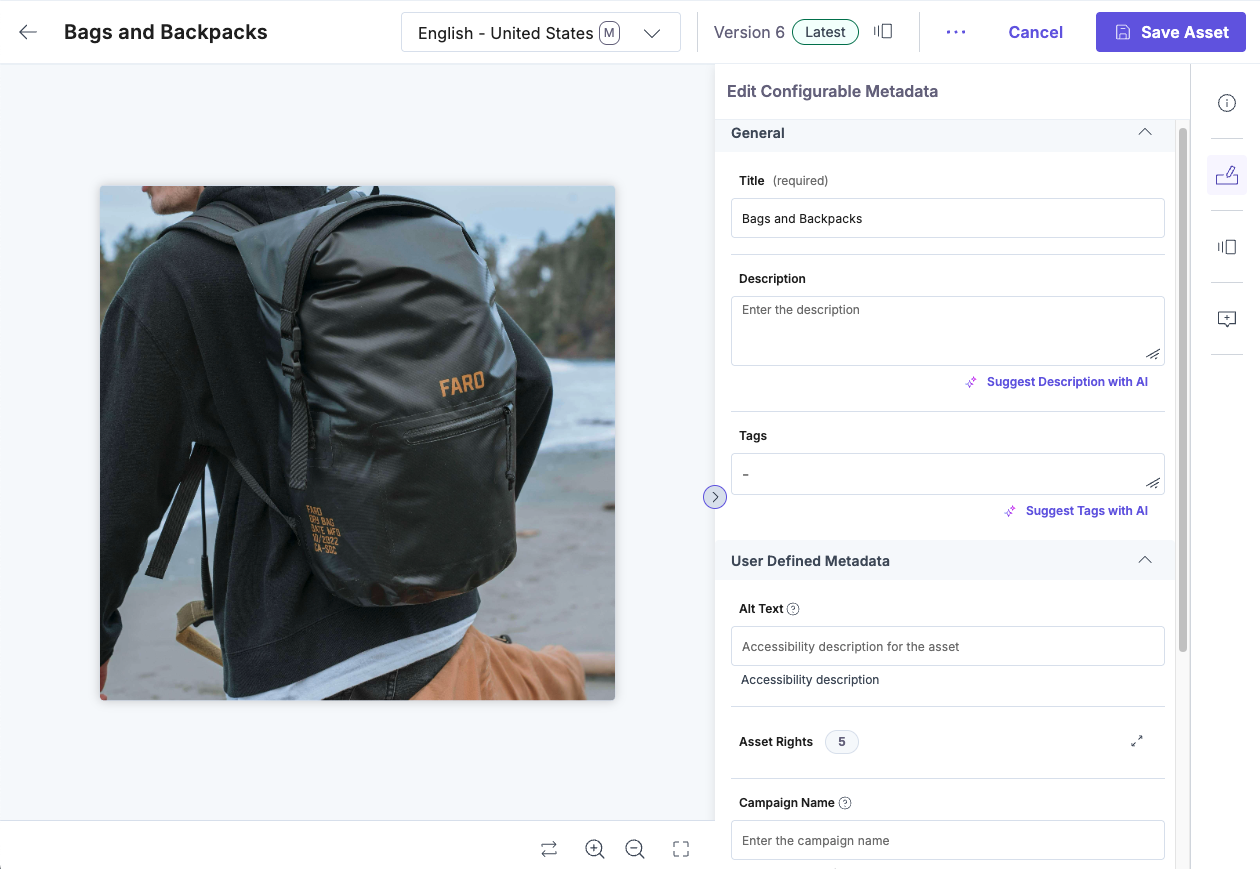
AI automates tagging and classification at upload by identifying objects, colors and content within assets. Alt text is generated automatically to support accessibility. Visual Markups let teams add clickable or hoverable regions directly onto images to highlight products, add context or link to related content, turning static assets into interactive, actionable experiences.
Custom Asset Types
The Asset Type Builder allows teams to define metadata that matches how they work. Product images, videos and licensed assets can each have tailored fields like SKUs, duration, usage rights or expiration windows. Required fields and expiry rules help ensure assets are complete, compliant, and up to date.
Asset Localization
Teams can manage localized versions of assets and metadata within a single record. Each market can maintain its own variation while staying connected to the global asset, with fallback support ensuring coverage across regions without duplication.
User-Defined Fields
Custom fields make it easy to filter assets by what matters most — campaign, product, region or usage rights. Saved Views let teams quickly access common filters like approved assets, expiring licenses or social-ready content.
The asset management upgrade you’re missing
Contentstack Assets brings asset management directly into the platform where your content teams already work. Instead of introducing another disconnected tool or workflow, it closes the gap between finding an asset and publishing it.
For teams managing digital experiences across brands, regions and channels, asset management can’t be an afterthought anymore. It needs to be part of the foundation.
Ready to level up how you manage assets? The Contentstack Assets Foundation course in Contentstack Academy is live. Dive in, explore the fundamentals, and see what modern asset management looks like in practice. Or join the live demo on May 28th, 2026, to see it in action.