What headless means: ownership, not tooling
What headless means: ownership, not tooling
TL;DR
- "Headless" means the CMS does not own the rendering layer -- your frontend is a separate application you build and maintain
- Contentstack stores structured content and serves it via APIs; it does not generate HTML, manage URLs, or host your site
- This architecture trades built-in rendering convenience for full control over framework, hosting, and delivery strategy
"Headless" is the single most misused word in CMS marketing. Vendors attach it to product launches, analysts embed it in quadrant labels, and conference talks treat it as a synonym for "modern." None of that helps you build anything. What actually matters is a specific architectural fact: in a headless setup, the CMS does not own the rendering layer. The frontend is your responsibility - you choose the framework, the hosting, and the delivery architecture. Everything downstream of the API is yours to build and yours to maintain.
Why this matters
If you misunderstand what "headless" shifts onto the development team, later lessons about content modeling, APIs, preview, and workflow feel like isolated platform features. This lesson gives you the ownership model that ties the certification together.
You will be able to
- explain headless architecture in terms of responsibility, not buzzwords
- identify which concerns Contentstack owns and which concerns your application owns
- connect those ownership boundaries to the implementation work you will do later in the certification
What "headless" actually describes
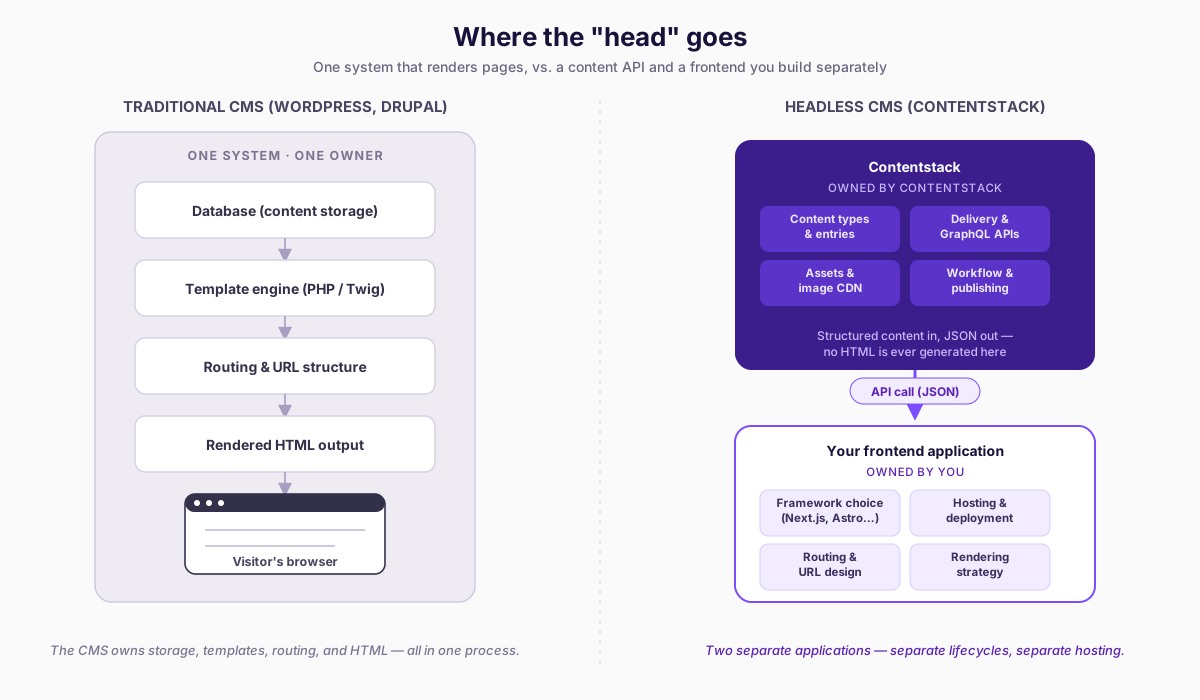
The term comes from a simple metaphor. In a traditional CMS, the "head" is the presentation layer - the templates, the routing, the HTML output. A traditional CMS like WordPress or Drupal is a monolithic application: the same system that stores your content also generates the pages your visitors see. When you write a blog post in WordPress, the CMS decides which PHP template renders it, what URL structure it gets, and how the final HTML is assembled. The CMS owns the full pipeline from content entry to browser output.
Remove the head, and you have a headless CMS. The system stores content and exposes it through APIs. It does not generate HTML. It does not decide what framework you use. It does not host your website. It is an API-first content repository, and the rendering layer is a separate application that you build independently.
This distinction is architectural, not qualitative. Calling a CMS "headless" does not mean it is better. It means the rendering responsibility has shifted from the CMS to you.
How Contentstack implements this architecture
Contentstack is a headless CMS. Concretely, that means the following:
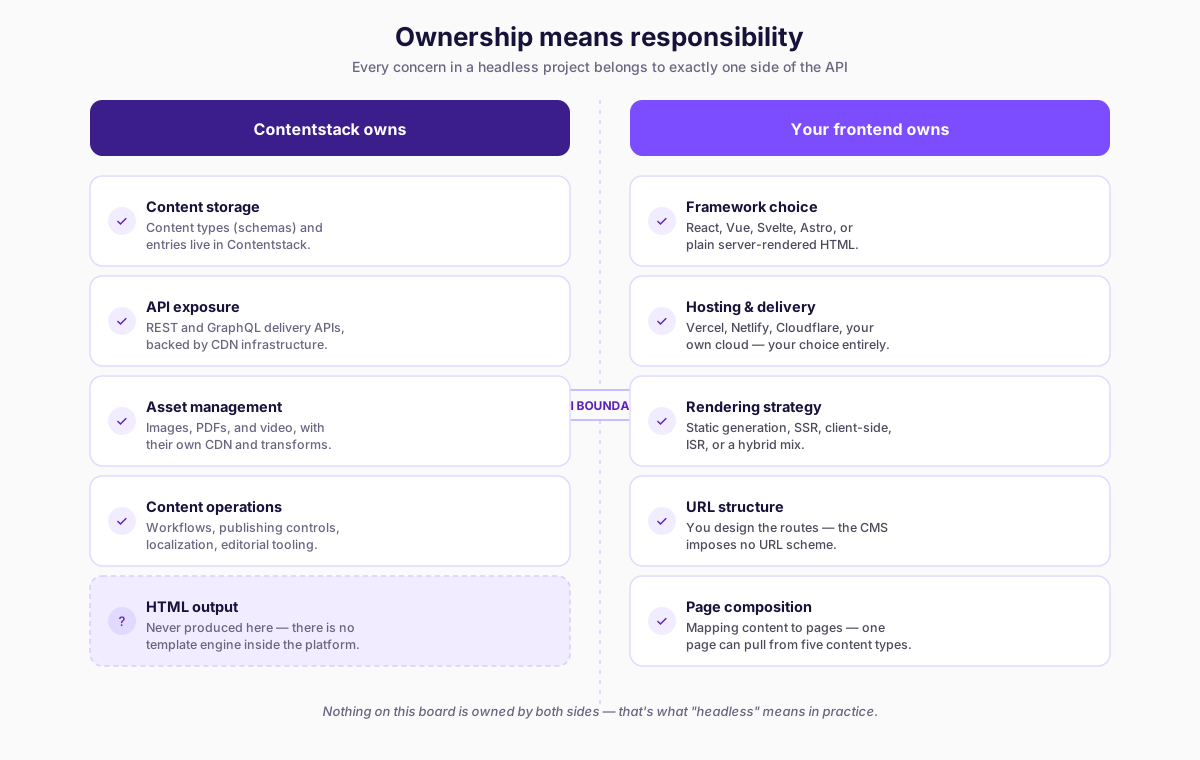
- Content storage: You define content types (schemas) and create entries (instances of those schemas). All structured content lives in Contentstack's infrastructure.
- API exposure: Contentstack serves your content through REST APIs and GraphQL APIs. Both are read-optimized delivery APIs backed by CDN infrastructure. A separate Content Management API handles write operations.
- Asset management: Images, PDFs, videos, and other files are stored in Contentstack's asset repository with its own CDN and image transformation pipeline.
- Content operations: Workflows, publishing controls, localization, and editorial tooling are all built into the platform.
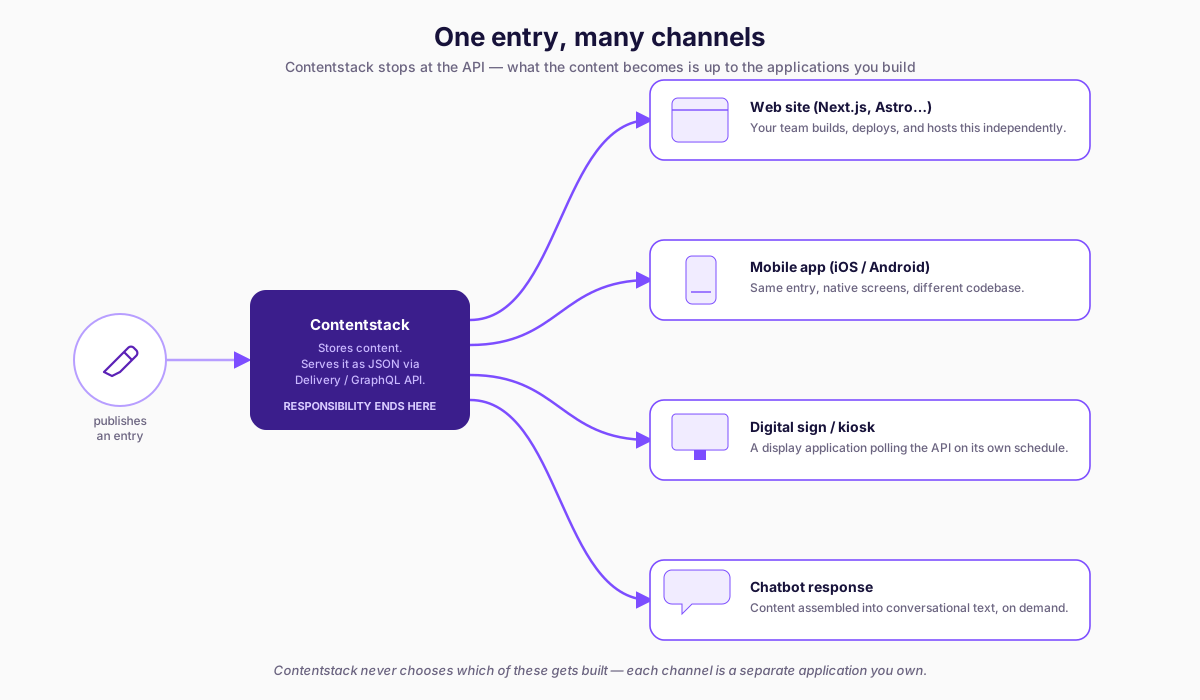
What Contentstack does not do is generate a single HTML page. There is no template engine inside the platform. There is no routing layer that maps URLs to content. There is no server-side rendering pipeline. When an editor publishes an entry, Contentstack makes that content available via API. What happens after that - how and where and when that content becomes a web page, a mobile screen, a digital sign, or a chatbot response - is entirely determined by the applications you build.
This is the defining characteristic of the architecture.
The contrast with traditional CMS platforms
To understand what headless means, it helps to be precise about what it replaced.
In WordPress, when you create a page and hit "Publish," the CMS writes to a MySQL database, selects a PHP template from your active theme, executes that template with the content data, and returns fully rendered HTML to the browser. The CMS owns every step: storage, retrieval, template selection, rendering, and delivery. Your theme is tightly coupled to the CMS runtime. Changing the frontend means changing WordPress theme files that execute inside the WordPress PHP process.
In Drupal, the pattern is similar. Content is stored in the database, and Drupal's rendering pipeline - using Twig templates, render arrays, and the theme layer - produces HTML output. The CMS controls routing, page assembly, and the response lifecycle.
In Contentstack, when an editor publishes an entry, the content is made available through delivery APIs. That is where Contentstack's responsibility ends. Your Next.js application, your Nuxt site, your Astro project, your React Native app - whatever frontend you have built - makes an API call, receives JSON, and renders it however you have decided. The CMS and the frontend are separate applications with separate deployment lifecycles, separate hosting, and separate technology stacks.
This separation is the architectural change. Everything else - the marketing language, the analyst positioning, the vendor comparisons - is commentary on this single structural fact.
Ownership means responsibility
The word "headless" describes where ownership sits. In a traditional CMS, the vendor owns the rendering layer. You customize it through themes and plugins, but you operate within the constraints and capabilities of the vendor's rendering system. In a headless CMS, you own the rendering layer entirely. You choose:
- The framework: React, Vue, Svelte, Angular, Astro, Qwik, or server-rendered HTML with no framework at all.
- The hosting: Vercel, Netlify, Cloudflare Pages, AWS, Azure, Google Cloud, or your own infrastructure.
- The rendering strategy: Static site generation, server-side rendering, client-side rendering, incremental static regeneration, or a hybrid approach.
- The URL structure: You design the routing. The CMS does not impose a URL scheme.
- The page composition: You decide how content maps to pages. A single page might pull from five different content types. A single entry might appear on twelve pages. That mapping logic is yours.
This level of control is powerful, but it is not free. You will need to build all of it. There is no "install a theme and launch" path. There is no default template that produces a working website the moment you create content. The content exists as structured data behind an API, and it stays there until your code fetches it and renders it.
For developers accustomed to traditional CMS platforms, this shift can feel like losing functionality. The page just worked before - why do I need to build routing? The answer is that you are trading the convenience of vendor-controlled rendering for the flexibility of owning the entire delivery architecture. Whether that trade is worth it depends on your project, your team, and your requirements.
The trade-off is real
It is important to resist the narrative that headless is universally better. A well-built WordPress site with proper caching, a thoughtful theme, and solid hosting can outperform a poorly built headless implementation. Architecture does not guarantee quality. Execution does.
Headless architecture gives you the ability to choose the best tools for your frontend. It also gives you the ability to choose the wrong tools, or to choose the right tools and use them badly. The CMS is no longer a safety net that provides default rendering. You are the safety net.
The certification curriculum you are working through acknowledges this trade-off explicitly. Course 4 covers the preview and visual editing infrastructure you need to build so that editors can see their content in context - something traditional CMS platforms provide out of the box. Course 3 covers API patterns and query design - concerns that do not exist when the CMS renders pages for you. These are real costs of the headless architecture, and understanding them honestly is part of being a competent Contentstack developer.
Why the distinction matters for this certification
Throughout this curriculum, you will encounter decisions that only exist because of the headless architecture. When you model content types in Course 2, you are designing API contracts, not database tables for a template engine. When you configure environments in Course 3, you are setting up delivery targets for your independently hosted frontend, not deployment stages for a monolithic application. When you implement Live Preview in Course 4, you are building the editorial feedback loop that a traditional CMS provides automatically.
Every lesson in this certification assumes the headless architecture as a starting point. Understanding what that architecture actually means - not as a marketing label, but as a concrete set of responsibilities - is the foundation for everything that follows.
Common mistakes
Mistake 1: Equating "headless" with "better"
Headless describes architecture, not quality. A project with a headless CMS and a poorly implemented frontend delivers a worse experience than a well-maintained traditional CMS site. The architecture enables flexibility; it does not guarantee good outcomes.
Common Pitfall
Developers coming from WordPress or Drupal often expect the CMS to handle routing or generate pages -- in a headless setup, all URL management and HTML rendering is your frontend's responsibility.
Mistake 2: Assuming the CMS handles routing or page generation
Developers coming from WordPress or Drupal sometimes expect the CMS to produce pages or manage URLs. In a headless setup, the CMS produces structured content via APIs. Routing, URL generation, page composition, and HTML rendering are entirely the frontend application's responsibility.
Mistake 3: Treating headless as a frontend framework decision
Choosing React or Next.js is not what makes a CMS headless. The CMS is headless because it does not own the rendering layer. You could build a headless frontend with jQuery and server-rendered PHP if you wanted to. The framework is your choice; the architecture is the CMS's characteristic.
Practice in Contentstack
Open your stack and pick one content type or entry from the Veda scenario. Then answer these questions in writing:
- Which part of this experience is owned by Contentstack?
- Which part would your frontend or backend need to implement?
- Which part would an editor expect to see in preview even though the CMS cannot provide it by itself?
If you can answer those three questions clearly, you are starting to think like a headless Contentstack developer.
Summary
Headless does not mean "modern" or "better." It means the CMS stores and delivers structured content, while your team owns rendering, routing, hosting, and experience delivery. That ownership shift is the foundation for every later decision in this certification.
