Tradeoffs of headless architecture
Tradeoffs of headless architecture
TL;DR
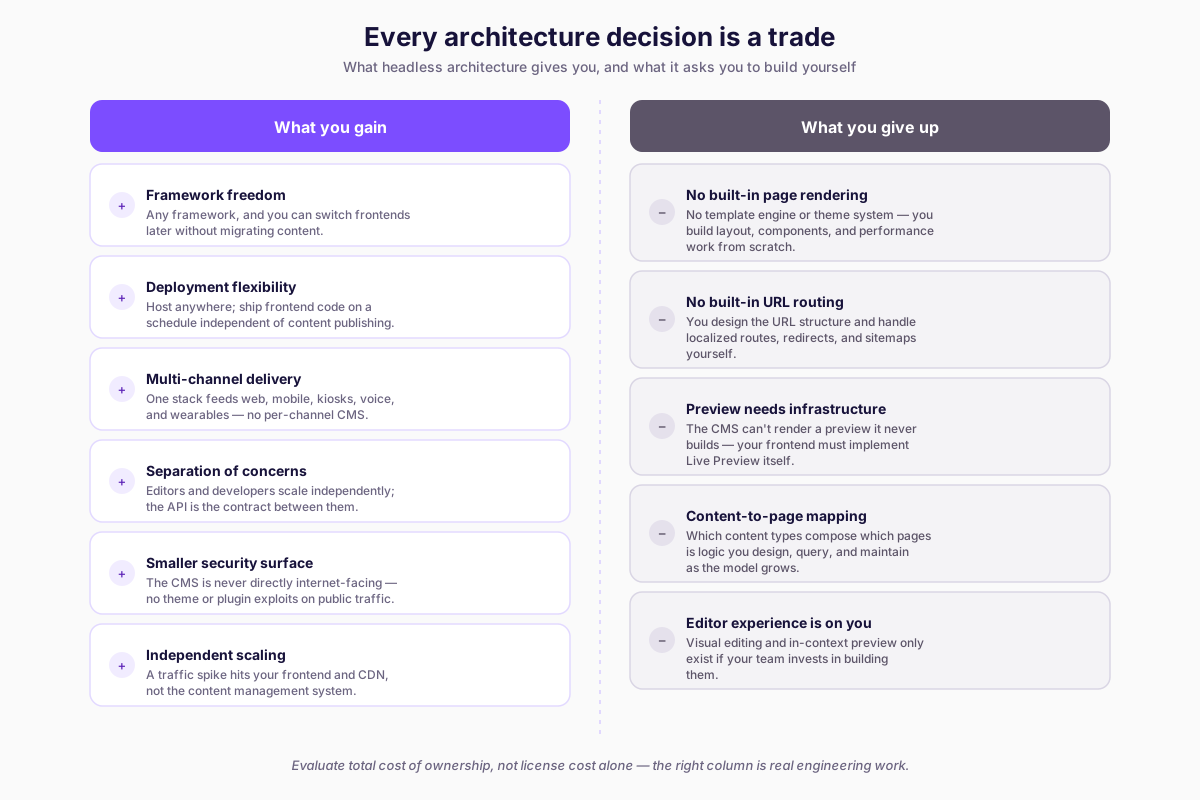
- Headless gives you framework freedom, deployment flexibility, multi-channel delivery, and independent scaling
- You give up built-in page rendering, URL routing, preview, and content-to-page mapping -- all of which you must build yourself
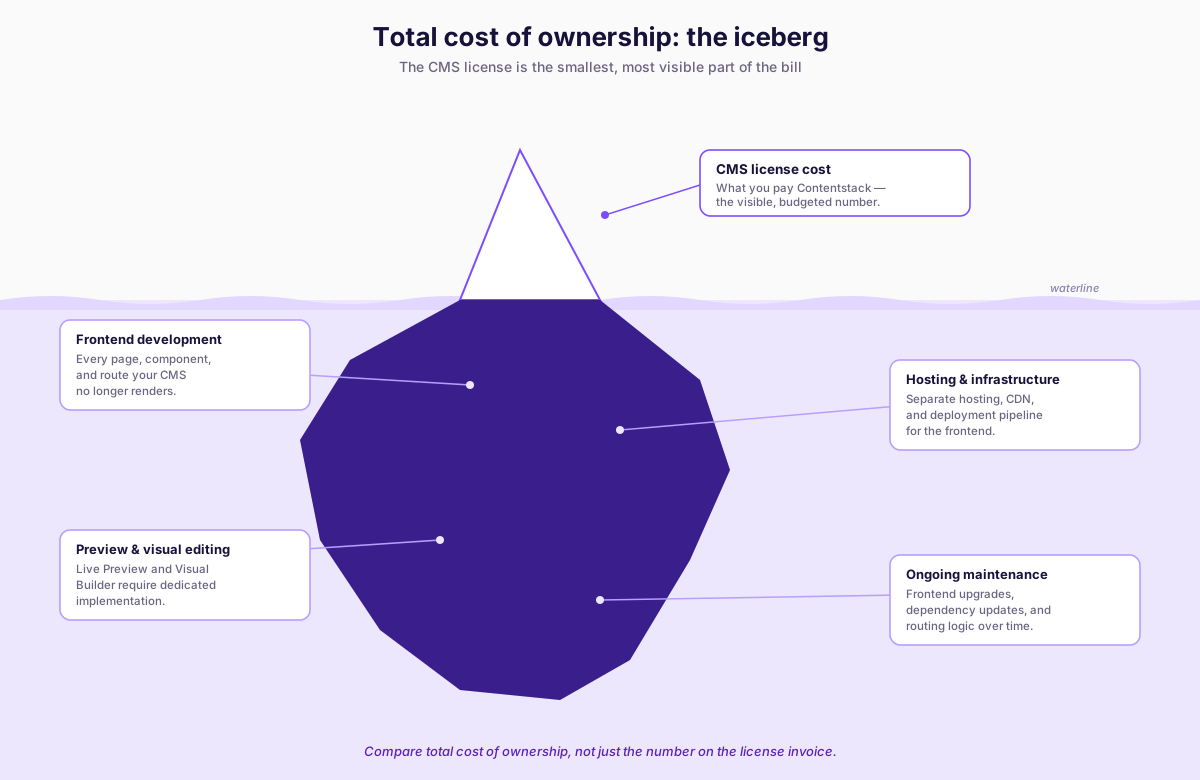
- Evaluate total cost of ownership (frontend dev, hosting, preview tooling, maintenance), not just CMS license cost
- Headless is the wrong choice when your team lacks frontend capacity or time-to-launch is the primary constraint
Every architecture decision is a trade. Headless CMS trades built-in rendering convenience for frontend ownership and multi-channel flexibility. That trade is excellent for some projects and costly for others. This lesson lays out both sides honestly so you can evaluate headless architecture on its actual merits rather than on marketing claims.
What you gain
The gains of headless architecture are real and significant. They explain why organizations with complex digital requirements adopt this approach. But each gain comes with a prerequisite: your team must have the capability to capitalize on it.
Framework freedom
When the CMS does not own the rendering layer, you choose your frontend technology. React, Vue, Svelte, Angular, Astro, Qwik, SolidJS, plain server-rendered HTML - all are valid options because the CMS only provides content via API. This freedom matters for two reasons.
First, you can select the framework that best fits your project requirements. A marketing site with heavy static content might use Astro for its minimal JavaScript output. A complex interactive application might use React with Next.js for its server-side rendering and routing capabilities. A mobile app uses React Native or Swift or Kotlin. The CMS does not constrain any of these choices because it is not involved in rendering.
Second, you can change frameworks without migrating your CMS. If you build a site with Nuxt today and decide to move to Astro in two years, your content stays exactly where it is. You build a new frontend, point it at the same APIs, and retire the old one. In a traditional CMS, switching from a WordPress theme to a different rendering technology means either migrating the entire CMS or building a hybrid architecture.
Deployment flexibility
Your frontend is an independent application, which means you choose where and how to host it. Vercel, Netlify, Cloudflare Pages, AWS Amplify, a Kubernetes cluster, a CDN with edge functions - the deployment target is your decision. You can optimize for the infrastructure that matches your traffic patterns, geographic distribution, and cost constraints.
This independence also means you can deploy the frontend on a completely different schedule from the CMS. Content publishing and code deployment are decoupled. Editors can publish content without waiting for a code release, and developers can ship frontend changes without coordinating with the content calendar.
Multi-channel delivery
A single Contentstack stack can serve content to a website, a mobile app, a digital kiosk, an in-store display, a voice assistant, and a smartwatch. The content is structured data accessed through APIs - any application that can make an HTTP request can consume it.
This is one of the strongest arguments for headless architecture. If your organization needs to deliver the same content across multiple channels, maintaining a separate CMS for each channel creates duplication, inconsistency, and operational overhead. A single content repository with multiple consuming applications is architecturally cleaner and operationally simpler.
Separation of concerns
In a headless architecture, the content team and the development team operate with clear boundaries. Content editors work in the CMS: creating entries, managing workflows, publishing to environments. Developers work on the frontend application: building components, implementing routing, optimizing performance. Changes on one side do not require changes on the other, as long as the content model (the API contract) remains stable.
This separation enables independent scaling of teams. You can hire more editors without needing more developers. You can restructure the frontend team without disrupting content operations. The API is the contract between the two groups.
Security surface reduction
A traditional CMS is a server-side application that handles both content management and public-facing traffic. That means your content management system is exposed to the internet, creating a large attack surface. WordPress security vulnerabilities are among the most frequently exploited on the web because the same application that serves pages also processes administrative requests.
In a headless architecture, the CMS is not directly accessible to end users. Visitors interact with your frontend application, which communicates with the CMS API using tokens. The CMS management interface is a separate system with its own access controls. This reduces the attack surface significantly and eliminates entire categories of vulnerability - SQL injection through theme code, cross-site scripting through plugin rendering, server-side exploits targeting the CMS runtime.
Independent scaling
When the CMS and the frontend are separate applications, they scale independently. A viral blog post that generates millions of page views puts load on your frontend infrastructure and the CDN-backed delivery API - not on the content management system. Editors can continue working uninterrupted while the frontend handles traffic spikes.
Conversely, a bulk content import that generates thousands of CMA calls does not affect your frontend response times. The management plane and the delivery plane have separate resource pools.
What you give up
The losses of headless architecture are equally real. They represent work that traditional CMS platforms handle automatically and that you must now build, maintain, and support.
No built-in page rendering
There is no template engine, no theme system, no default page output. When you create a content type and entries in Contentstack, those entries exist as structured data behind an API. To see that content as a web page, you must build a frontend application that fetches the data and renders it. This is not a small task - it includes page layout, component mapping, responsive design, accessibility, and performance optimization.
For teams with strong frontend development capability, this is an opportunity. For teams without it, this is a blocker.
No built-in URL routing
Traditional CMS platforms generate URLs automatically. WordPress creates /blog/my-post-title/ when you publish a post. Drupal maps content to routes through its routing system. In a headless architecture, the CMS does not manage URLs. You'll want to design your URL structure, implement the routing logic in your frontend framework, and handle redirects, canonical URLs, and sitemap generation yourself.
This is one of the most commonly underestimated costs. URL routing seems simple until you account for localized URLs, dynamic routes from referenced content, URL changes that require redirects, and SEO requirements for canonical link elements.
Preview requires dedicated infrastructure
In WordPress, clicking "Preview" opens a draft version of the page because the CMS renders the page. In a headless architecture, the CMS cannot preview your page because it does not render pages. Preview requires your frontend application to support a preview mode that fetches draft content from preview-specific API endpoints and renders it in the editor's browser.
Contentstack provides Live Preview and Visual Builder capabilities, but these require implementation work on the frontend side. You need to configure preview tokens, set up preview-aware routing, handle draft content states, and integrate the Live Preview SDK. Course 4 covers this in detail. The point here is that preview is a feature you build, not a feature you get.
Content-to-page mapping is your problem
In a traditional CMS, content and pages are often the same thing. A WordPress "page" is both a content container and a rendered output. In a headless architecture, content types are data schemas, not page templates. The mapping between content and pages - which content types appear on which pages, how multiple content types compose into a single page, how a single entry might appear on different pages in different contexts - is logic you design and implement.
This mapping can become complex. A homepage might pull from a "Hero Banner" content type, a "Featured Products" content type, a "Latest Articles" content type, and a "Promotional Banner" content type. Each of those might have references to other entries. The composition logic, the query strategy, and the rendering orchestration are all your responsibility.
Editor experience depends on your implementation
In a traditional CMS, the editor experience is built into the product. WordPress provides a block editor, media management, page management, and a built-in preview. The editor experience is the product.
In a headless architecture, the CMS provides the editorial interface for content management - Contentstack's entry editor, workflow panels, asset manager, and content type builder are all part of the platform. But the experience of seeing content in context, editing content visually, and understanding how content will appear on the actual site depends on the infrastructure you build. If you do not implement Live Preview, editors cannot see their changes in context. If you do not configure Visual Builder, editors cannot edit content directly on the page. The quality of the editor experience is directly proportional to the investment your development team makes.
Total cost of ownership
Whether headless is cheaper or more expensive than a traditional CMS depends almost entirely on team capability and project requirements.
Headless can be cheaper when: your team already has frontend development expertise, you need multi-channel delivery, you want to use modern deployment infrastructure (serverless, edge, JAMstack), and the project has a long enough lifespan to amortize the initial frontend build cost.
Headless can be more expensive when: you need to hire frontend developers specifically for the CMS implementation, the project is a simple site that a traditional CMS could handle with a pre-built theme, the editorial team needs extensive preview and visual editing capabilities that require custom development, or the project has a short timeline that does not allow for building the rendering infrastructure.
The licensing cost of the CMS is only one factor. The development cost of the frontend, the ongoing maintenance cost, the infrastructure cost of hosting the frontend separately, and the cost of building editorial tooling like preview and visual editing - all of these factor into the total cost of ownership.
When headless is the wrong choice
Headless architecture is not appropriate for every project. Being honest about this is more useful than pretending it is universally superior.
Simple brochure sites: A five-page marketing site with static content, a contact form, and no multi-channel requirements does not benefit from headless architecture. A WordPress site with a good theme and managed hosting can be live in hours, with preview, URL management, and page rendering handled automatically.
Teams without frontend development capacity: If your organization does not have developers who can build and maintain a frontend application, adopting a headless CMS creates a dependency on external agencies or contractors for every change that involves page structure, routing, or rendering logic.
Projects where time-to-launch is the primary constraint: If the project must be live in two weeks, the overhead of building a rendering layer, implementing preview, configuring deployment, and setting up URL routing may not be justified. A traditional CMS with an existing theme gets you to launch faster.
Content-heavy editorial sites with minimal multi-channel needs: If your content goes to one website and the editorial team needs rich, out-of-the-box editing and preview capabilities, a traditional CMS with strong editorial tools may provide a better editorial experience with less development investment.
The right question is not "is headless better?" but "does the headless trade-off align with our project constraints, team capabilities, and long-term requirements?"
Common mistakes
Mistake 1: Adopting headless without frontend development capacity
The most expensive version of this mistake is an organization that chooses a headless CMS, then discovers that every page change requires developer involvement because no one anticipated the frontend build cost. If your team cannot build and maintain a standalone frontend application, headless architecture creates a bottleneck rather than removing one.
Common Pitfall
Underestimating the preview and editorial tooling investment leads to editor frustration -- Live Preview and Visual Builder are not polish features but core requirements that need dedicated development time.
Mistake 2: Underestimating the preview and editorial tooling investment
Developers focus on the API and the rendering pipeline. Editors need to see their content in context before publishing. Bridging that gap requires infrastructure - preview environments, Live Preview integration, potentially Visual Builder setup. Treating these as optional polish rather than core requirements leads to editor frustration and slower content operations.
Mistake 3: Comparing CMS license cost instead of total cost of ownership
A headless CMS license might cost less or more than a traditional CMS license, but the license is a fraction of the total cost. Frontend development, hosting infrastructure, preview tooling, deployment pipelines, and ongoing maintenance are all costs that exist in headless but are partially absorbed by the platform in traditional CMS setups. Evaluate total cost, not license cost.
