Lookalike Models
Gain an in-depth understanding of Lytics Lookalike Models and how to build Predictive Audiences that drive engagement and conversions.
Introducing Lookalike Models
Overview
Note: On January 10, 2023, we upgraded our UI with a new, refreshed interface. All of the underlying functionality is the same, but you will notice that things look a little different from this Academy guide. The most notable change is that the navigation menu has moved from the top of the app to the left side. We appreciate your patience as we work on updating our Academy.
Lytics makes it easy to build Lookalike Models and Predictive Audiences that drive engagement and conversions.
What will I learn?
- What are Lytics Lookalike Models? How can I use them?
- Where do Lookalike Models live in Lytics?
- How to start making models
- How to understand your model performance and what to do next
- How to create Predictive Audiences
How are Lytics Lookalike Models different from other tools?
You may be familiar with "Lookalike Audiences" on Facebook or "Similar Audiences" on Google. Lytics Lookalike Models are different in a few key ways:
- Based on your own first-party, cross-channel data (no walled garden)
- You can build and validate your own custom models (no black box)
- Quick and easy interface for marketers to make models (no data science team required)
- Provide real-time predictions - updating user scores for dynamic and effective targeting
Lytics Laboratory
Lytics provides a data science workbench for your marketing teams in the Laboratory section of the Lytics UI. This is where you'll go to build Lookalike Models.

Check out the short video "Lookalike Models" (1.5 min).
What are common use cases for Lookalike Models?
- Optimize early stage funnel. Identify users least likely to progress to cast an intelligently wide net.
- Unknown users to known users
- Optimize late stage funnel. Identify users most likely to convert to optimize higher touch experiences.
- Known Users to Purchasers
- One time Purchasers to Repeat Purchasers
- Nurture users who are likely to become high lifetime value (LTV) customers
- Reduce churn by identifying known users who are likely to churn
Learn more: Lytics Laboratory documentation
Which of the following are benefits of Lytics Lookalike Models? (select all that apply)
A. Models continuously update allowing real-time predictions
B. You can import existing models from other tools into Lytics
C. Custom models can be built from scratch
D. Models are built using your own first-party data
Answer: A, C, D
Core Concepts
Before learning how to build Lookalike Models in Lytics, it's important to understand the key terms that will be used throughout:
- Model: the output of customer data and a ML algorithm that can provide predictions on the data.
- Source Audience: the group of users you want to reach with your marketing messages to get them to convert on a particular marketing goal.
- For example: “unknown users”.
- Lytics calculates a score from 0 to 1 representing the user's likelihood to convert to the target audience.
- Target Audience: the group of users that represents the desired outcome for users in the source audience (have converted in the past).
- For example: “users with email addresses”.
- Predictive Audience: the output audience(s) that are built using the predictive score from a Lookalike Model.
For more definitions, see our Glossary.
Segmentation Strategies: Manual vs. Machine
Check out the Lookalike Models Overview for an example of how Lookalike Models work compared to a manual segmentation strategy.
Match the Lytics term to its definition.
| Model | Output of data and an algorithm that provides predictions |
| Target Audience | Users that have yet to convert on your marketing goal |
| Source Audience | Users that have converted in the past |
| Predictive Audience | Users available to target, using the predictive score output from a Lookalike Model |
Building Lookalike Models
Lookalike Model Builder
The Lookalike Model Builder provides an interface for marketers to quickly build custom models in Lytics. Navigate to the Lookalike Models dashboard and find the Create New Model button at the top right to get started.

Configuration Options
You can use a number of basic and advanced configuration options to build your model:
- Basic options provide an intelligent starting point, making it quick and easy to get started.
- Advanced options give granular control to those who have more experience with model building.
For most use cases, building a model with the basic configuration parameters is sufficient. The only required parameters are:
- Source audience
- Target audience
Selecting the right audiences is very important for building a usable model. We'll touch on this more in a later section.
For descriptions and examples of all configuration options, see Model Builder documentation.
Which of the following basic configuration parameters are required?
A. Custom Model Name
B. Source Audience
C. Auto Tune
D. Target Audience
Answer: B, D
Models built with Auto Tune can also include advanced configuration parameters.
A. True
B. False
Answer: True
Model Dashboard
The Lookalike Model dashboard provides visibility of the health, status, and usage of your Lookalike Models. It lists all models in your account allowing you to search, sort, and view the summary, configuration, and diagnostic information for each model created.
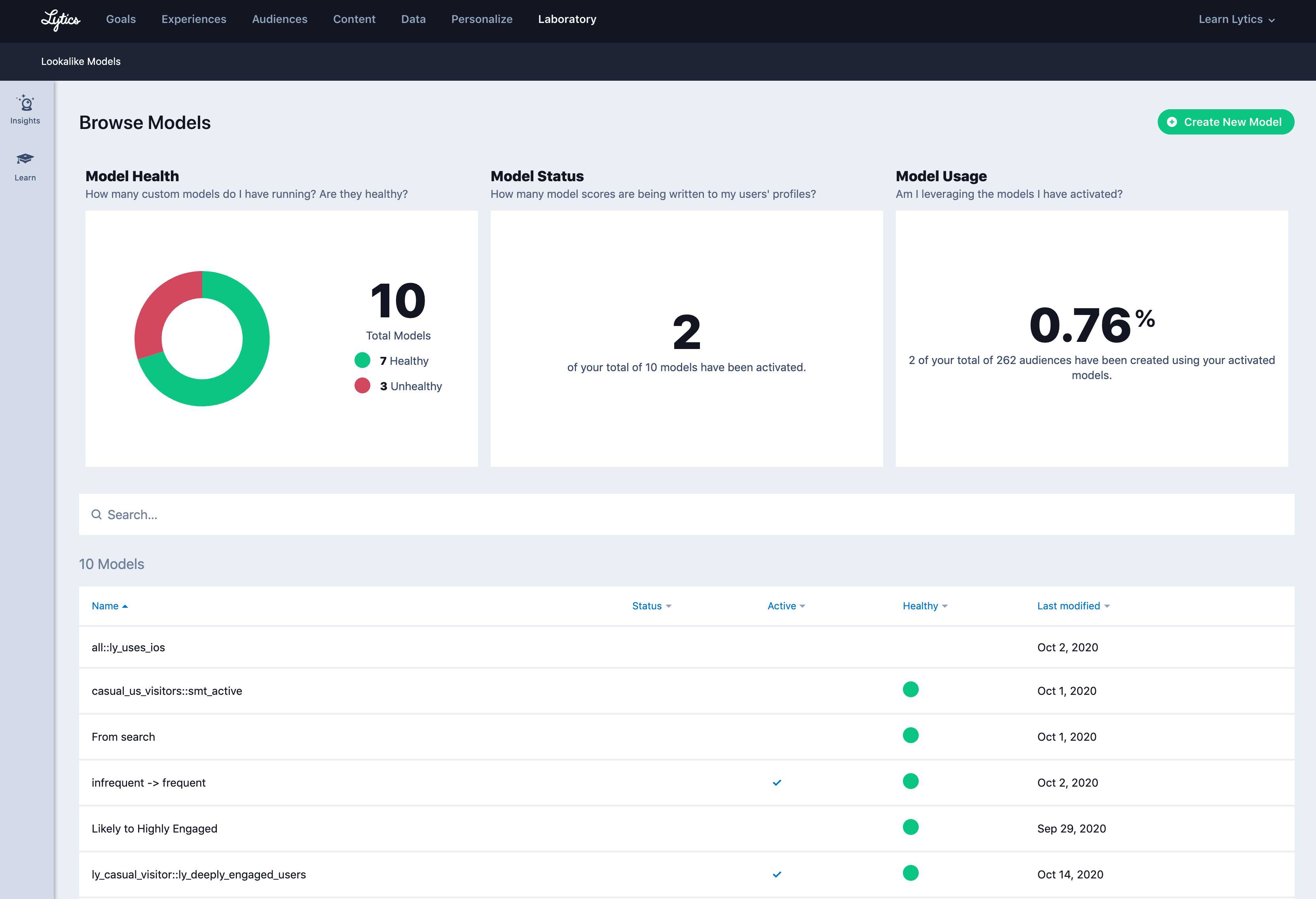
Here's a quick rundown of the main sections:
Model health chart
Shows the total number of models for an account, and how many are considered healthy or unhealthy. A model is considered healthy if it can make accurate predictions.
Model status
Displays how many of your models have been activated. An activated model is a model currently generating a score that is being written to user profiles, meaning the model's predictions can be used for audience segmentation and targeting.
Model usage
Shows the percentage of all your audiences that are using activated models.
Model table
Allows you to search for any model in your account. Click any model to open its summary for more detailed information about that model.
See the documentation for more details.
Note: Lookalike Models Activation Limit - You can only have 5 Lookalike Models active at a time, per the default account setting. If you're interested in a higher limit, please contact your Account Manager for more information.
To use your model's predictions in audience segmentation and targeting, the model must be _______?
A. Recently created
B. Activated
C. Top performing
Answer: B
Model Summary
The Lookalike Model Summary surfaces valuable information and metrics about the performance and usage of your model.
Understanding Accuracy and Reach
At the top of each Model Summary page, you'll see two bars indicating the model's accuracy and reach scores.
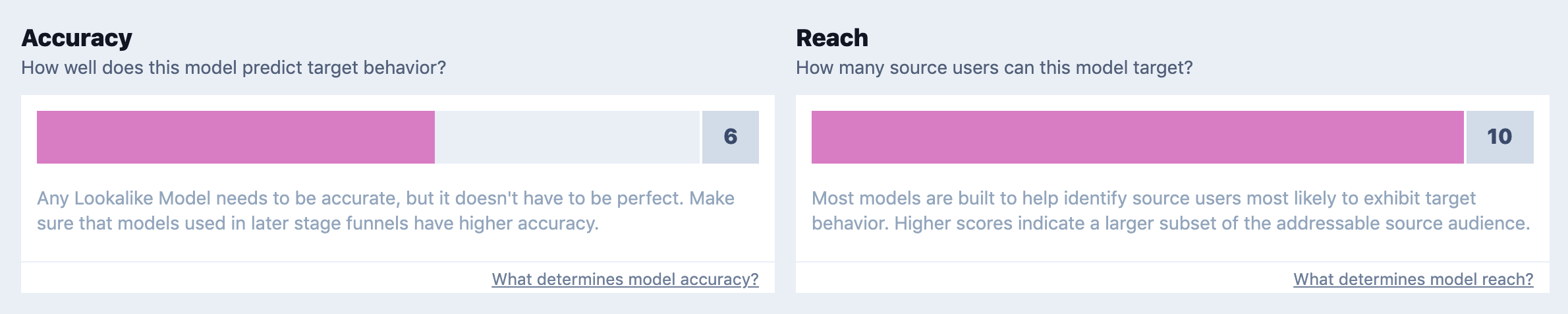
- Accuracy: the precision of a model’s predictions
- Reach: the relative size of a Lookalike Model’s addressable audience
As a general principle, you cannot optimize for both accuracy and reach in a Lookalike Model. There are inherent tradeoffs between the two.
- Optimize for reach for targeting users in earlier stages of your funnel
- Reach more users, while being less precise
- Optimize for accuracy for targeting users in later stages of your funnel
- Be more precise, but reach less users
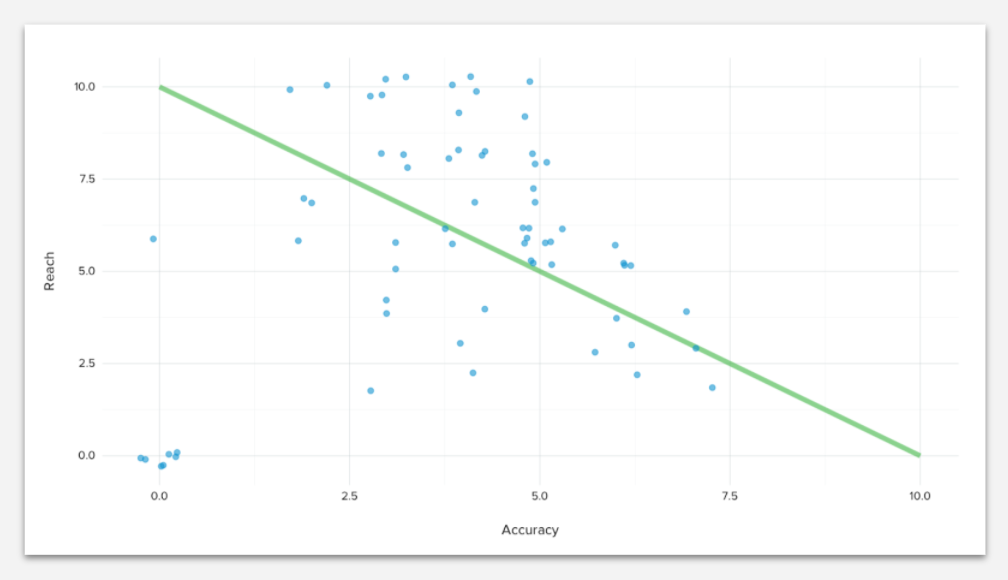
When balancing the trade off between accuracy and reach, consider the sum of accuracy and reach to determine a model’s fitness to be used: good models have an accuracy and reach sum around 10, excellent models will sum to more than 10, fair/poor models will sum to less than 10.
Refer to the Accuracy vs. Reach documentation
Interpreting your model's results
In the rest of the Model Summary, you can see how the source and target audiences overlap, the important features that contribute to the model's predictions, what audiences are using the model, and any diagnostic and troubleshooting messages.
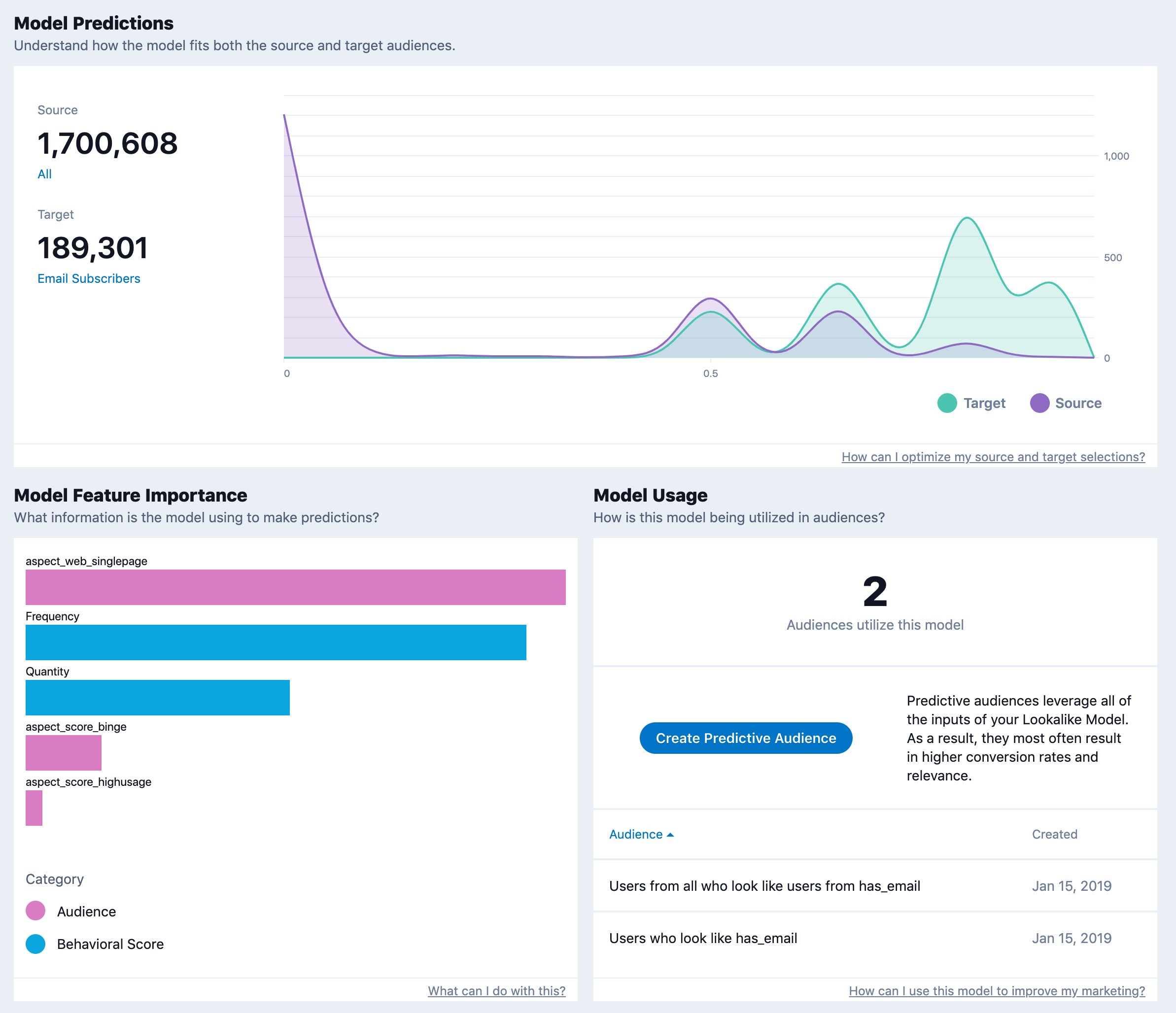
Model predictions
Displays the size of your source and target audiences and charts the predictions for those audiences. The shape of the graph is most important, which indicates the amount of overlap between your source and target audiences.
Model features importance
Indicates which information the model is using to make predictions. More specifically, the chart lists the relative importance of features among users likely to convert from the source to the target audience.
Model usage
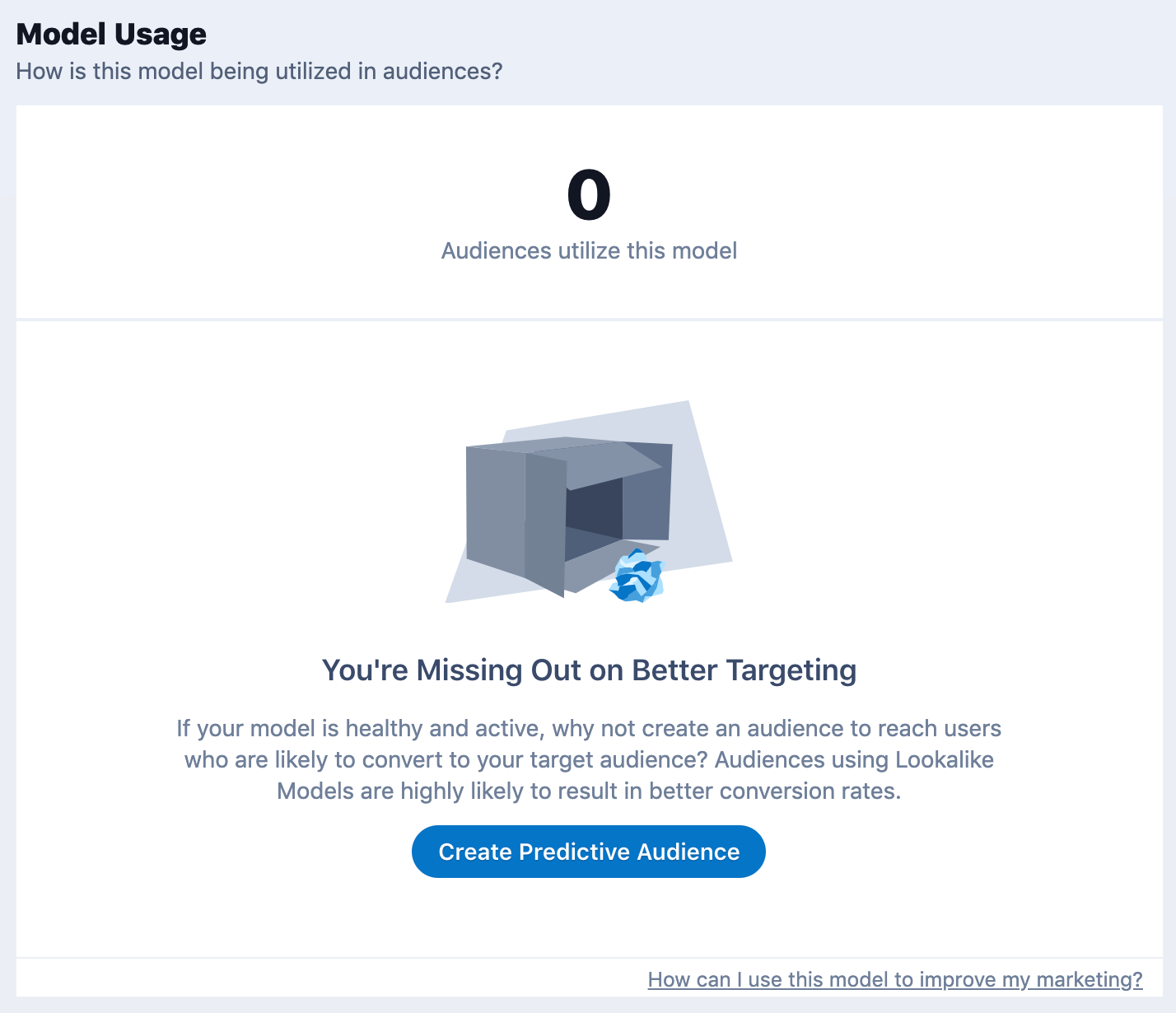
Displays a list of audiences that are utilizing this model for targeting and a button to create a new Predictive Audience with this model.
Diagnostics & troubleshooting
Provides messages pertaining to the performance and status of your Lookalike Model. These messages are categorized as warnings, errors, or information, and may include suggestions on how to improve your models.
Refer the Model Summary documentation
Check your understanding of the tradeoffs between accuracy and reach.
| High reach | Better for earlier stages of your funnel |
| Low accuracy and low reach | Better for later stages of your funnel |
| High accuracy | Not a good model, shouldn't be used for predictions |
Targeting Predictive Audiences
Creating Predictive Audiences
Marketing campaigns run with Predictive Audiences from a healthy Lookalike Model are very likely to result in higher conversion rates. Even better, Lytics makes it super easy to create Predictive Audiences with the click of a button.
Really, it's that easy!
Ok, show me how to create a Predictive Audience!
Once a Lookalike Model is built and users are scored, follow these steps to make a Predictive Audience.
- Find the model of interest and go to its Summary page.
- Scroll to the Model Usage section.
- Click Create Predictive Audience.
- Now in the Audience Builder, you'll see the model predictions pre-populated as a user field named `segment_prediction`.
- You can adjust the prediction decision threshold or add rules to further refine the audience.
Refer to the Create Predictive Audiences documentation.
Selecting the right Source and Target
Building effective Lookalike Models that power your Predictive Audiences is an iterative process.
Some experimentation is to be expected before you find the right audiences and configuration options for your use case, which ties into the idea behind the "Lytics Laboratory."
Selecting the Right Source and Target Audience
One of the most important factors for Lookalike Model performance is your selection of the source and target audience.
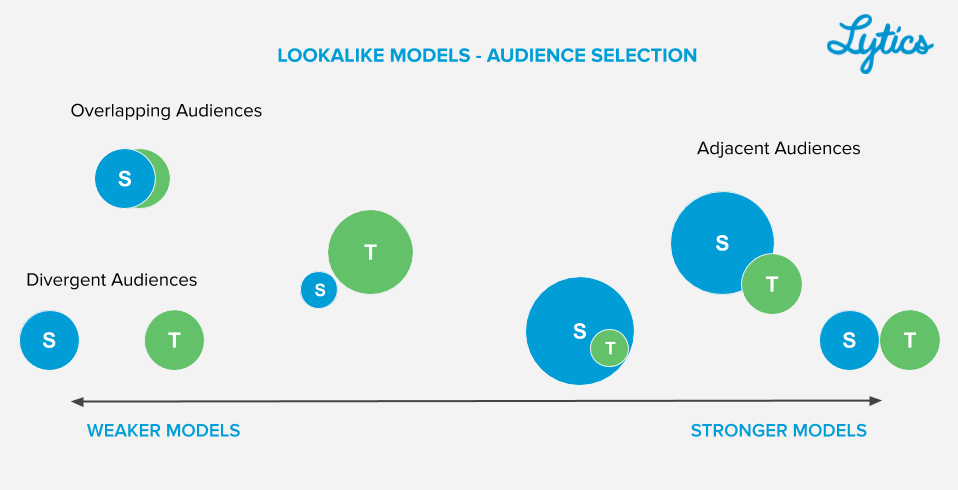
Check out the documentation linked below for examples of how to select the right audiences for your use case.
Refer to the Selecting the right audiences documentation.
Match the audience type to the example use case.
| Adjacent Audience | unknown audience → audience with email |
| Divergent Audience | unknown audience → audience with newsletter signup and single purchase |
| Overlapping Audience | unknown audience → audience with no purchases |
Iterating your Predictive Audiences
Most Predictive Audiences are built by identifying users in the source audience who have a high model score, indicating they are likely to convert to the target audience. This "high score" is called the Decision Threshold.
Adjusting the Decision Threshold
The decision threshold is a score from 0-1
- 0= very unlikely to convert
- 1= very likely convert
- In most cases, the decision threshold is set to 0.5
To adjust the reach of the audience you are building, you might consider using a different decision threshold.
- Lower decision threshold - reach more users in the source audience.
- Higher decision threshold - be more accurate but reach less users in the source audience.
Refer to the Decision Threshold documentation
How do I pick the right threshold? You may see diagnostic messages suggesting you create audiences using a different decision threshold. But keep in mind any relevant domain knowledge (which the model doesn't have) when choosing the decision threshold.
If you want to expand the reach of your Predictive Audience, how should you adjust the decision threshold?
A. Raise the decision threshold
B. Keep it the same but pick a larger source audience
C. Lower the decision threshold
Answer: C
My model is unhealthy. What can I do?
See the Improving Unhealthy Models section for examples of why your model might not be performing well and suggested next steps.
What is the most common reason a model is considered unhealthy?
A. Auto Tune wasn't selected
B. Source and target audiences were divergent or overlapping
C. Decision threshold was too high
D. Not enough signal in the underlying data
Answer: B
If you are trying to predict which users are likely to make a purchase, which of the following data sources are required to build an accurate Lookalike Model?
A. Email data
B. Demographic data
C. Subscription data
D. Purchase data
Answer: D
Next Steps
More Resources
To continue learning, we recommend you check out the following resources:
- Lookalike Models documentation
- Leveraging Lookalike Models & Predictive Audiences
- Learn about 6 different Use Cases across the customer lifecycle
Just as you iterate Lookalike Models, the Lytics Team wants to keep iterating our training guides.
