---
title: "CMA | Assets"
description: "Assets refer to all the media files (images, videos, PDFs, audio files, and so on) uploaded in your Contentstack repository for future use.
You can now pass the branch header in the API request to fetch or manage modules located within specific branches of the stack. Additionally, you can also set the include_branch query parameter to true to include the _branch top-level key in the response. This key specifies the unique ID of the branch where the concerned Contentstack module resides.
These files can be attached and used in multiple entries.
"
url: "https://www.contentstack.com/docs/developers/apis/content-management-api/assets"
product: "Contentstack"
doc_type: "guide"
audience:
- developers
- admins
version: "current"
last_updated: "2026-06-02"
---
# CMA | Assets
[Assets](/docs/content-managers/author-content/#create-and-manage-assets) refer to all the media files (images, videos, PDFs, audio files, and so on) uploaded in your Contentstack repository for future use.
You can now pass the branch header in the API request to fetch or manage modules located within specific branches of the stack. Additionally, you can also set the include\_branch query parameter to true to include the \_branch top-level key in the response. This key specifies the unique ID of the branch where the concerned Contentstack module resides.
These files can be attached and used in multiple [entries](/docs/content-managers/working-with-entries/about-entries).
## Get All Assets
### Get all assets
**GET** `/assets?folder={folder_uid}&include_folders={boolean_value}&environment={environment}&version={version_number}&include_publish_details={boolean_value}&include_count={include_count}&relative_urls={relative_urls}&asc={asc_field_uid}&desc={desc_field_uid}`
The Get all assets request returns comprehensive information on all assets available in a stack.
To configure the permissions for your application via OAuth, please include the cm.assets.management:read scope.
Additionally, if you wish to fetch the metadata attached to each asset, then you need to pass include\_metadata as a query parameter. Set this parameter to true to include the asset metadata along with all assets in the response body.
You will find the asset metadata under the \_metadata key in the response. It will be associated with a specific extension UID as follows:
```
"_metadata":{ "extensions":{ "{extension_uid}":[ { "image_copyrights": "Contentstack Branding", "scope”: “local” } ] }}
```
You can add queries to extend the functionality of this API call. Under the URL Parameters section, insert a parameter named query and provide a query in JSON format as the value.
To learn more about the queries, refer to the [Queries](/docs/developers/apis/content-delivery-api#queries) section of the Content Delivery API doc.
**Tip:** To include the publish details in the response, make use of the include\_publish\_details parameter and set its value to ‘true’. This query will return the publish details of the entry in every environment along with the version number that is published in each of the environment. When you publish an asset, the associated metadata of that asset will also get published.
#### Query Parameters
- **folder** (optional)
Enter either the UID of a specific folder to get the assets of that folder, or enter ‘cs\_root’ to get all assets and their folder details from the root folder.
- **include_folders** (optional)
Set this parameter to ‘true’ to include the details of the created folders along with the details of the assets.
- **environment** (optional)
Enter the name of the environment to retrieve the assets published on them. You can enter multiple environments.
- **version** (optional)
Specify the version number of the asset that you want to retrieve. If the version is not specified, the details of the latest version will be retrieved.
- **include_publish_details** (optional)
Enter 'true' to include the publish details of the entry.
- **include_count** (optional)
Set this parameter to 'true' to include the total number of assets available in your stack in the response body.
- **relative_urls** (optional)
Set this to 'true' to display the relative URL of the asset.
- **asc** (optional)
Enter the unique ID of the field for sorting the assets in ascending order by that field.
- **desc** (optional)
Enter the unique ID of the field for sorting the assets in descending order by that field.
- **include_branch** (optional)
Set this to 'true' to include the '\_branch' top-level key in the response. This key states the unique ID of the branch where the concerned Contentstack module resides.
#### Headers
- **api_key** (required)
Default: `blt20962a819b57e233`
- **authtoken** (optional)
Default: `your_authtoken`
- **authorization** (required)
Enter your OAuth token or management token. Learn more about [authentication](/docs/developers/apis/content-management-api#authentication)
Default: `[Bearer ] or [your_management_token]`
- **branch** (optional)
Enter your branch unique ID.
Default: `main`
#### Sample Response
```json
{
"assets": [{
"uid": "blt558a9890b838abcd",
"created_at": "2015-01-08T15:07:53.495Z",
"updated_at": "2015-01-08T15:07:53.495Z",
"created_by": "abcd1234567890",
"updated_by": "abcd1234567890",
"content_type": "application/vnd.contenstack.folder",
"tags": [],
"name": "Asset Folder",
"ACL": {},
"is_dir": true,
"parent_uid": null,
"_version": 2
},
{
"uid": "bltabc123e1a1231b23d",
"created_at": "2018-12-27T04:58:58.014Z",
"updated_at": "2019-07-10T12:02:14.299Z",
"created_by": "abcd1234567890",
"updated_by": "abcd1234567890",
"content_type": "image/png",
"file_size": "42670",
"tags": [],
"filename": "Asset file.png",
"url": "https://images.contentstack.io/v3/assets/blt23423c2acaae34b3/bltabc123e1a2b34b5d/5c555c555d5c5e5cc5b55d555/download",
"ACL": {},
"is_dir": false,
"parent_uid": "blt1223b11e22ae333f",
"_version": 1,
"title": "Asset file.png",
"publish_details": [{
"environment": "bltc15045c3098babcd",
"locale": "en-us",
"time": "2015-01-08T15:07:53.495Z",
"user": "blt42ed70d5f81026a2b9f",
"version": 1
}]
}
]
}
```
## Get a Single Asset
### Get an asset
**GET** `/assets/{asset_uid}?include_path={boolean_value}&version={version_number}&environment={environment}&include_publish_details={boolean_value}&relative_urls={relative_urls}`
The Get an asset request returns comprehensive information about a specific version of an asset of a stack.
To configure the permissions for your application via OAuth, please include the cm.assets.management:read scope.
Additionally, if you wish to fetch the metadata attached to each asset, then you need to pass include\_metadata as a query parameter. Set this parameter to true to include the asset metadata along with all assets in the response body.
You will find the asset metadata under the \_metadata key in the response. It will be associated with a specific extension UID as follows:
```
"_metadata":{ "extensions":{ "{extension_uid}":[ { "image_copyrights": "Contentstack Branding", "scope”: “local” } ] }}
```
**Tip:** To include the publish details in the response, make use of the include\_publish\_details parameter and set its value to ‘true’. This query will return the publish details of the entry in every environment along with the version number that is published in each of the environment. When you publish an asset, the associated metadata of that asset will also get published. However, when publishing assets in bulk, the associated metadata of the assets will not get published.
#### URL Parameters
- **asset_uid** (required)
Enter the unique ID of the asset of which you want to retrieve the details.
#### Query Parameters
- **include_path** (optional)
Set this parameter to ‘true’ to retrieve the complete path of the folder. The path will be displayed as an array of objects which includes the names and UIDs of each parent folder.
- **version** (optional)
Specify the version number of the asset that you want to retrieve. If the version is not specified, the details of the latest version will be retrieved.
**Note**: If no version is mentioned, this request will retrieve the latest published version of the asset. To retrieve a specific version, make use of the version parameter and keep the environment parameter blank.
- **environment** (optional)
Enter the name of the environment to retrieve assets published on them. You can enter multiple environments.
- **include_publish_details** (optional)
Enter 'true' to include the publish details of the asset.
- **relative_urls** (optional)
Set this to 'true' to display the relative URL of the asset. This parameter is not applicable when you delete an asset.
- **include_branch** (optional)
Set this to 'true' to include the '\_branch' top-level key in the response. This key states the unique ID of the branch where the concerned Contentstack module resides.
#### Headers
- **api_key** (required)
Enter the API key of the stack that holds the asset
Default: `blt20962a819b57e233`
- **authtoken** (optional)
Default: `your_authtoken`
- **authorization** (required)
Enter your OAuth token or management token. Learn more about [authentication](/docs/developers/apis/content-management-api#authentication)
Default: `[Bearer ] or [your_management_token]`
- **Content-Type** (required)
Default: `application/json`
- **branch** (optional)
Enter your branch unique ID.
Default: `main`
#### Sample Response
```json
{
"asset": {
"uid": "blt558a9890b838abcd",
"created_at": "2015-01-08T15:07:53.495Z",
"updated_at": "2015-01-08T15:07:53.495Z",
"created_by": "abcd1234567890",
"updated_by": "abcd1234567890",
"content_type": "image/png",
"file_size": "12227244",
"tags": [],
"filename": "file-name.png",
"url": "https: //images.contentstack.io/v3/assets/blt33333c3acaae33b3/bltd44a4444444444e7/5d2dfe55af0d5dea966e/download",
"ACL": {},
"is_dir": false,
"_version": 1,
"title": "Test",
"description": "This is testing",
"publish_details": [{
"environment": "bltc15045c3098babcd",
"locale": "en-us",
"time": "2015-01-08T15:07:53.495Z",
"user": "blt7d4028cc76efee9e",
"version": 1
}]
}
}
```
## Get Assets of a Specific Folder
### Get assets of a specific folder
**GET** `/assets?folder={folder_uid}`
The Get assets of a specific folder retrieves all assets of a specific asset folder; however, it doesn't retrieve the details of subfolders within it.
To configure the permissions for your application via OAuth, please include the cm.assets.management:read scope.
#### Query Parameters
- **folder** (required)
Enter the UID of the asset folder.
- **include_branch** (optional)
Set this to 'true' to include the '\_branch' top-level key in the response. This key states the unique ID of the branch where the concerned Contentstack module resides.
#### Headers
- **api_key** (required)
Enter the API key of the stack that holds the asset
Default: `bltd7eee4a49bdf2842`
- **authtoken** (optional)
Enter your authtoken.
Default: `your_authtoken`
- **authorization** (required)
Enter your OAuth token or management token. Learn more about [authentication](/docs/developers/apis/content-management-api#authentication)
Default: `[Bearer ] or [your_management_token]`
- **branch** (optional)
Enter your branch unique ID.
Default: `main`
#### Sample Response
```json
{
"assets": [{
"uid": "bltabc555e5a5b55b5d",
"created_at": "2018-12-27T04:58:58.014Z",
"updated_at": "2019-07-10T12:02:14.299Z",
"created_by": "blt1e1dead1f11f1111",
"updated_by": "blt1e1dead1f11f1111",
"content_type": "image/png",
"file_size": "42670",
"tags": [],
"filename": "Sample File",
"url": "https://images.contentstack.io/v3/assets/blt33333c3acaae33b3/bltabc555e5a5b55b5d/5c555c55d5c5e5cc5b55d555/download",
"ACL": {},
"is_dir": false,
"parent_uid": "blt0011b00e11ae001f",
"_version": 1,
"title": "Sample File",
"publish_details": []
},
{
"uid": "bltdd55a5555555b5f5",
"created_at": "2018-12-27T04:58:58.101Z",
"updated_at": "2019-07-10T12:02:14.299Z",
"created_by": "blt1e1dead1f11f1111",
"updated_by": "blt1e1dead1f11f1111",
"content_type": "image/png",
"file_size": "53825",
"tags": [],
"filename": "Sample File 2",
"url": "https://images.contentstack.io/v3/assets/blt33333c3acaae33b3/bltdd55a5555555b5f5/5c555c555a5ac5dc5b55cc5a/download",
"ACL": {},
"is_dir": false,
"parent_uid": "blt0011b00e11ae001f",
"_version": 1,
"title": "Sample File 2",
"publish_details": []
}
]
}
```
## Get Assets and Subfolders of a Parent Folder
### Get assets and subfolders of a parent folder
**GET** `/assets?include_folders={boolean_value}&folder={folder_uid}`
The Get assets and folders of a parent folder retrieves details of both assets and asset subfolders within a specific parent asset folder.
To configure the permissions for your application via OAuth, please include the cm.assets.management:read scope.
#### Query Parameters
- **include_folders** (required)
Set this parameter to ‘true’ to include the asset folders in the search query.
- **folder** (required)
Enter the UID of the parent folder.
- **include_branch** (optional)
Set this to 'true' to include the '\_branch' top-level key in the response. This key states the unique ID of the branch where the concerned Contentstack module resides.
#### Headers
- **api_key** (required)
Enter the API key of the stack that holds the asset
Default: `blt20962a819b57e233`
- **authtoken** (optional)
Enter your authtoken.
Default: `your_authtoken`
- **authorization** (required)
Enter your OAuth token or management token. Learn more about [authentication](/docs/developers/apis/content-management-api#authentication)
Default: `[Bearer ] or [your_management_token]`
- **branch** (optional)
Enter your branch unique ID.
Default: `main`
#### Sample Response
```json
{
"assets": [{
"uid": "blt1111b11e11ae111f",
"created_at": "2019-07-10T12:01:24.694Z",
"updated_at": "2019-07-10T12:01:24.694Z",
"created_by": "blt22e22222d22d2f22222a2b2f",
"updated_by": "blt22e22222d22d2f22222a2b2f",
"content_type": "application/vnd.contenstack.folder",
"tags": [],
"name": "Demo Folder",
"ACL": {},
"is_dir": true,
"parent_uid": "bltd11bd1a1c11111ee",
"_version": 1
},
{
"uid": "bltabc555e5a5b55b5d",
"created_at": "2018-12-27T04:58:58.014Z",
"updated_at": "2019-07-10T12:02:14.299Z",
"created_by": "blt1e1dead1f11f1111",
"updated_by": "blt1e1dead1f11f1111",
"content_type": "image/png",
"file_size": "42670",
"tags": [],
"filename": "Sample File",
"url": "https://images.contentstack.io/v3/assets/blt33333c3acaae33b3/bltabc555e5a5b55b5d/5c555c55d5c5e5cc5b55d555/download",
"ACL": {},
"is_dir": false,
"parent_uid": "bltd11bd1a1c11111ee",
"_version": 1,
"title": "Sample File",
"publish_details": []
}
]
}
```
## Upload Asset
### Upload asset
**POST** `/assets?relative_urls={boolean_value}&include_dimension={boolean_value}`
The Upload asset request uploads an asset file to your stack.
To configure the permissions for your application via OAuth, please include the cm.assets.management:write scope.
To upload assets from your local system to Contentstack and manage their details, you need to use the following "form-data" parameters:
Parameter
Description
**asset\[upload\]** (_mandatory_)
Select the input type as 'File'. Then, browse and select the asset file that you want to import. Most file types are supported.
**asset\[parent\_uid\]** (_optional_)
If needed, assign a parent folder to your asset by passing the UID of the parent folder.
**asset\[title\]** (_optional_)
Enter a title for your uploaded asset.
**asset\[description\]** (_optional_)
Enter a description for your uploaded asset.
**asset\[tags\]** (optional)
Assign a specific tag(s) to your uploaded asset.
You can try the call manually in any REST API client, such as Postman. Here's a screenshot for reference:
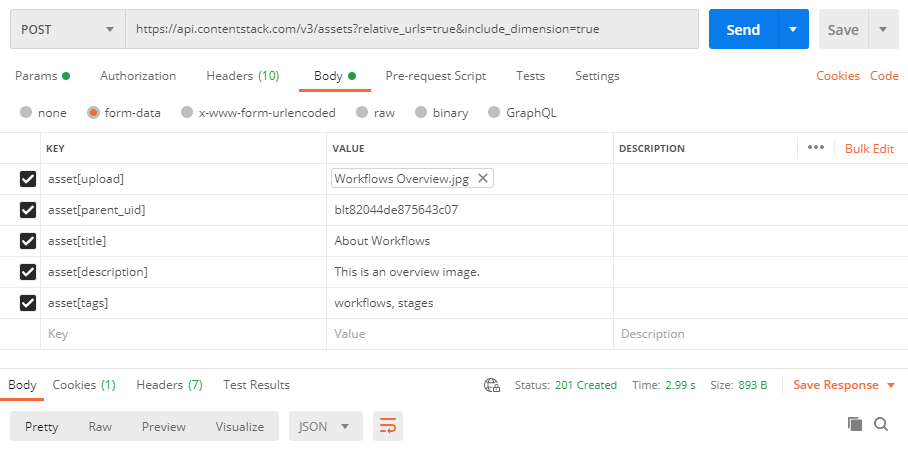
For easier access, here's the cURL for this API Request:
```
curl -X POST \ https://api.contentstack.io/v3/assets?include_dimension=true \ -H 'api_key: {api_key_of_your_stack}' \ -H 'authtoken: {your_authtoken}' \ -H 'cache-control: no-cache' \ -H 'content-type: multipart/form-data; boundary=----WebKitFormBoundary7MA4YWxkTrZu0gW' \ -F 'asset[upload]=@{Filepath e.g., /C:/Users/abc/Desktop/Sample.png}' \ -F 'asset[parent_uid]={If you need to add this file under an existing asset folder, pass the UID of the parent folder.}' \ -F 'asset[title]={If needed, enter a title for your uploaded asset.}' \ -F 'asset[description]={If needed, enter a description for your uploaded asset.}' -F 'asset[tags]={If needed, assign a specific tag to your uploaded asset.}'
```
In the above cURL command, pass the necessary values within the curly brackets. The asset\[parent\_uid\],asset\[title\],asset\[description\],asset\[tags\], and include\_dimension=true parameters are optional. You can skip them if not required.
#### Query Parameters
- **relative_urls** (optional)
Set this to 'true' to display the relative URL of the asset.
- **include_dimension** (optional)
Set this to 'true' to include the dimensions (height and width) of the image in the response.
- **include_branch** (optional)
Set this to 'true' to include the '\_branch' top-level key in the response. This key states the unique ID of the branch where the concerned Contentstack module resides.
#### Headers
- **api_key** (required)
Enter the API key of your stack.
Default: `your_stack_api_key`
- **authtoken** (optional)
Enter your authtoken.
Default: `your_authtoken`
- **authorization** (required)
Enter your OAuth token or management token. Learn more about [authentication](/docs/developers/apis/content-management-api#authentication)
Default: `[Bearer ] or [your_management_token]`
- **Content-Type** (required)
Pass “multipart/form-data” to include form data body parameters.
Default: `multipart/form-data`
- **branch** (optional)
Enter your branch unique ID.
Default: `main`
#### Sample Response
```json
{
"notice": "Asset created successfully.",
"asset": {
"uid": "asset_uid",
"created_at": "2020-12-09T07:58:53.020Z",
"updated_at": "2020-12-09T07:58:53.020Z",
"created_by": "user_uid",
"updated_by": "user_uid",
"content_type": "image/png",
"file_size": "file_size",
"tags": [
"workflows",
"stages"
],
"filename": "file-name.png",
"url": "https://assets.contentstack.io/v3/assets/{api_key}/{asset-id}/{upload_uid}/asset_name",
"ACL": {},
"is_dir": false,
"parent_uid": "parent_asset_folder_uid",
"_version": 1,
"title": "Test",
"description": "This is a test image.",
"dimension": {
"height": "image_height",
"width": "image_width"
}
}
}
```
## Replace Asset
### Replace asset
**PUT** `/assets/{asset_uid}?environment={environment}&relative_urls={boolean_value}`
The Replace asset call will replace an existing asset with another file on the stack.
To configure the permissions for your application via OAuth, please include the cm.assets.management:write scope.
**Tip:** You can try the call manually in any REST API client, such as Postman.
Under 'Body', pass a body parameter named asset\[upload\] and select the input type as 'File'. This will enable you to select the file that you wish to import.
You can assign a parent folder to your asset by using the asset\[parent\_uid\] parameter, where you can pass the UID of the parent folder.
Additionally, you can pass optional parameters such as asset\[title\] and asset\[description\] which let you enter a title and a description for the uploaded asset, respectively.
#### URL Parameters
- **asset_uid** (required)
Enter the unique ID of the asset of which you wish to retrieve details, or that you wish to update or delete.
#### Query Parameters
- **environment** (optional)
Enter the name of the environment if you wish to retrieve the assets published on a particular environment. You can enter multiple environments.
- **relative_urls** (optional)
Set this to 'true' to display the relative URL of the asset. This parameter is not applicable when you delete an asset.
- **include_branch** (optional)
Set this to 'true' to include the '\_branch' top-level key in the response. This key states the unique ID of the branch where the concerned Contentstack module resides.
#### Headers
- **api_key** (required)
Enter the API key of the stack that holds the asset
Default: `blt20962a819b57e233`
- **authtoken** (optional)
Default: `your_authtoken`
- **authorization** (required)
Enter your OAuth token or management token. Learn more about [authentication](/docs/developers/apis/content-management-api#authentication)
Default: `[Bearer ] or [your_management_token]`
- **Content-Type** (required)
Default: `multipart/form-data`
- **branch** (optional)
Enter your branch unique ID.
Default: `main`
#### Sample Response
```json
{
"notice": "Asset updated successfully.",
"asset": {
"uid": "blt91af1e5af9c3639f",
"created_at": "2015-01-08T15:07:53.495Z",
"updated_at": "2015-01-08T15:07:53.495Z",
"created_by": "abcd1234567890",
"updated_by": "abcd1234567890",
"content_type": "image/png",
"file_size": "12227244",
"tags": [],
"app_user_object_uid": "system",
"filename": "file-name.png",
"url": "https://assets.contentstack.io/v3/assets/{api_key}/{asset-id}/{upload_uid}/download",
"ACL": {},
"_version": 1,
"title": "Test",
"description": "This is testing",
"publish_details": [{
"environment": "bltc15045c3098babcd",
"locale": "en-us",
"time": "2015-01-08T15:07:53.495Z",
"user": "sys_bltd0f5afeabcd"
}]
}
}
```
## Generate Permanent Asset URL
### Generate permanent asset URL
**PUT** `/assets/{asset_uid}`
The Generate Permanent Asset URL request allows you to generate a permanent URL for an asset. This URL remains constant irrespective of any subsequent updates to the asset.
To configure the permissions for your application via OAuth, please include the cm.assets.management:write scope.
**Warning**: You can generate the permanent asset URL and update the asset details only once. Once done, you can no longer make changes to the permanent URL.
In the request body, you need to pass the permanent URL in the following format:
```
{ "asset": { "permanent_url": "https://images.contentstack.io/v3...{stack_api_key}/{asset_uid}/{unique_identifier}" }}
```
In the above URL, you can pass any unique identifier (slug) that suits your requirement.
Another way to generate a permanent URL for an asset is to pass the URL as a form-data parameter, i.e., asset\[permanent\_url\]. In that case, the Content-Type in the **Headers** section must be changed from application/json to multipart/form-data. You can provide the permanent URL of your choice (along with a slug) as a value for this parameter, for example:
```
https://{base_URL}/v3/assets/{stack_api_key}/{asset_uid}/{slug}
```
#### URL Parameters
- **asset_uid** (required)
Enter the UID of the asset for which you want to generate a permanent URL. Use the [Get All Assets](/docs/developers/apis/content-management-api#get-all-assets) request to get the UID of the asset.
#### Query Parameters
- **include_branch** (optional)
Set this to 'true' to include the '\_branch' top-level key in the response. This key states the unique ID of the branch where the concerned Contentstack module resides.
#### Headers
- **api_key** (required)
Enter the API key of the stack that holds the asset.
Default: `your_stack_api_key`
- **authtoken** (optional)
Enter your authtoken.
Default: `your_authtoken`
- **authorization** (required)
Enter your OAuth token or management token. Learn more about [authentication](/docs/developers/apis/content-management-api#authentication)
Default: `[Bearer ] or [your_management_token]`
- **Content-Type** (required)
Enter “application/json” to pass a Request body.
Default: `application/json`
- **branch** (optional)
Enter your branch unique ID.
Default: `main`
#### Sample Response
```json
{
"notice": "Asset updated successfully.",
"asset": {
"uid": "blt27ce607b94b7e5ed",
"created_at": "2021-04-17T09:27:06.922Z",
"updated_at": "2021-05-10T06:47:55.726Z",
"created_by": "blt00d8ff3f5827019c",
"updated_by": "blt00d8ff3f5827019c",
"content_type": "image/jpeg",
"file_size": "5505",
"tags": [],
"filename": "boy.jpeg",
"url": "https://images.contentstack.io//v3/assets/blt1fba6c8ee0351ff8/blt27ce607b94b7e5ed/607aa9ea2bd7634611656475/boy.jpeg",
"ACL": {},
"is_dir": false,
"parent_uid": null,
"_version": 31,
"title": "boy.jpeg",
"description": "New description",
"permanent_url": "https://images.contentstack.io/v3/assets/{stack_api_key}/{asset_UID}/sample-slug.jpeg"
}
}
```
## Download an Asset with Permanent URL
### Download an asset with permanent URL
**GET** `/assets/{api_key}/{asset_uid}/{slug}`
The Download an asset with permanent URL request displays an asset in the response. The asset returned in the response can be saved to your local storage system. Make sure to specify the unique identifier (slug) in the request URL.
To configure the permissions for your application via OAuth, please include the cm.assets:download scope.
This request will return the most recent version of the asset, however, to download the latest published version of the asset, pass the environment query parameter with the environment name.
**Note**: Before executing this API request, ensure to [create a permanent URL for the asset](/docs/developers/apis/content-management-api#generate-permanent-asset-url) you want to download.
#### URL Parameters
- **asset_uid** (required)
Enter the UID of the asset you want to download. Use the [Get All Assets](/docs/developers/apis/content-management-api#get-all-assets) request to get the UID of the asset.
- **slug** (required)
Enter the unique identifier of the asset.
#### Headers
- **api_key** (required)
Enter the API key of the stack that holds the asset.
Default: `your_stack_api_key`
- **authtoken** (optional)
Enter your authtoken.
Default: `your_authtoken`
- **authorization** (required)
Enter your OAuth token or management token. Learn more about [authentication](https://www.contentstack.com/docs/developers/apis/content-management-api#authentication).
Default: `[Bearer ] or [your_management_token]`
- **Content-Type** (required)
Pass “application/json” as the value to this parameter.
Default: `application/json`
- **branch** (optional)
Enter your branch unique ID.
Default: `main`
#### Sample Response
```json
{Displays the requested asset in API response}
```
## Delete Asset
### Delete asset
**DELETE** `/assets/{asset_uid}`
The Delete asset call will delete an existing asset from the stack.
To configure the permissions for your application via OAuth, please include the cm.assets.management:write scope.
#### URL Parameters
- **asset_uid** (required)
Enter the unique ID of the asset that you want to delete.
#### Headers
- **api_key** (required)
Default: `the API key of the stack that holds the asset`
- **authtoken** (optional)
Default: `your_authtoken`
- **authorization** (required)
Enter your OAuth token or management token. Learn more about [authentication](/docs/developers/apis/content-management-api#authentication)
Default: `[Bearer ] or [your_management_token]`
- **branch** (optional)
Enter your branch unique ID.
Default: `main`
#### Sample Response
```json
{
"notice": "Asset deleted successfully."
}
```
## Rich Text Editor Assets
### Get information on RTE assets
**GET** `/assets/rt`
The Get information on RTE assetscall returns comprehensive information on all assets uploaded through the [Rich Text Editor field](/docs/developers/create-content-types/rich-text-editor).
To configure the permissions for your application via OAuth, please include the cm.assets.rt:read scope.
#### Query Parameters
- **include_branch** (optional)
Set this to 'true' to include the '\_branch' top-level key in the response. This key states the unique ID of the branch where the concerned Contentstack module resides.
#### Headers
- **api_key** (required)
Default: `the API key of the stack that holds the asset`
- **authtoken** (optional)
Default: `your_authtoken`
- **authorization** (required)
Enter your OAuth token or management token. Learn more about [authentication](https://www.contentstack.com/docs/developers/apis/content-management-api#authentication).
Default: `[Bearer ] or [your_management_token]`
- **branch** (optional)
Enter your branch unique ID.
Default: `main`
#### Sample Response
```json
[{
"image": "https://api.assets.contentstack.io/v3/assets/{api_key}/{asset-id}/{upload_uid}/download",
"thumb": "https://api.assets.contentstack.io/v3/assets/{api_key}/{asset-id}/{upload_uid}/download",
"title": "filename"
}]
```
## Asset Versions
Versioning helps you track changes made to assets over time. You can assign custom names to specific asset versions for easier identification and reference.
For more details, refer to the [Name Asset Versions](/docs/content-managers/asset-versions/name-asset-versions) documentation.
##### Set Version Name for Asset
### Set Version Name for Asset
**POST** `/assets/{asset_uid}/versions/{version_number}/name`
The Set Version Name for Asset request allows you to assign a name to a specific version of an asset.
In the request body, you need to specify the version name to be assigned to the asset version.
To configure the permissions for your application via OAuth, please include the cm.asset:writescope.
##### Get Details of All Versions of an Asset
#### URL Parameters
- **asset_uid** (required)
Enter the UID of the asset of which you want to assign a name to a specific asset version.
- **version_number** (required)
Enter the version number of the asset version that you want to assign a name to.
#### Headers
- **api_key** (required)
Default: `blt20962a819b57e233`
- **authtoken** (optional)
Enter your authtoken.
Default: `Your_authtoken`
- **authorization** (required)
Enter your OAuth token or management token. Learn more about [authentication](https://www.contentstack.com/docs/developers/apis/content-management-api#authentication).
Default: `[Bearer ] or [your_management_token]`
- **Content-Type** (required)
Default: `application/json`
- **branch** (optional)
Enter your branch unique ID.
Default: `main`
#### Sample Response
```json
{
"notice": "Version name assigned successfully."
}
```
### Get Details of All Versions of an Asset
**GET** `/assets/{asset_uid}/versions?named={boolean_value}&include_count={boolean_value}&include_updated_at={boolean_value}&include_updated_by={boolean_value}`
The Get Details of All Versions of an Asset request returns comprehensive information of all the versions of a specific asset within your stack.
**Note**:
* The \_version\_name field is included in the response only if a name has been assigned to that version. To assign a version name, use the [Set Version Name for Asset](/docs/developers/apis/content-management-api#set-version-name-for-asset) request.
* When using OAuth, ensure your application includes the cm.asset:read scope to access this endpoint.
##### Delete Version Name of Asset
#### URL Parameters
- **asset_uid** (required)
Enter the UID of the asset of which you want to retrieve details of all versions.
#### Query Parameters
- **named** (optional)
Set this parameter to 'true' to include in response only the named versions of the specified asset.
- **include_count** (optional)
Set this parameter to 'true' to include in response the total number of versions of the specified asset.
- **include_updated_at** (optional)
Set this parameter to 'true' to include in response the timestamps for when each version was updated.
- **include_updated_by** (optional)
Set this parameter to 'true' to include in response the UID of the user who updated each version.
#### Headers
- **authtoken** (optional)
Enter your authtoken.
Default: `your_authtoken`
- **authorization** (required)
Enter your OAuth token or management token. Learn more about [authentication](https://www.contentstack.com/docs/developers/apis/content-management-api#authentication).
Default: `[Bearer ] or [your_management_token]`
- **api_key** (required)
Enter the API key of your stack.
Default: `your_api_key`
- **Content-Type** (required)
Pass application/json value.
Default: `application/json`
- **branch** (optional)
Enter your branch unique ID.
Default: `main`
#### Sample Response
```json
{
"versions": [
{
"_version": 2,
"updated_at": "2025-04-24T09:03:13.496Z",
"updated_by": "blt**************f3"
},
{
"_version": 1,
"updated_at": "2025-04-24T09:00:59.720Z",
"updated_by": "blt**************f3"
}
],
"count": 2
}
```
### Delete Version Name of Asset
**DELETE** `/assets/{asset_uid}/versions/{version_number}/name`
The Delete Version Name of Asset request allows you to delete the name assigned to a specific version of an asset. This request resets the name of the asset version to the version number.
To configure the permissions for your application via OAuth, please include the cm.asset:write scope.
#### URL Parameters
- **asset_uid** (required)
Enter the UID of the asset of which you want to delete the version name.
- **version_number** (required)
Enter the version number of the asset of which you want to delete the version name.
#### Headers
- **api_key** (required)
Default: `blt20962a819b57e233`
- **authtoken** (optional)
Enter your authtoken.
Default: `Your_authtoken`
- **authorization** (required)
Enter your OAuth token or management token. Learn more about [authentication](https://www.contentstack.com/docs/developers/apis/content-management-api#authentication).
Default: `[Bearer ] or [your_management_token]`
- **branch** (optional)
Enter your branch unique ID.
Default: `main`
#### Sample Response
```json
{
"notice": "Version name deleted successfully"
}
```
## Asset Reference
##### Get asset references
### Get asset references
**GET** `/assets/{asset_uid}/references`
The Get asset references request retrieves a list of entries and content types that reference the specified asset.
When using OAuth, ensure your application includes the cm.asset:read scope to access this endpoint.
To include publish-related metadata for the referenced asset, set the include\_publish\_details query parameter to true. This metadata includes:
* \_version\_name: Name assigned to the latest version (if available)
* \_version: Latest version number of the specified asset
* publish\_details: An array of objects containing:
* environment: UID of the environment where the asset is published
* locale: Locale of the published asset
* time: Timestamp of when the asset was published
* user: UID of the user who performed the publishing action
* version: Version number that was published
* version\_name: Metadata about the published version, including title, updated\_by, and updated\_at
#### URL Parameters
- **asset_uid** (required)
Enter the unique ID of the asset to find where it is referenced across entries and content types.
#### Query Parameters
- **include_count** (optional)
Set this parameter to 'true' to include in response the total number of versions of the specified asset.
- **deleted** (optional)
Set this parameter to 'true' to include in response the timestamps for when each version was updated.
- **include_branch** (optional)
Set this parameter to 'true' to include the \_branch top-level key in the response.
- **include_publish_details** (optional)
Set this parameter to 'true' to include publish-related metadata for each referenced asset in the response.
#### Headers
- **authtoken** (optional)
Enter your authtoken.
Default: `your_authtoken`
- **authorization** (required)
Enter your OAuth token or management token. Learn more about [authentication](https://www.contentstack.com/docs/developers/apis/content-management-api#authentication).
Default: `[Bearer ] or [your_management_token]`
- **api_key** (required)
Enter the API key of your stack.
Default: `your_api_key`
- **Content-Type** (required)
Pass application/json value.
Default: `application/json`
- **branch** (optional)
Enter your branch's unique ID.
Default: `main`
#### Sample Response
```json
{
"references": [
{
"entry_uid": "blt**************2e",
"content_type_uid": "ref_parent",
"locale": "en-us",
"_version": 8,
"_version_name": {
"title": "V8",
"updated_by": "blt**************d8",
"updated_at": "2025-05-29T08:21:57.731Z"
},
"title": "parent entry v8",
"content_type_title": "Ref Parent",
"publish_details": [
{
"environment": "blt**************26",
"locale": "en-us",
"time": "2025-05-14T18:34:49.591Z",
"user": "blt**************d8",
"version": 7,
"version_name": {
"title": "V7",
"updated_by": "blt**************d8",
"updated_at": "2025-05-29T08:18:08.978Z"
}
}
]
}
],
"count": 1
}
```
## Retrieve Specific Asset Types
### Get either only images or videos
**GET** `/assets/{asset_type}`
The Get either only images or videos request retrieves assets that are either image or video files, based on query request.
To configure the permissions for your application via OAuth, please include the cm.assets.management:read scope.
You can add queries to extend the functionality of this API call. Under the URL Parameters section, insert a parameter named query and provide a query in JSON format as the value.
To learn more about the queries, refer to the [Queries](/docs/developers/apis/content-delivery-api#queries) section of the Content Delivery API doc.
#### URL Parameters
- **asset_type** (required)
Enter the asset type that you want to retrieve. For example, "images" or "videos".
For images, _https://api.contentstack.io/v3/assets/images_
For videos, _https://api.contentstack.io/v3/assets/videos_
#### Query Parameters
- **include_branch** (optional)
Set this to 'true' to include the '\_branch' top-level key in the response. This key states the unique ID of the branch where the concerned Contentstack module resides.
#### Headers
- **api_key** (required)
Default: `the API key of the stack that holds the asset`
- **authtoken** (optional)
Default: `your_authtoken`
- **authorization** (required)
Enter your OAuth token or management token. Learn more about [authentication](/docs/developers/apis/content-management-api#authentication)
Default: `[Bearer ] or [your_management_token]`
- **branch** (optional)
Enter your branch unique ID.
Default: `main`
#### Sample Response
```json
{
"assets": [
{
"uid": "blt558a9890b838abcd",
"created_at": "2015-01-08T15:07:53.495Z",
"updated_at": "2015-01-08T15:07:53.495Z",
"created_by": "abcd1234567890",
"updated_by": "abcd1234567890",
"content_type": "image/png",
"file_size": "12227244",
"tags": [],
"app_user_object_uid": "system",
"filename": "file-name.png",
"url": "https://api.assets.contentstack.io/v3/assets/{api_key}/{asset-id}/{upload_uid}/download",
"ACL": {},
"publish_details": [
{
"environment": "bltc15045c3098babcd",
"locale": "en-us",
"time": "2015-01-08T15:07:53.495Z",
"user": "sys_bltd0f5afeabcd"
}
]
}
]
}
```
## Update Asset Details
### Update asset revision
**PUT** `/assets/{asset_uid}`
The Update asset revision call upgrades a specified version of an asset as the latest version of that asset.
To configure the permissions for your application via OAuth, please include the cm.assets.management:write scope.
Under 'Body', you need to specify the asset version number that you want to make the latest in raw JSON format, and also provide a "Title" and a "Description" for the asset. Another way to provide a "Title" and a "Description" for the asset is to pass them as optional form-data parameters, i.e., asset\[title\] and asset\[description\].
Here's an example of the raw body:
```
{ "asset": { "title": "Title", "description": "Description" }, "version": 3}
```
#### URL Parameters
- **asset_uid** (required)
Enter the UID of the asset of which you want to update the version.
#### Query Parameters
- **include_branch** (optional)
Set this to 'true' to include the '\_branch' top-level key in the response. This key states the unique ID of the branch where the concerned Contentstack module resides.
#### Headers
- **api_key** (required)
Enter the API key of the stack that holds the asset
Default: `blt20962a819b57e233`
- **authtoken** (optional)
Default: `your_authtoken`
- **authorization** (required)
Enter your OAuth token or management token. Learn more about [authentication](/docs/developers/apis/content-management-api#authentication)
Default: `[Bearer ] or [your_management_token]`
- **Content-Type** (required)
Pass “application/json” to enter JSON request body and “multipart/form-data” to include form data body parameters.
Default: `application/json`
- **branch** (optional)
Enter your branch unique ID.
Default: `main`
#### Sample Response
```json
{
"notice": "Asset updated successfully.",
"asset": {
"uid": "blt558a9890b838abcd",
"created_at": "2015-01-08T15:07:53.495Z",
"updated_at": "2015-01-08T15:07:53.495Z",
"created_by": "abcd1234567890",
"updated_by": "abcd1234567890",
"content_type": "image/png",
"file_size": "12227244",
"tags": [],
"app_user_object_uid": "system",
"filename": "file-name.png",
"url": "https://assets.contentstack.io/v3/assets/{api_key}/{asset-id}/{upload_uid}/download",
"ACL": {},
"_version": 2,
"title": "Test",
"description": "This is testing"
}
}
```
### Update asset
**PUT** `/assets/{asset_uid}`
The Update asset request allows you to update the title and description of an asset.
To configure the permissions for your application via OAuth, please include the cm.assets.management:write scope.
**Note:** Here are some points to keep in mind:
1\. You can also use this request to [Generate a permanent URL](/docs/developers/apis/content-management-api#generate-permanent-asset-url) for your asset, which remains constant irrespective of any further updates to the asset.
2\. This call updates only the meta data of an asset. To replace an asset, try the [Replace asset](/docs/developers/apis/content-management-api#replace-asset) request under **Asset Collection**.
Under 'Body', you need to pass the updated details of "Title" and "Description" is in the form of 'raw' body as follows:
```
{
"asset":{
"title":"new title",
"description":"updated description"
}
}
```
Another way to provide a "Title" and a "Description" for the asset is to pass them as optional form-data parameters, i.e., asset\[title\] and asset\[description\]. You can assign a parent folder to your asset by using the asset\[parent\_uid\] parameter, where you need to pass the UID of the parent folder.
#### URL Parameters
- **asset_uid** (required)
Enter the UID of the asset that you want to update.
#### Query Parameters
- **include_branch** (optional)
Set this to 'true' to include the '\_branch' top-level key in the response. This key states the unique ID of the branch where the concerned Contentstack module resides.
#### Headers
- **api_key** (required)
Enter the API key of the stack that holds the asset
Default: `blt20962a819b57e233`
- **authtoken** (optional)
Default: `your_authtoken`
- **authorization** (required)
Enter your OAuth token or management token. Learn more about [authentication](/docs/developers/apis/content-management-api#authentication)
Default: `[Bearer ] or [your_management_token]`
- **Content-Type** (required)
Pass “multipart/form-data” as the value to this parameter to include form data body parameters.
Default: `multipart/form-data`
- **branch** (optional)
Enter your branch unique ID.
Default: `main`
#### Sample Response
```json
{
"notice": "Asset updated successfully.",
"asset": {
"uid": "blt558a9890b838abcd",
"created_at": "2015-01-08T15:07:53.495Z",
"updated_at": "2015-01-08T15:07:53.495Z",
"created_by": "abcd1234567890",
"updated_by": "abcd1234567890",
"content_type": "image/png",
"file_size": "12227244",
"tags": [],
"app_user_object_uid": "system",
"filename": "file-name.png",
"url": "https://assets.contentstack.io/v3/assets/{api_key}/{asset-id}/{upload_uid}/download",
"ACL": {},
"_version": 1,
"title": "Test",
"description": "This is testing",
"publish_details": [
{
"environment": "bltc15045c3098babcd",
"locale": "en-us",
"time": "2015-01-08T15:07:53.495Z",
"user": "sys_bltd0f5afeabcd"
}
]
}
}
```
## Publish Asset
### Publish an asset
**POST** `/assets/{asset_uid}/publish`
The Publish an asset call is used to publish a specific version of an asset on the desired [environment](/docs/developers/set-up-environments/about-environments) either immediately or at a later date/time.
To configure the permissions for your application via OAuth, please include the cm.asset:publish scope.
**Note:** When you publish an asset, the associated metadata of that asset will also get published. However, when publishing assets in bulk, the associated metadata of the assets will not get published.
In case of **Scheduled Publishing**, add the scheduled\_at key and provide the date/time in the ISO format as its value. Example: "scheduled\_at":"2016-10-07T12:34:36.000Z"
In the 'Body' section, enter the asset details, such as locales and environments, where the assets need to be published. These details should be in JSON format.
#### URL Parameters
- **asset_uid** (required)
Enter the UID of the asset that you want to publish.
#### Headers
- **api_key** (required)
Enter the API key of the stack that holds the asset
Default: `blt20962a819b57e233`
- **authtoken** (optional)
Default: `your_authtoken`
- **authorization** (required)
Enter your OAuth token or management token. Learn more about [authentication](https://www.contentstack.com/docs/developers/apis/content-management-api#authentication).
Default: `[Bearer ] or [your_management_token]`
- **Content-Type** (required)
Default: `application/json`
- **branch** (optional)
Enter your branch unique ID.
Default: `main`
#### Sample Response
```json
{
"notice": "Asset sent for publishing."
}
```
## Unpublish Asset
### Unpublish an asset
**POST** `/assets/{asset_uid}/unpublish`
The Unpublish an asset call is used to unpublish a specific version of an asset from a desired [environment](/docs/developers/set-up-environments/about-environments).
To configure the permissions for your application via OAuth, please include the cm.asset:unpublish scope.
In case of **Scheduled Unpublishing**, add the scheduled\_at key and provide the date/time in the ISO format as its value. Example: "scheduled\_at":"2016-10-07T12:34:36.000Z"
In the 'Body' section, enter the asset details, such as locales and environments, from where the assets need to be unpublished. These details should be in JSON format.
#### URL Parameters
- **asset_uid** (required)
Enter the unique ID of the asset that you wish to unpublish.
#### Headers
- **api_key** (required)
Enter the API key of the stack that holds the asset
Default: `blt20962a819b57e233`
- **authtoken** (optional)
Default: `your_authtoken`
- **authorization** (required)
Enter your OAuth token or management token. Learn more about [authentication](https://www.contentstack.com/docs/developers/apis/content-management-api#authentication).
Default: `[Bearer ] or [your_management_token]`
- **Content-Type** (required)
Default: `application/json`
- **branch** (optional)
Enter your branch unique ID.
Default: `main`
#### Sample Response
```json
{
"notice": "Asset sent for unpublishing."
}
```
## Asset Folder Collection
### Get a single folder
**GET** `/assets/folders/{folder_uid}?include_path={boolean_value}`
The Get a single folder call gets the comprehensive details of a specific [asset folder](/docs/content-managers/author-content/#create-and-manage-asset-folders) by means of folder UID.
To configure the permissions for your application via OAuth, please include the cm.assets.management:read scope.
When executing the API call to search for a subfolder, you need to provide the parent folder UID.
#### URL Parameters
- **folder_uid** (required)
Enter the uid of the folder
#### Query Parameters
- **include_path** (optional)
Set this parameter to ‘true’ to retrieve the complete path of the folder. The path will be displayed as an array of objects which includes the names and UIDs of each parent folder.
- **include_branch** (optional)
Set this to 'true' to include the '\_branch' top-level key in the response. This key states the unique ID of the branch where the concerned Contentstack module resides.
#### Headers
- **api_key** (required)
Enter the API key of the stack that holds the asset
Default: `blt20962a819b57e233`
- **authtoken** (optional)
Default: `your_authtoken`
- **authorization** (required)
Enter your OAuth token or management token. Learn more about [authentication](/docs/developers/apis/content-management-api#authentication)
Default: `[Bearer ] or [your_management_token]`
- **branch** (optional)
Enter your branch unique ID.
Default: `main`
#### Sample Response
```json
{
"asset": {
"uid": "blt91af1e5af9c3639f",
"created_at": "2019-07-16T07:25:43.846Z",
"updated_at": "2019-07-16T07:25:43.846Z",
"created_by": "blt123123cc123fe123",
"updated_by": "blt123123cc123fe123",
"content_type": "application/vnd.contenstack.folder",
"tags": [],
"name": "Demo",
"ACL": {},
"is_dir": true,
"parent_uid": "blt123af1e2af3c12321f",
"path": [{
"uid": "blt99af9e9af9c9999f",
"name": "sample"
}],
"_version": 1
}
}
```
### Get a single folder by name
**GET** `/assets?query={"is_dir": true, "name": "folder_name"}`
The Get a single folder by name call retrieves a specific [asset folder](/docs/content-managers/author-content/#create-and-manage-asset-folders) based on the name provided.
To configure the permissions for your application via OAuth, please include the cm.assets.management:read scope.
#### Query Parameters
- **query** (required)
Enter the is\_dir and name parameters to find the asset folder by name.
- **include_branch** (optional)
Set this to 'true' to include the '\_branch' top-level key in the response. This key states the unique ID of the branch where the concerned Contentstack module resides.
#### Headers
- **api_key** (required)
Enter the API key of the stack that holds the asset
Default: `blt20962a819b57e233`
- **authtoken** (optional)
Enter your authtoken.
Default: `your_authtoken`
- **authorization** (required)
Enter your OAuth token or management token. Learn more about [authentication](/docs/developers/apis/content-management-api#authentication)
Default: `[Bearer ] or [your_management_token]`
- **branch** (optional)
Enter your branch unique ID.
Default: `main`
#### Sample Response
```json
{
"assets": [{
"uid": "blt1111b11e11ae111f",
"created_at": "2019-07-10T12:01:24.694Z",
"updated_at": "2019-07-10T12:01:24.694Z",
"created_by": "blt22e22222d22d2f22222a2b2f",
"updated_by": "blt22e22222d22d2f22222a2b2f",
"content_type": "application/vnd.contenstack.folder",
"tags": [],
"name": "Demo Folder",
"ACL": {},
"is_dir": true,
"parent_uid": "bltd11bd1a1c11111ee",
"_version": 1
}]
}
```
### Get subfolders of a parent folder
**GET** `/assets?include_folders=true&query={"is_dir": true}&folder={parent_folder_uid}`
The Get subfolders of a parent folder request retrieves the details of only the subfolders of a specific [asset folder](/docs/content-managers/author-content/#create-and-manage-asset-folders). This request does not retrieve asset files.
To configure the permissions for your application via OAuth, please include the cm.assets.management:read scope.
#### Query Parameters
- **include_folders** (required)
Set this parameter to ‘true’ to include the asset folders in the search query.
- **query** (required)
Enter the is\_dir parameter to include asset folder details.
- **folder** (required)
Enter the parent folder UID.
- **include_branch** (optional)
Set this to 'true' to include the '\_branch' top-level key in the response. This key states the unique ID of the branch where the concerned Contentstack module resides.
#### Headers
- **api_key** (required)
Enter the API key of the stack that holds the asset
Default: `bltd7eee4a49bdf2842`
- **authtoken** (optional)
Enter your authtoken.
Default: `your_authtoken`
- **authorization** (required)
Enter your OAuth token or management token. Learn more about [authentication](/docs/developers/apis/content-management-api#authentication)
Default: `[Bearer ] or [your_management_token]`
- **branch** (optional)
Enter your branch unique ID.
Default: `main`
#### Sample Response
```json
{
"assets": [{
"uid": "blt1111b11e11ae111f",
"created_at": "2019-07-10T12:01:24.694Z",
"updated_at": "2019-07-10T12:01:24.694Z",
"created_by": "blt22e22222d22d2f22222a2b2f",
"updated_by": "blt22e22222d22d2f22222a2b2f",
"content_type": "application/vnd.contenstack.folder",
"tags": [],
"name": "Demo Folder",
"ACL": {},
"is_dir": true,
"parent_uid": "bltd11bd1a1c11111ee",
"_version": 1
}]
}
```
### Create a folder
**POST** `/assets/folders`
The Create a folder call is used to create an asset folder and/or add a parent folder to it (if required). To configure the permissions for your application via OAuth, please include the cm.assets.management:write scope.
In the ‘Body’ section, you need to provide a name for the new folder.
If you want to place this folder within another folder, provide the UID of the parent folder in the Request body as follows:
```
{ "asset": { "name": "asset_folder_name", "parent_uid": "asset_parent_folder_uid" }}
```
**Note:** Here are some points that needs to be considered when executing this API request:
* A maximum of 300 folders can be created.
* The maximum level of folder nesting is 5.
* When nesting folder, you cannot nest a folder within the same folder or within its child folders.
#### Query Parameters
- **include_branch** (optional)
Set this to 'true' to include the '\_branch' top-level key in the response. This key states the unique ID of the branch where the concerned Contentstack module resides.
#### Headers
- **api_key** (required)
Enter the API key of the stack that holds the asset
Default: `blt20962a819b57e233`
- **authtoken** (optional)
Default: `your_authtoken`
- **authorization** (required)
Enter your OAuth token or management token. Learn more about [authentication](/docs/developers/apis/content-management-api#authentication)
Default: `[Bearer ] or [your_management_token]`
- **Content-Type** (required)
Default: `application/json`
- **branch** (optional)
Enter your branch unique ID.
Default: `main`
#### Sample Response
```json
{
"notice": "Folder created successfully.",
"asset": {
"uid": "blt1bf1231a7fd1231b",
"created_at": "2019-07-17T05:27:07.318Z",
"updated_at": "2019-07-17T05:27:07.318Z",
"created_by": "blt123123cc123fee1e",
"updated_by": "blt123123cc123fee1e",
"content_type": "application/vnd.contenstack.folder",
"tags": [],
"name": "Demo",
"ACL": {},
"is_dir": true,
"parent_uid": "bltf0000d00f00c0e00",
"_version": 1
}
}
```
### Update or move folder
**PUT** `/assets/folders/{folder_uid}`
The Update or move folder request can be used either to update the details of a folder or set the parent folder if you want to move a folder under another folder.
To configure the permissions for your application via OAuth, please include the cm.assets.management:write scope.
When executing the API request, provide the UID of the folder that you want to move/update.
In the ‘Body’ section, you need to provide a new name for your folder, and if you want to move your folder within another folder, then you need provide the UID of the parent folder.
**Note**: Here are some points that needs to be considered when executing this API request:
* A maximum of 300 folders can be created.
* The maximum level of folder nesting is 5.
* When nesting folder, you cannot nest a folder within the same folder or within its child folders.
#### URL Parameters
- **folder_uid** (required)
Enter the UID of the folder that you want to either update or move.
#### Query Parameters
- **include_branch** (optional)
Set this to 'true' to include the '\_branch' top-level key in the response. This key states the unique ID of the branch where the concerned Contentstack module resides.
#### Headers
- **api_key** (required)
Enter the API key of the stack that holds the asset
Default: `blt20962a819b57e233`
- **authtoken** (optional)
Default: `your_authtoken`
- **authorization** (required)
Enter your OAuth token or management token. Learn more about [authentication](/docs/developers/apis/content-management-api#authentication)
Default: `[Bearer ] or [your_management_token]`
- **Content-Type** (required)
Default: `application/json`
- **branch** (optional)
Enter your branch unique ID.
Default: `main`
#### Sample Response
```json
{
"notice": "Folder updated successfully.",
"asset": {
"uid": "blt91af1e5af9c3639f",
"created_at": "2019-07-17T05:40:36.606Z",
"updated_at": "2019-07-17T05:44:23.604Z",
"created_by": "blt123123cc123fee1e",
"updated_by": "blt123123cc123fee1e",
"content_type": "application/vnd.contenstack.folder",
"tags": [],
"name": "Demo",
"is_dir": true,
"parent_uid": "blt91af1e5af9c0000f",
"_version": 3
}
}
```
### Delete a folder
**DELETE** `/assets/folders/{folder_uid}`
The Delete a folder call is used to delete an [asset folder](/docs/content-managers/author-content/#create-and-manage-asset-folders) along with all the assets within that folder.
When executing the API call, provide the parent folder UID.
To configure the permissions for your application via OAuth, please include the cm.assets.management:write scope.
#### URL Parameters
- **folder_uid** (required)
Enter the UID of the asset folder that you want to delete.
#### Headers
- **api_key** (required)
Enter the API key of the stack that holds the asset
Default: `blt20962a819b57e233`
- **authtoken** (optional)
Default: `your_authtoken`
- **authorization** (required)
Enter your OAuth token or management token. Learn more about [authentication](/docs/developers/apis/content-management-api#authentication)
Default: `[Bearer ] or [your_management_token]`
- **branch** (optional)
Enter your branch unique ID.
Default: `main`
#### Sample Response
```json
{
"notice": "Folder deleted successfully."
}
```