# Implementing App Locations: Field Modifier
### About this export
| Field | Value |
| --- | --- |
| **content_type** | lesson |
| **platform** | contentstack-academy |
| **source_url** | https://www.contentstack.com/academy/courses/marketplace-apps/implementing-app-locations-field-modifier |
| **course_slug** | marketplace-apps |
| **lesson_slug** | implementing-app-locations-field-modifier |
| **markdown_file_url** | /academy/md/courses/marketplace-apps/implementing-app-locations-field-modifier.md |
| **generated_at** | 2026-05-27T10:19:10.196Z |
> Part of **[Building Marketplace Apps](https://www.contentstack.com/academy/courses/marketplace-apps)** on Contentstack Academy. **Academy MD v3** — structured for retrieval; no quiz or assessment keys.
#### Lesson text
The Field Modifier Location is a type of UI location which extends the capabilities of entry fields. With the Field Modifier UI location, you can allow the different apps to appear on defined field data types such as Text, Number, JSON, Boolean, File, Reference fields etc...
## **Use Case**
Using the Field Modifier UI location you can manage the content of a field, you can get the value of a field, modify it according to your use case, and update it in the entry. Form this location, liken in the others, you can get the application configuration, and entry data using Contentstack SDK, too.
A common use case can be machine translation of a field, you can send a single field for translation to a third-party system, wait for it response and update the field. You can also use this location to implement logic to get sentiment analysis, ensure that your editors follow your companies messaging guidelines by removing unwanted terms and ensuring that certain others are used etc...
You can refer to the sample code below on how to access the field value data and to update the entry as needed:
useEffect(() => {
ContentstackAppSdk.init()
.then(async (appSdk: any) => {
const config = await appSdk?.getConfig();
const entryData =
appSdk?.location?.FieldModifierLocation?.field?.getData() || "";
appSdk?.location?.CustomField?.frame?.enableAutoResizing();
setEntry(entryData);
setState({
config,
location: appSdk?.location,
appSdkInitialized: true,
});
setLoading(false);
})
.catch((error: any) => {
console.error("appSdk initialization error", error);
setError("Something went wrong!");
});
}, \[\]);
const updateEntry = (updatedData: any) => {
const { location } = state;
location.FieldModifierLocation?.field?.setData(updatedData);
};
## **Exercise 7**
In this exercise you will show the configuration value stored when using the App Configuration location, and also you will add a button, that when clicked, will capitalize the value of the field.
* Using your code editor, access the file located at: **src/containers/FieldModifier/FieldModifier.tsx**
* In that file, locate the **{/\* your code goes here \*/}** and replace it with this:
<>
{state?.config?.title}
**Note**: notice how in this case we used a regular _button_ html element as opposed to a _Button_ component from the Venus Component Library. This shows how you can use the library of your choice and any components that might fit better your application and your UI requirements.
Save your file and make sure that your application is still running with no errors.
**Tip**: in case you might have experienced any issues or your application is erroring, the final code is provided in the **src/containers/SidebarWidget/solution.txt**file, which contents you can copy and paste into the **src/containers/SidebarWidget/EntrySidebar.tsx** file.
Using the left navigation bar, select the Entries section.
Next, find the entry you saved when you developed the Custom Field Location.
From the editorial form screen, over the _title_ field click the _Sample App_ icon:
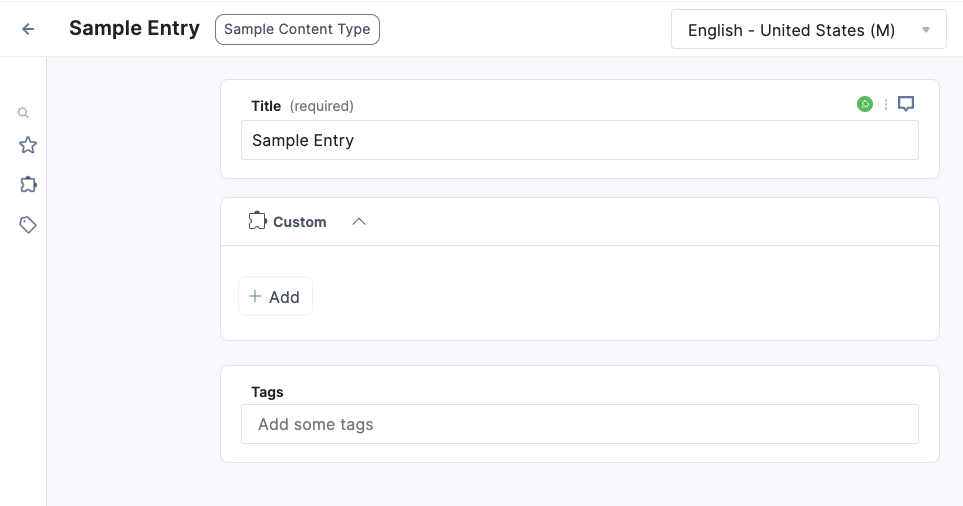
You should see something like this:

On the field modifier dialog, click the Capitalize button, it should capitalize the value of the field as follows:

As you can see the title has been capitalized.
**Tip**: make sure you go over the entire code in the file to get a better understanding on how the logic is implemented.
If you want to learn more about this location, please visit our documentation: [Field Modifier Location](https://www.contentstack.com/docs/developers/developer-hub/field-modifier-location)
Next, you will develop a JSON RTE extension.
## **Video: Implementing Field Modifier Location**
The following video walks you through the previous exercise steps so you can review and follow along:
#### Key takeaways
- Connect **Implementing App Locations: Field Modifier** back to your stack configuration before moving to the next module.
- Capture one concrete artifact (screenshot, Postman call, or code snippet) that proves the step works in your environment.
- Re-read the delivery versus management boundary for anything you changed in the entry model.
## Supplement for indexing
### Content summary
Implementing App Locations: Field Modifier. The Field Modifier Location is a type of UI location which extends the capabilities of entry fields. With the Field Modifier UI location, you can allow the different apps to appear on defined field data types such as Text, Number, JSON, Boolean, File, Reference fields etc... Use Case Using the Field Modifier UI location you can manage the content of a field, you can get the value of a field, modify it according to your use case, and update it in the entry. Form this location, liken in the others, you can get the application configuration, and entry data using Contentstack SDK, too. A common use case can be machine translation of a field, you can send a single field for translation to a third
### Retrieval tags
- Implementing
- App
- Locations
- Field
- Modifier
- marketplace-apps
- lesson 12
- Implementing App Locations: Field Modifier
- marketplace-apps lesson
### Indexing notes
Index this lesson as a primary chunk tagged with lesson_id "12" and topics: [Implementing, App, Locations, Field, Modifier].
Parent course slug: marketplace-apps. Use asset_references URLs as thumbnail hints in search results when present.
Never surface LMS quiz content or assessment answers from this file.
### Asset references
| Label | URL |
| --- | --- |
| BuildingMarketApps\_L12\_img-1.png | `https://images.contentstack.io/v3/assets/bltebc53cfaf0dd6403/blt2f6625927a6db60e/67ddd9c6986725010d888f6f/BuildingMarketApps_L12_img-1.png` |
| BuildingMarketApps\_L12\_img-2.png | `https://images.contentstack.io/v3/assets/bltebc53cfaf0dd6403/bltf05e3c45b26df693/67ddd9f0632b93877cd4a792/BuildingMarketApps_L12_img-2.png` |
| BuildingMarketApps\_L12\_img-3.png | `https://images.contentstack.io/v3/assets/bltebc53cfaf0dd6403/bltcfc1c7bf4056b920/67ddda2b443bd6f690f1d0af/BuildingMarketApps_L12_img-3.png` |
### External links
| Label | URL |
| --- | --- |
| Contentstack Academy home | `https://www.contentstack.com/academy/` |
| Training instance setup | `https://www.contentstack.com/academy/training-instance` |
| Academy playground (GitHub) | `https://github.com/contentstack/contentstack-academy-playground` |
| Contentstack documentation | `https://www.contentstack.com/docs/` |
| BuildingMarketApps\_L12\_img-1.png | `https://images.contentstack.io/v3/assets/bltebc53cfaf0dd6403/blt2f6625927a6db60e/67ddd9c6986725010d888f6f/BuildingMarketApps_L12_img-1.png` |
| BuildingMarketApps\_L12\_img-2.png | `https://images.contentstack.io/v3/assets/bltebc53cfaf0dd6403/bltf05e3c45b26df693/67ddd9f0632b93877cd4a792/BuildingMarketApps_L12_img-2.png` |
| BuildingMarketApps\_L12\_img-3.png | `https://images.contentstack.io/v3/assets/bltebc53cfaf0dd6403/bltcfc1c7bf4056b920/67ddda2b443bd6f690f1d0af/BuildingMarketApps_L12_img-3.png` |
| Field Modifier Location | `https://www.contentstack.com/docs/developers/developer-hub/field-modifier-location` |